原始内容
name: agent-token-usage
description: Summarize per-agent LLM token consumption for OpenClaw multi-agent setups by parsing ~/.openclaw/agents/*/sessions/<id>.jsonl session logs (type=message, role=assistant). Ships both a CLI (Python) and an optional 📊 button injected into the Control UI header next to Search. Use when the user asks "今天哪个 agent 用了多少 token / 消耗了多少 token / token 排行 / token 统计 / how much did agent X spend today / which agent burns the most tokens / token usage breakdown / billable token estimate", or asks to install/remove the 📊 token-usage button in Control UI. Returns a ranked table with input / output / cacheRead / cacheWrite / total (and equivalent-billable token estimate). NOT for: dollar cost (use codexbar/model-usage skill), per-message inspection (use sessions_history), or non-OpenClaw runtimes.
agent-token-usage 📊
Accurately attribute LLM token consumption across all OpenClaw agents for a given day.

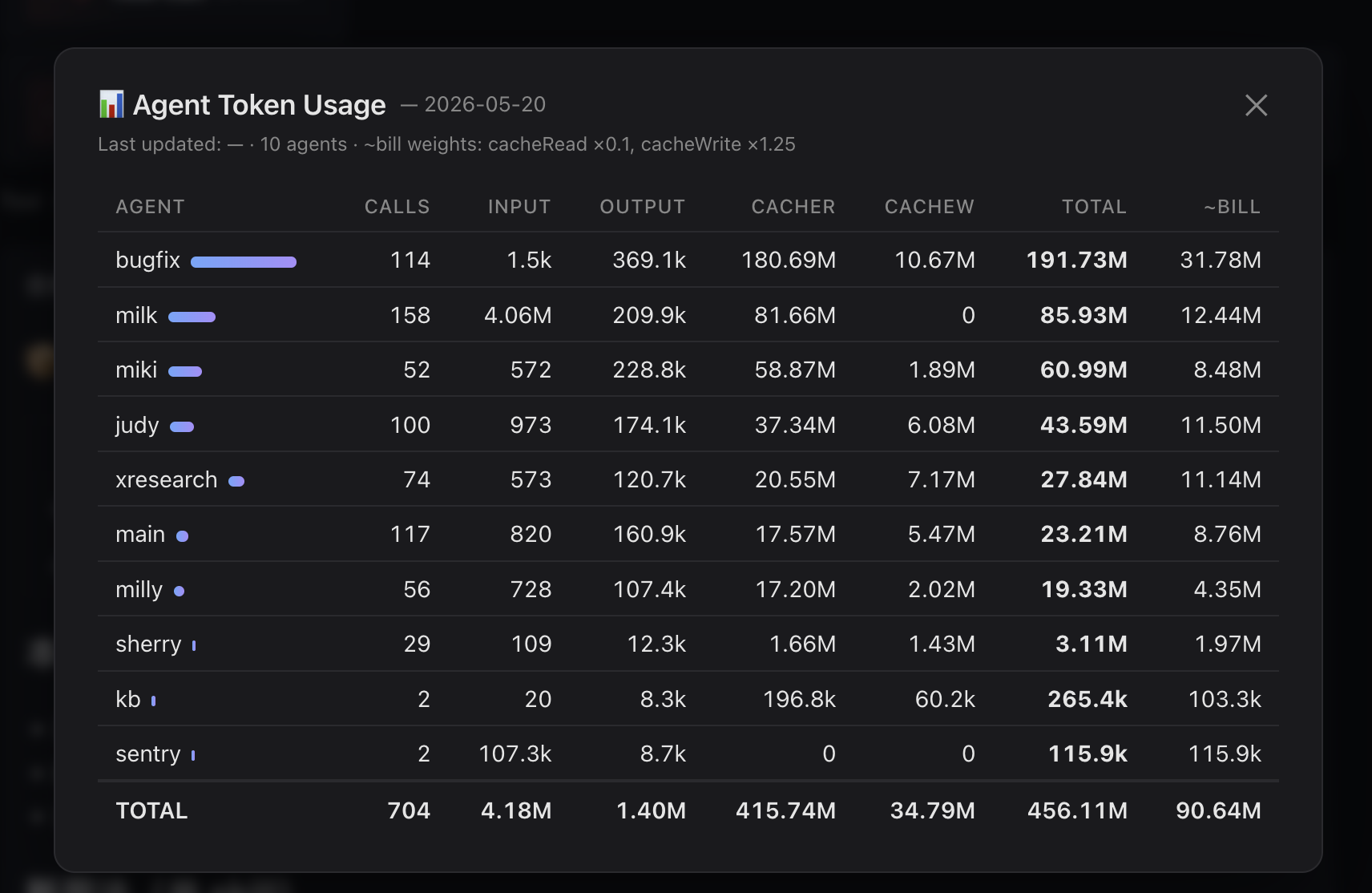
Ships two things in one skill:
- CLI —
scripts/agent_token_usage.py, always works, zero setup - UI button — optional
apply-ui.shinjects a 📊 button into Control UI's header next to Search; clicking shows today's per-agent table in a modal
Why this exists
sessions_list returns each session's totalTokens field which is the last context window size, NOT the cumulative consumption across all LLM calls in that session. For long-running sessions, real consumption can be 100×+ larger. This skill reads the canonical session log (<id>.jsonl, NOT <id>.trajectory.jsonl) and sums every type=="message" / role=="assistant" row's usage object — exactly one entry per real LLM API call. This matches pew / openclaw's own accounting.
Quick start (CLI)
# default = today, UTC date (matches pew / openclaw accounting)
python ~/.openclaw/workspace/skills/agent-token-usage/scripts/agent_token_usage.py

# local-tz date instead of UTC
python …/agent_token_usage.py --tz local

# specific date
python …/agent_token_usage.py --date 2026-05-20

# equivalent billable (cacheRead × 0.1 + cacheWrite × 1.25 + input + output)
python …/agent_token_usage.py --date 2026-05-20 --billable

# JSON
python …/agent_token_usage.py --format json
Optional: 📊 button in Control UI
bash ~/.openclaw/workspace/skills/agent-token-usage/apply-ui.sh
Then refresh the Control UI tab. The button appears next to Search; clicking shows the modal.
Uninstall:
bash ~/.openclaw/workspace/skills/agent-token-usage/remove-ui.sh
Per-browser toggle:
localStorage.setItem('milly.tokenUsageBtn', 'off')
localStorage.removeItem('milly.tokenUsageBtn')
How the UI part works
launchd (5min)  →  refresh-data.sh  →  <ui>/data/agent-token-usage.json
                                              │ same-origin fetch
                                              ▼
                                    Control UI bundle (patched IIFE)
                                       📊 button → modal table
CSP-friendly (connect-src 'self') because data is served from the UI's own origin. No extra daemon, no extra port. After openclaw update overwrites dist/control-ui/*, just re-run apply-ui.sh — idempotent.
Column semantics
| Field | Meaning | Billing weight |
|---|---|---|
input |
new, non-cached prompt tokens | 1.0× |
output |
model-generated tokens | 1.0× (typically 5× input price) |
cacheRead |
prompt tokens served from prompt cache | ~0.1× |
cacheWrite |
prompt tokens written to cache | ~1.25× |
total |
sum of all four (real LLM throughput) | — |
~bill |
weighted billable-equivalent tokens | — |
Use total to see "who's burning the most LLM compute"; use ~bill to see "who's actually most expensive". High-cacheRead agents look huge but are cheap; high-input agents look small but cost more.
How it works
- Walk
~/.openclaw/agents/<agent>/sessions/*.jsonl(excluding*.trajectory.jsonl,*.deleted*,*.bak) - For each line keep only records with
type=="message"andmessage.role=="assistant" - Match
timestampagainst target date in chosen timezone (--tz utcdefault,--tz localavailable) - Sum
message.usage.{input,output,cacheRead,cacheWrite}per agent; track sessions and models
Why NOT trajectory.jsonl
Each LLM call produces several trajectory events (prompt.submitted, context.compiled, model.completed, trace.artifacts, …) and every one of them embeds the same usage snapshot. A DFS sum over trajectory inflates the real number by ~2.6×. The canonical <id>.jsonl has exactly one type=="message" row per call — 1:1 with the API call, no de-dup needed.
Caveats
- Only counts LLM calls (events with a
usageobject) — non-LLM tool calls excluded by design - Cache multipliers are Anthropic ballpark numbers; adjust for other providers mentally
- Does NOT compute USD cost — use the
model-usageskill for $ amounts --datematches ISO timestamps in session logs (UTC by default). Use--tz localto bucket by your local day instead- UI auto-refresh job (launchd) is macOS only; on Linux, run
scripts/refresh-data.shvia cron/systemd timer
Files
| File | Purpose |
|---|---|
scripts/agent_token_usage.py |
CLI aggregator |
scripts/refresh-data.sh |
Writes JSON into every patched Control UI dist |
scripts/token-usage-button.iife.js |
UI patch payload (button + modal + same-origin fetch) |
apply-ui.sh |
Inject IIFE, cache-bust, install launchd refresh job |
remove-ui.sh |
Restore bundle, remove launchd job, delete data dir |