---
slug: "agentlogs-pi"
source_type: "readme"
source_url: "https://cdn.jsdelivr.net/gh/agentlogs/agentlogs@main/README.md"
repo: "https://github.com/agentlogs/agentlogs"
source_file: "README.md"
branch: "main"
---

AgentLogs
Coding agents, visible to your team.
Open-source and self-hostable. Track sessions, share prompts, and link every conversation to the commit it produced.
Website ·
Docs ·
Discord ·
Changelog
---
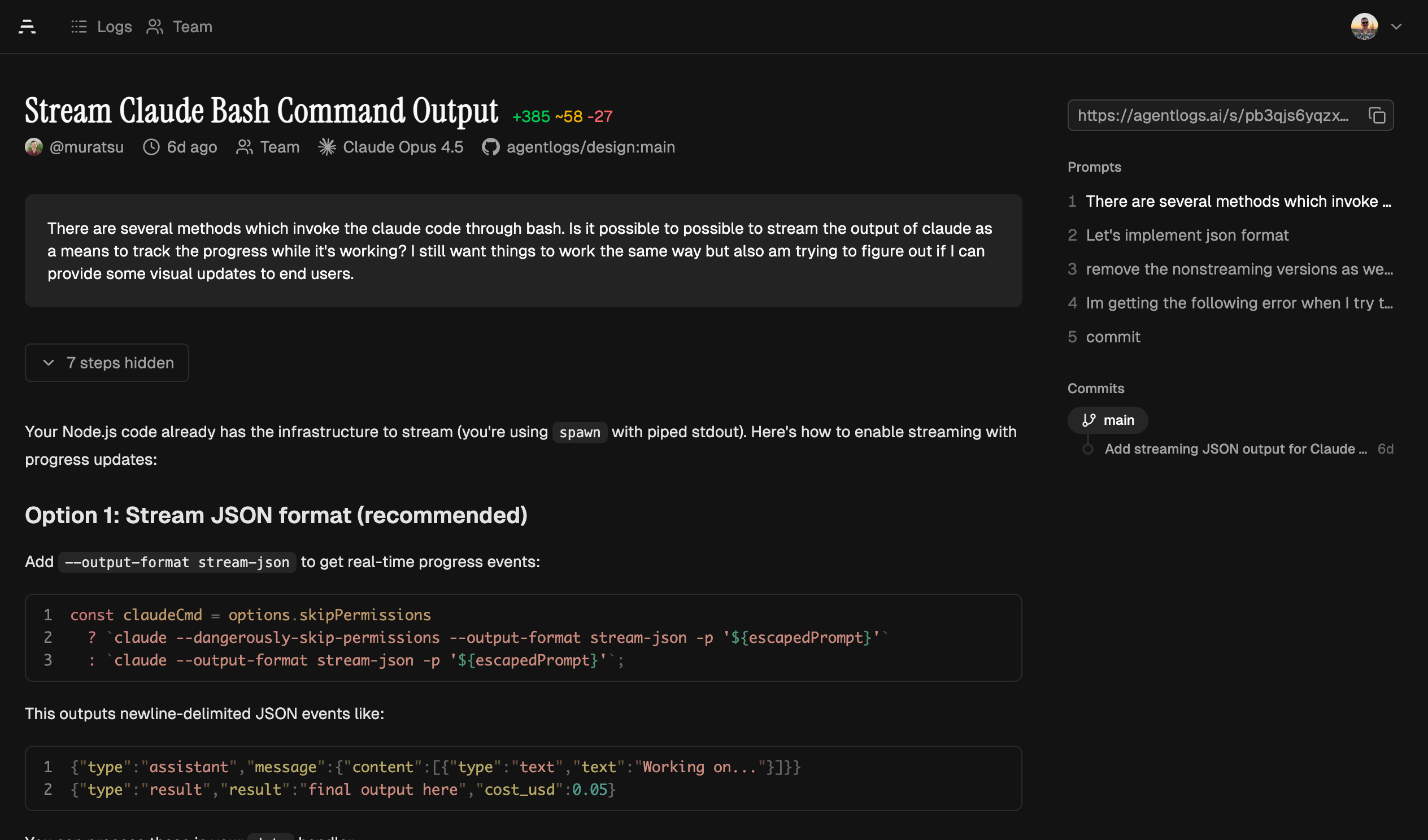
AgentLogs captures and analyzes transcripts from AI coding agents (like Claude Code, Codex, OpenCode, and Pi) to give your team visibility into how AI tools are used in their codebases.
**See it in action →** [Example transcript](https://agentlogs.ai/s/ijz0z090jxrmmfjsz9lkcq7j)
## Why AgentLogs?
AI coding agents are becoming core to how teams write software. But right now, every session is a black box stored on the machine of the user. You can't see the context put into each session and there is no knowledge sharing between teammates.
AgentLogs fixes that:
- **Team observability** — Dashboard with activity metrics, agent & model usage, and per-member breakdowns
- **Git integration** — Links sessions to the commits they produced. See which transcript wrote which code
- **Shared learning** — Browse and share your team's sessions to discover effective prompts and workflows
| Team Dashboard | Git Integration | Session Browser |
| --------------------------------------------------------- | --------------------------------------------- | ----------------------------------------------- |
| 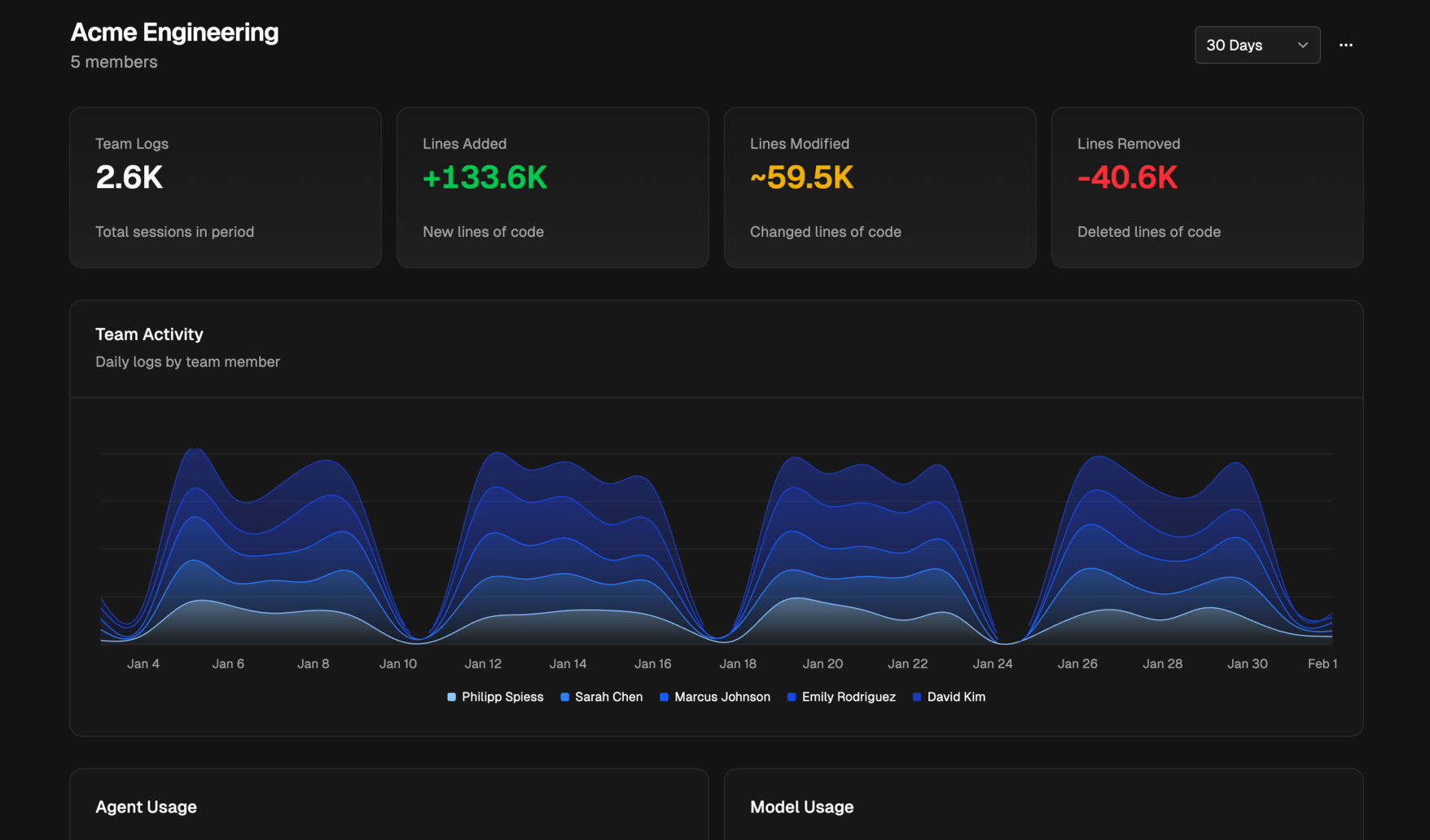 | 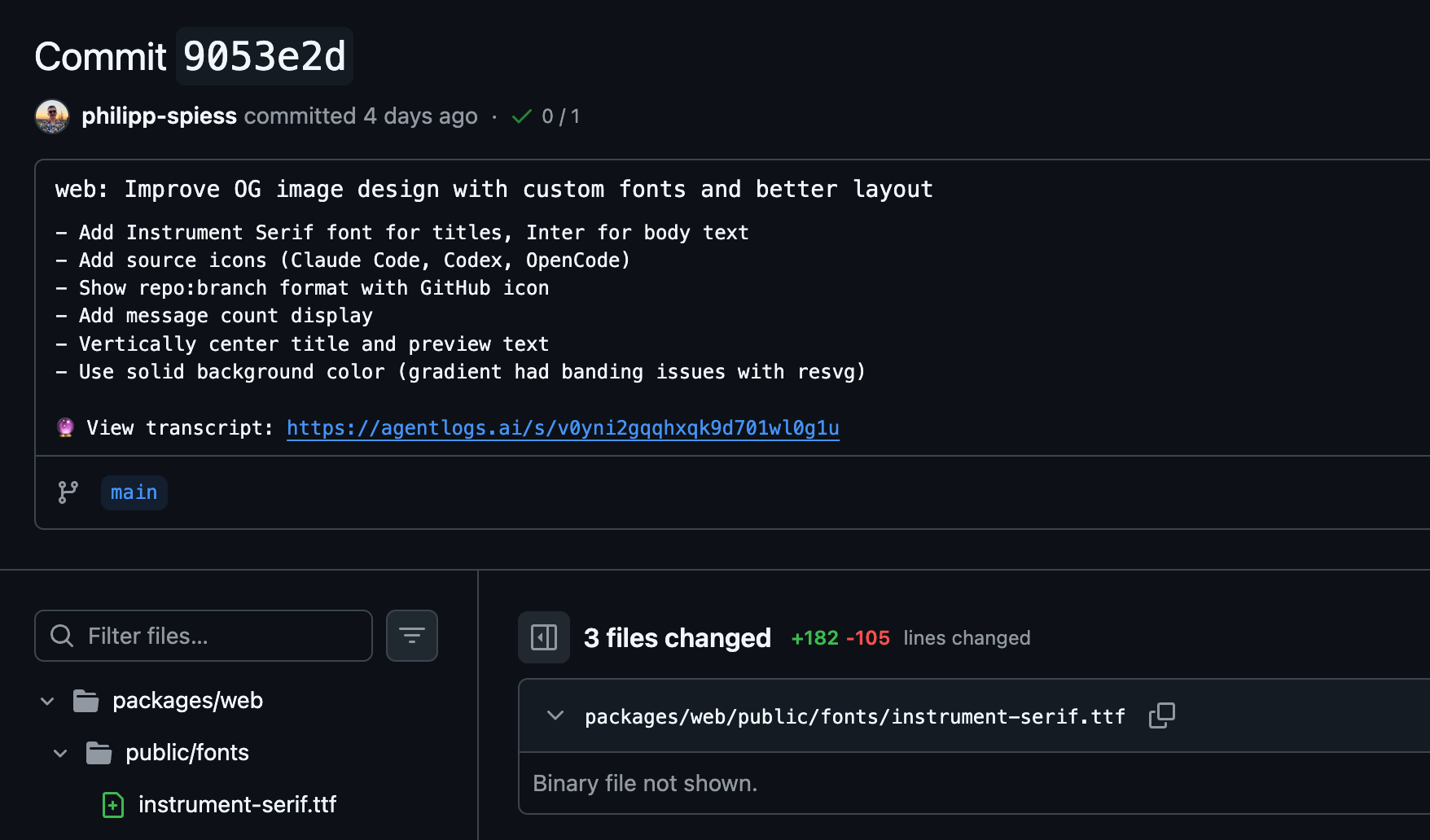 | 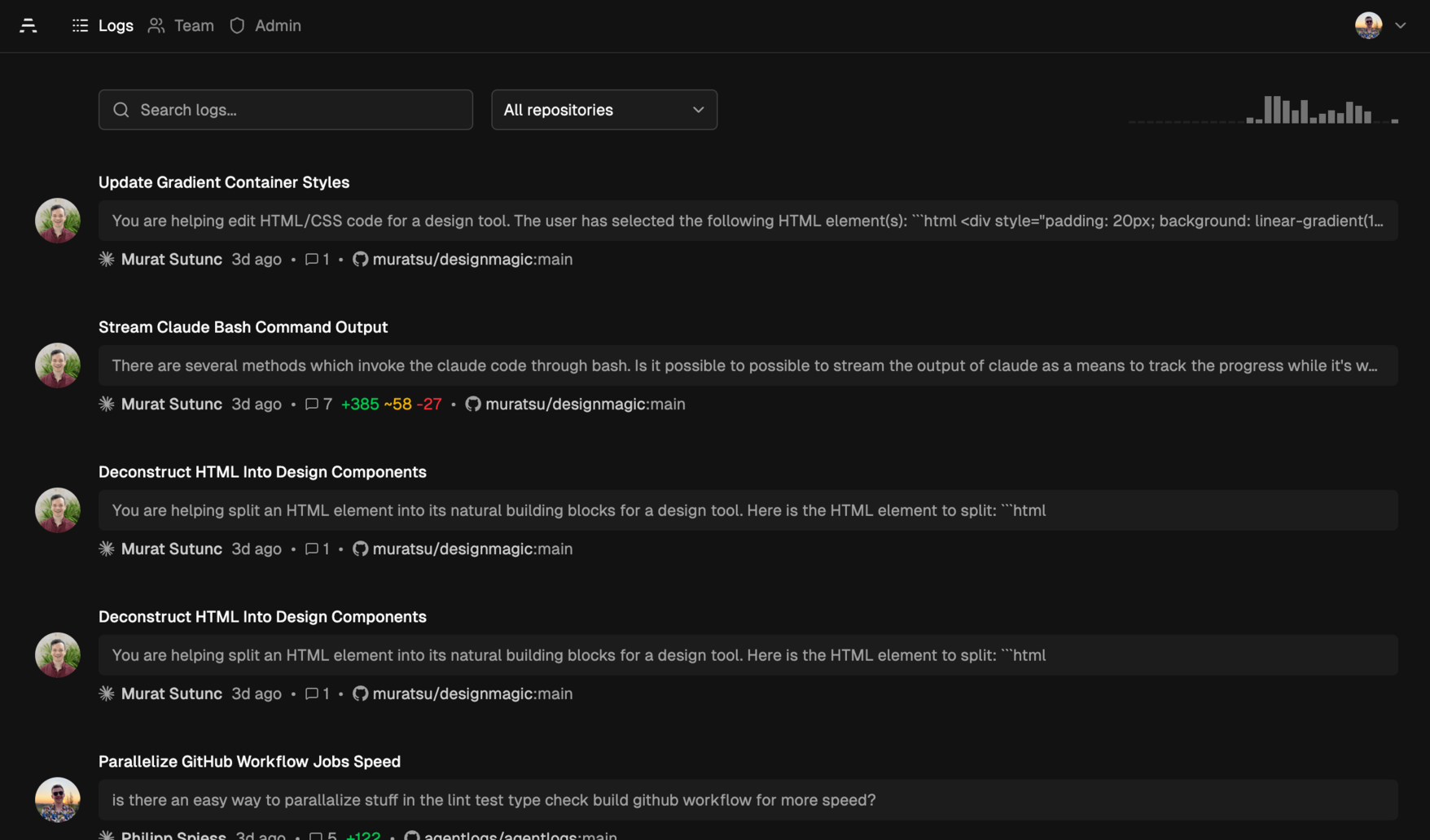 |
## Supported Agents
| Agent | Transcripts | Auto-sync | Commit Tracking |
| -------------------------------------------------------------- | ----------- | --------- | --------------- |
| [Claude Code](https://agentlogs.ai/docs/agents/claude-code) | ✓ | ✓ | ✓ |
| [Cline](https://agentlogs.ai/docs/agents/cline) (experimental) | ✓ | ✓ | ✓ |
| [Codex](https://agentlogs.ai/docs/agents/codex) | ✓ | ✓ | ✓ |
| [OpenCode](https://agentlogs.ai/docs/agents/opencode) | ✓ | ✓ | ✓ |
| [Pi](https://agentlogs.ai/docs/agents/pi) | ✓ | ✓ | ✓ |
## Quick Start (using AgentLogs Cloud)
### 1. Log in
```bash
npx agentlogs login agentlogs.ai
```
### 2. Install the plugin for your agent
**Claude Code** — inside Claude Code:
```
/plugin marketplace add agentlogs/claude-code
/plugin install agentlogs
```
**Cline:**
```bash
npx agentlogs cline install
```
**Codex:**
Run `npx agentlogs codex install` to write `~/.codex/hooks.json`, enable Codex hook capture, and track git commits in AgentLogs.
Set `AGENTLOGS_CLI_PATH='bun /absolute/path/to/packages/cli/src/index.ts'` before starting Codex if you want hooks to use a local AgentLogs checkout while developing.
Codex does not currently let hooks rewrite the commit message body, so transcript URLs are not appended to commit messages automatically.
See the full setup guide: https://agentlogs.ai/docs/agents/codex
**OpenCode** — add to `opencode.json`:
```json
{ "plugin": ["@agentlogs/opencode"] }
```
**Pi** — run inside Pi or from the terminal:
```bash
pi install npm:@agentlogs/pi
```
### 3. Use your agent as usual
Transcripts are captured and uploaded automatically. View them at [agentlogs.ai](https://agentlogs.ai).
## CLI
The CLI can also be used standalone for manual uploads:
```bash
# Interactive picker, browse transcripts from all agents
npx agentlogs upload
# Upload most recent transcript
npx agentlogs upload --latest
# Sync all Claude Code transcripts
npx agentlogs claudecode sync
# Check auth status
npx agentlogs status
```
See the full [CLI reference](https://agentlogs.ai/docs/cli/commands).
## Hosting
AgentLogs is source-available and can be self-hosted.
You can deploy it either as:
- A container from `ghcr.io/agentlogs/agentlogs`
- A standalone `agentlogs-server` binary from GitHub Releases
See the full guide at [Hosting Docs](https://agentlogs.ai/docs/server/hosting).
### Prerequisites
- GitHub OAuth App ([create one](https://github.com/settings/developers))
- Homepage URL: `https://your-domain.example`
- Callback URL: `https://your-domain.example/api/auth/callback/github`
- For local development: `http://localhost:3000` and `http://localhost:3000/api/auth/callback/github`
### Required Secrets / Env Vars
- `GITHUB_CLIENT_ID`
- `GITHUB_CLIENT_SECRET`
- `BETTER_AUTH_SECRET` (generate with `openssl rand -base64 32`)
- `WEB_URL` (public app URL, e.g. `https://logs.example.com`)
### Optional AI Summary Backend
AgentLogs can generate short transcript titles automatically. Configure one of:
- `OPENROUTER_API_KEY` for the default hosted backend
- `AI_BASE_URL` and `AI_MODEL` for any OpenAI-compatible endpoint (Ollama, vLLM, LiteLLM, and similar)
- `AI_API_KEY` if your OpenAI-compatible endpoint requires authentication
If `AI_BASE_URL` and `AI_MODEL` are set, AgentLogs prefers that endpoint and only falls back to OpenRouter when the custom backend is not configured. See the full [Hosting Docs](https://agentlogs.ai/docs/server/hosting#ai-features).
### Local Development (From Source)
Requires [Bun](https://bun.sh/) v1.3.10.
```bash
git clone https://github.com/agentlogs/agentlogs.git
cd agentlogs
bun install
# Configure environment
cp packages/server/.env.example packages/server/.env
# Edit packages/server/.env with:
# GITHUB_CLIENT_ID=...
# GITHUB_CLIENT_SECRET=...
# BETTER_AUTH_SECRET=... (openssl rand -base64 32)
# WEB_URL=http://localhost:3000
# Optional AI summaries:
# OPENROUTER_API_KEY=...
# or use an OpenAI-compatible endpoint:
# AI_BASE_URL=http://localhost:11434/v1
# AI_MODEL=llama3.2
# AI_API_KEY=... # only if your endpoint requires auth
# Initialize database
bun db:migrate
# Start
bun dev
```
Open `http://localhost:3000`.
Point the CLI at your local instance:
```bash
npx agentlogs login localhost:3000
```
### Option A: Deploy With GHCR
```bash
docker run -d \
--name agentlogs \
-p 3000:3000 \
-v agentlogs-data:/app/.data \
-e GITHUB_CLIENT_ID=... \
-e GITHUB_CLIENT_SECRET=... \
-e BETTER_AUTH_SECRET=... \
-e WEB_URL=https://logs.example.com \
ghcr.io/agentlogs/agentlogs:latest
```
### Option B: Deploy With A Single Binary
Download the correct binary for your OS/architecture from GitHub Releases:
```bash
chmod +x ./agentlogs-server
./agentlogs-server
```
By default, the standalone server applies embedded migrations before startup. Use `--no-migrations` to skip them or `--only-migrations` to run them and exit.
### Connect Your Agents To Your Host
```bash
npx agentlogs login logs.example.com
```
## Project Structure
```
packages/
├── cli/ — CLI tool (npx agentlogs)
├── server/ — Server package (TanStack Start web UI + API, standalone Bun binary + SQLite)
├── shared/ — Shared types, schemas, transcript parsing, secret redaction
├── pi/ — Pi extension (@agentlogs/pi)
├── opencode/ — OpenCode plugin (@agentlogs/opencode)
└── e2e/ — End-to-end tests
docs/ — Documentation (Mintlify)
```
## Development
```bash
# Start the server package
bun dev
# Run CLI
bun agentlogs
# Type check, lint, format
bun run check
# Format code
bun run format
# Run e2e tests
bun run test:e2e
# Database commands
bun db:migrate # Run migrations
bun db:generate # Generate migrations from schema changes
bun db:studio # Open Drizzle Studio
bun db:reset # Reset local database
```
## Tech Stack
- **Web**: [TanStack Start](https://tanstack.com/start) + [Bun](https://bun.sh/) standalone runtime
- **Data**: SQLite + local blob storage on disk
- **ORM**: [Drizzle](https://orm.drizzle.team/)
- **Auth**: [BetterAuth](https://better-auth.com/) (GitHub OAuth + device flow)
- **Styling**: [Tailwind CSS v4](https://tailwindcss.com/) + [shadcn/ui](https://ui.shadcn.com/)
- **CLI**: [Commander](https://github.com/tj/commander.js)
- **Quality**: [oxlint](https://oxc.rs/) + [oxfmt](https://oxc.rs/) + [tsgo](https://github.com/nicolo-ribaudo/tsgo)
## Contributing
We welcome contributions! Please:
1. Fork the repo and create a branch
2. Make your changes
3. Run `bun run format` and `bun run check`
4. Open a PR
## Acknowledgments
AgentLogs was inspired by and builds on ideas from:
- [Amp Threads](https://ampcode.com/) — team observability for AI coding agents
- [Yaplog](https://yaplog.dev/), [Pi session sharing](https://pi.dev), [OpenCode session sharing](https://opencode.ai) — public sharing of AI coding sessions
## License
[FSL-1.1-Apache-2.0](https://github.com/agentlogs/agentlogs/tree/HEAD/LICENSE)