---
slug: "chromskills"
source_type: "readme"
source_url: "https://cdn.jsdelivr.net/gh/BIsnake2001/ChromSkills@master/README.md"
repo: "https://github.com/BIsnake2001/ChromSkills"
source_file: "README.md"
branch: "master"
---
# ChromSkills
ChromSkills is a curated library of domain-specific Claude Code Skills for **agentic, interpretable, and reproducible chromatin data analysis** inside a Docker environment.
ChromSkills translates **natural-language analysis intents** into structured, tool-guided workflows across common epigenomic assays, while enforcing assay-aware decision logic and reducing unstable, free-form command generation.
---

## Example usage of ChromSkills
[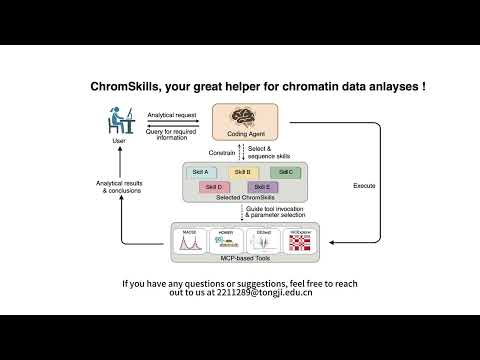](https://www.youtube.com/watch?v=sgEKayNTHfM)
## 1. Scope
### (1) What ChromSkills is for
Typical use cases of ChromSkills include:
- ChIP-seq analysis
- ATAC-seq analysis
- WGBS and DNA methylation analysis
- Hi-C analysis
- Multi-omics integration
- Read mapping/alignment workflows
- Quality control, annotation, visualization, and downstream biological interpretation
### (2) 📊 Can I use ChromSkills with my data?
Use the table below to quickly determine whether your data can be analyzed **directly** with ChromSkills.
| Assay | Required starting input | Supported analyses |
|------|------------------------|--------------------|
| **ATAC-seq/ChIP-seq** | BAM | reads mapping, QC, peak calling, replicate handling, track generation, footprinting, differential accessibility/binding, motif analysis, peak annotation, chromatin state inference |
| **WGBS** | Per-CpG methylation table (BED / BedGraph / TSV) | reads mapping, Global/local methylation, DMR/DMC, methylation variability, UMR/LMR/PMD detection |
| **Hi-C** | `.cool` / `.mcool` | Matrix QC, normalization, compartments, compartment shifts, TADs (including nested), loops, differential TADs, loop annotations, regulatory community analysis |
| **Multi-omics** | Any combination above | ATAC–WGBS correlation, DMR–DEG integration, regulatory feature association |
---
## 2. Quick Start
### (1) Pull Docker image
```bash
docker pull yuxuan2001/chromskills:0429
```
---
## (2) Run the Docker container
Run ChromSkills in interactive mode:
```bash
docker run -it -p 8080:8080 --name chromskills yuxuan2001/chromskills /bin/bash
```
### Recommended: mount a local project directory
```bash
docker run -it -p 8080:8080 \
-v /path/to/your/project:/work \
--name chromskills \
yuxuan2001/chromskills /bin/bash
```
Inside the container, work under:
```
/work
```
---
### (3) Configure HOMER (required for motif & annotation tasks)
```bash
cd /mnt/softwares/homer
perl configureHomer.pl -list
perl configureHomer.pl -install hg38
```
Install other species as needed.
---
### (4) Install ChromSkills MCP Tools and Skills
Inside the container, ChromSkills provides installation scripts in `~/scripts`. These scripts install or update the MCP tools and Skill files required by ChromSkills.
```bash
cd ~/scripts
# Install MCP tools and Skills according to coding agent you prefer
./install-claude.sh # the default coding agent is Claude Code
```
‼️ Notes for Users of Other Coding Agents
ChromSkills is not limited to Claude Code. If your coding agent supports compatible Skill loading and MCP tool invocation, you can install the ChromSkills Skills and MCP tools by executing `~/scripts/install_{name_coding_agent}.sh` and adapt the agent configuration accordingly.
### (5) Configure Your Coding Agent (COST SENSITIVE!!!)
- **Option A: Use Claude Code with an API Backend**
ChromSkills works with any target coding agent-compatible model backend.
| Coding Agent | Price (per 1M tokens) | Environment Variable Example(s) |
|------|------------------------|--------------------|
| **Claude** | ~$3–$15 | `export ANTHROPIC_API_KEY=your_key_here` |
| **DeepSeek** | ~$0.28–$0.42 | `export ANTHROPIC_BASE_URL=https://api.deepseek.com/anthropic`
`export ANTHROPIC_AUTH_TOKEN=your_key_here` |
| **MiniMax** | ~$0.20–$2.20 | `export ANTHROPIC_BASE_URL=https://api.minimax.io/anthropic`
`export ANTHROPIC_AUTH_TOKEN=your_key_here` |
- **Option B: Use a Local Gemma 4 Model with Ollama**
If you want to avoid paying for a backend model API, you can deploy a local Gemma 4 model with Ollama and connect Claude Code to the local Ollama server.
First, install Ollama:
```bash
curl -fsSL https://ollama.com/install.sh | sh
```
Then pull a Gemma 4 model. The model size can be selected according to your hardware resources, for example `e2b`, `e4b`, `26b`, or `31b`.
```bash
ollama pull gemma4:31b
```
Open a new terminal and start the Ollama server:
```bash
ollama serve
```
Leave this terminal running. In another terminal, connect Claude Code to your local Ollama server:
```bash
export ANTHROPIC_BASE_URL=http://localhost:11434
export ANTHROPIC_AUTH_TOKEN=ollama
export ANTHROPIC_API_KEY=""
```
---
### (6) Initialize a project
```bash
cd ${path_to_project_dir}
claude /mcp # add --model gemma4:31b if use local gemma4 model
```
Wait until initialization completes, then exit or just start a conversation here.
---
### (7) (Optionnal) Start a chat session
The chat session is only compatible with Claude Code
```bash
chat
```
You can now perform analyses through natural language.
---
## 3. A Quick Example
### (1) Download demo input data
```bash
wget https://zenodo.org/record/1324070/files/wt_H3K4me3_rep1.bam
wget https://zenodo.org/record/1324070/files/wt_H3K4me3_rep2.bam
wget https://zenodo.org/record/1324070/files/wt_H3K27me3_rep1.bam
wget https://zenodo.org/record/1324070/files/wt_H3K27me3_rep2.bam
wget https://zenodo.org/record/1324070/files/wt_input_rep1.bam
wget https://zenodo.org/record/1324070/files/wt_input_rep2.bam
```
### (2) Prompt
```
Identify H3K4me3 and H3K27me3 peaks and generate genome-wide signal tracks for visualization in IGV with available skills.
```
### (3) Output
[example output reports from ChromSkills](https://github.com/BIsnake2001/ChromSkills/blob/HEAD/example/reports/ChIPseq_analysis_report.md)
---
## 4. Advanced Usage
### (1) Skill architecture
Each Skill is:
- Markdown-based
- Human-readable
- Decision-tree driven
- Tool-constrained via MCP
Directory structure:
```
~/.claude/skills/SkillName/SKILL.md
~/MCPs/ToolName.py
```
Execution flow:
1.Coding agents reads Skill metadata
2.Matches Skills to user intent
3.Loads full Skill logic on demand
4.Executes tools with context-aware parameters
---
### (2) Writing your own Skills
a. Create a new Skill.md file:
```bash
~/.claude/skills/MySkill/SKILL.md
```
b. Write instructions + decision logic in Markdown
c. Implement required MCP tools:
```bash
~/MCPs/MyTool.py
```
d. Register the MCP tool:
```bash
claude mcp add MyTool -s user -- python /root/MCPs/MyTool.py
```
e. Restart Claude Code by executing:
```bash
claude /mcp
```
---
### (3) Design principles
ChromSkills:
- separates reasoning from execution
- constrains tools via structured MCP interfaces
- improves reproducibility
- reduces hallucinated commands
- enables laptop-friendly epigenomic analysis
### (4) Contributing
We welcome:
- new Skills
- improved decision trees
- additional assay support
- documentation improvements
Feel free to open issues or pull requests.
## Contact us
If you have any questions or suggestions, feel free to reach out to us at 2211289@tongji.edu.cn