---
slug: "claude-code-tresor"
source_type: "readme"
source_url: "https://cdn.jsdelivr.net/gh/alirezarezvani/claude-code-tresor@main/README.md"
repo: "https://github.com/alirezarezvani/claude-code-tresor"
source_file: "README.md"
branch: "main"
---
# Claude Code Tresor 🏆
> A world-class collection of Claude Code utilities: autonomous skills, expert agents, slash commands, and prompts that supercharge your development workflow.
[](https://opensource.org/licenses/MIT)
[](https://github.com/alirezarezvani/claude-code-tresor)
[](docs/VALIDATION-REPORT-CONTENT.md)
[](https://claude.ai/code)
[](CONTRIBUTING.md)
## Also available on Smithery:
[](https://smithery.ai/skills?ns=alirezarezvani&utm_source=github&utm_medium=badge)
**Author**: Alireza Rezvani
**Created**: September 16, 2025
**Updated**: December 17, 2025 (v2.7.0 - Tresor Workflow Framework)
**Quality**: 9.7/10 (Exceptional)
**License**: MIT
**Repository**: https://github.com/alirezarezvani/claude-code-tresor
---
## 🎉 What's New in v2.7.0
**Major Release** - 10 New Orchestration Commands + Tresor Workflow Framework!
- 🚀 **10 Orchestration Commands** - Production-grade intelligent orchestration (12,682 lines of code)
- 🔒 **Security**: `/audit`, `/vulnerability-scan`, `/compliance-check`
- ⚡ **Performance**: `/profile`, `/benchmark`
- 🔧 **Operations**: `/deploy-validate`, `/health-check`, `/incident-response`
- 📊 **Quality**: `/code-health`, `/debt-analysis`
- 🤖 **Intelligent Agent Selection** - Auto-selects from 141 agents based on tech stack
- 🔄 **Multi-Phase Orchestration** - 3-4 phases with parallel & sequential execution
- 🛡️ **Dependency Verification** - Ensures safe parallel agent execution
- 🔄 **Tresor Workflow Framework** - Meta-prompting, todo management, context handoff
- 📦 **Consolidated Structure** - Unified agent directory in `/subagents/` (133 total agents)
---
### Previous: v2.6.0 - Quality Excellence
**Quality Excellence Release** - Achieved 9.7/10 exceptional quality rating!
- 🎨 **Design Category Transformation** - Improved from 4.0 to 8.0/10 (+100% quality boost)
- 📚 **12 Enhanced Examples** - Added comprehensive usage examples to key agents
- 📋 **Improved Consistency** - Standard sections added to 9 specialized agents
- ✅ **Best Practices** - Added to config-safety-reviewer and security-auditor
- 🤝 **Collaboration Guide** - Cross-team workflow documentation created
- 📖 **Streamlined Docs** - Consolidated 21 files into 3 guides + archive
**Backward Compatible** - No breaking changes from v2.5.0
### Previous Release: v2.5.0 (November 15, 2025)
**Agent Reorganization & Extension** - 141 agents organized by team and function!
- 🏗️ **New Structure** - `subagents/` directory with 10 color-coded team categories
- 📦 **141 Total Agents** - 8 core + 133 subagents across all development domains
- 🔄 **Core Agent Renaming** - systems-architect, config-safety-reviewer, root-cause-analyzer
- 🎨 **Color Coding System** - Visual team identification (10 team colors)
- 📚 **Comprehensive Documentation** - 450KB of guides, catalogs, and references
**BREAKING CHANGES** (v2.5.0 only):
- `@architect` → `@systems-architect`
- `@code-reviewer` → `@config-safety-reviewer`
- `@debugger` → `@root-cause-analyzer`
---
## 🎯 What is Claude Code Tresor?
Claude Code Tresor is the ultimate collection of **professional-grade utilities** for Claude Code users. Whether you're a solo developer or part of a team, this repository provides battle-tested tools that integrate seamlessly into your development workflow.
### 🌟 Why Choose Claude Code Tresor?
- **🚀 Production-Ready**: All utilities are tested and used in real-world projects
- **📚 Comprehensive**: Covers the entire development lifecycle
- **🛠️ Easy Installation**: One-command setup with automated updates
- **🎨 Customizable**: Adapt templates to your specific needs and tech stack
- **👥 Team-Friendly**: Includes collaboration guidelines and standards
- **📖 Well-Documented**: Every component includes detailed examples and usage guides
> **💡 Ecosystem Tip:** Looking for more? Check out the [Claude Code Skill Factory](https://github.com/alirezarezvani/claude-code-skill-factory) to build custom skills, or browse the [Claude Skills Library](https://github.com/alirezarezvani/claude-skills) for pre-built professional domain packages. See [Related Projects](#-related-projects--ecosystem) for details.
>
> **📖 [Complete Augmentation Guide](https://gist.github.com/alirezarezvani/a0f6e0a984d4a4adc4842bbe124c5935)** - Comprehensive guide with FAQs, use cases, and installation instructions
>
> ## 📚 Deep Dive
### Want to understand the architecture behind this 141-agent setup?
- [141 Claude Code Agents: The Setup That Actually Works](https://medium.com/@alirezarezvani/141-claude-code-agents-the-setup-that-actually-works-a-complete-guide-98c2c79bf867?sk=73d5be97f9bd81a18edbcc0394e44b95)
---
## ✨ What's Included
### 🚀 Slash Commands (19 Total)
**Development Commands** (4):
| Command | Purpose | Example Usage |
|---------|---------|---------------|
| **`/scaffold`** | Generate project structures, components, and boilerplate | `/scaffold react-component UserProfile --hooks --tests` |
| **`/review`** | Automated code review with security and performance analysis | `/review --scope staged --checks security,performance` |
| **`/test-gen`** | Create comprehensive test suites automatically | `/test-gen --file utils.js --coverage 90` |
| **`/docs-gen`** | Generate documentation from code and comments | `/docs-gen api --format openapi` |
**Tresor Workflow Commands** (5):
| Command | Purpose | Example Usage |
|---------|---------|---------------|
| **`/prompt-create`** | Generate optimized prompts for complex tasks | `/prompt-create Build user authentication system` |
| **`/prompt-run`** | Execute generated prompts in sub-agents | `/prompt-run 001 --parallel` |
| **`/todo-add`** | Capture ideas mid-conversation | `/todo-add Fix performance issue in API` |
| **`/todo-check`** | Review and work on captured todos | `/todo-check` |
| **`/handoff-create`** | Generate context handoff document | `/handoff-create` |
**Orchestration Commands** (10) - **NEW in v2.7.0!**
🔒 Security Commands (3)
| Command | Purpose | Duration | Key Features |
|---------|---------|----------|--------------|
| **`/audit`** | Comprehensive security audit | 2-4 hours | OWASP Top 10, pentesting, infrastructure review, RCA |
| **`/vulnerability-scan`** | CVE & dependency scanning | 30-60 min | NVD correlation, SAST, exploit detection, auto-fix |
| **`/compliance-check`** | Regulatory compliance validation | 1-2 hours | GDPR, SOC2, HIPAA, PCI-DSS, ISO 27001, CCPA |
⚡ Performance Commands (2)
| Command | Purpose | Duration | Key Features |
|---------|---------|----------|--------------|
| **`/profile`** | Performance profiling | 15min-2h | Bottleneck analysis, Core Web Vitals, query optimization |
| **`/benchmark`** | Load testing | 5-30 min | Scenario generation, stress testing, capacity planning |
🔧 Operations Commands (3)
| Command | Purpose | Duration | Key Features |
|---------|---------|----------|--------------|
| **`/deploy-validate`** | Pre-deployment validation | 10-20 min | Test suite, config safety, go/no-go decision |
| **`/health-check`** | System health verification | 5-15 min | Multi-layer checks, anomaly detection, alerting |
| **`/incident-response`** | Production incident coordination | 30min-2h | Emergency triage, RCA, blameless postmortem |
📊 Quality Commands (2)
| Command | Purpose | Duration | Key Features |
|---------|---------|----------|--------------|
| **`/code-health`** | Codebase quality assessment | 20-40 min | Quality metrics, test coverage, maintainability scoring |
| **`/debt-analysis`** | Technical debt identification | 30-60 min | Debt quantification, ROI prioritization, refactoring roadmap |
### 🤖 Core Agents (8 Production-Ready)
Expert-level assistance for complex development tasks:
| Agent | Expertise | Best For |
|-------|-----------|----------|
| **`@config-safety-reviewer`** | Configuration safety, production reliability | Pool sizes, timeouts, connection limits, magic numbers |
| **`@test-engineer`** | Testing strategies, test creation, QA | Unit tests, integration tests, coverage analysis |
| **`@docs-writer`** | Technical documentation, user guides | API docs, README files, troubleshooting guides |
| **`@systems-architect`** | System design, technology evaluation | Architecture reviews, design decisions, scalability |
| **`@root-cause-analyzer`** | Comprehensive RCA, systematic debugging | Production incidents, complex bugs, performance issues |
| **`@security-auditor`** | Security assessment, OWASP compliance | Security audits, vulnerability analysis, compliance |
| **`@performance-tuner`** | Performance optimization, profiling | Performance issues, bottleneck analysis, optimization |
| **`@refactor-expert`** | Code refactoring, clean architecture | Technical debt, code modernization, SOLID principles |
### 🌍 Extended Subagents (133 Specialists)
**Total: 141 agents** (8 core + 133 subagents) organized in `subagents/` directory
Organized by team and function across 10 color-coded categories:
- **🔵 Engineering** (54) - Backend, frontend, mobile, DevOps, security, testing, 16 languages
- **🏆 Leadership** (14) - Finance, strategy, risk, compliance
- **🌱 Marketing** (11) - Content, social media, growth, SEO
- **💜 Product** (9) - Product management, requirements, research, analytics
- **🧠 AI/Automation** (9) - AI/ML engineering, automation, prompt engineering
- **💙 Account/CS** (8) - Account management, customer success, sales, support
- **🎨 Design** (7) - UI/UX design, visual design, branding (9.7/10 quality ⭐)
- **🔶 Research** (7) - Market research, competitive intelligence, data research
- **🌊 Operations** (6) - Analytics, infrastructure, support
**Quality**: 9.7/10 (Exceptional - validated across all agents)
**See:** [Complete Agent Catalog](https://github.com/alirezarezvani/claude-code-tresor/blob/HEAD/subagents/README.md) | [Agent Index](https://github.com/alirezarezvani/claude-code-tresor/blob/HEAD/subagents/AGENT-INDEX.md) | [Technical Reference](https://github.com/alirezarezvani/claude-code-tresor/blob/HEAD/docs/TECHNICAL-REFERENCE.md)
### ✨ Skills (8 Autonomous) - **NEW!**
Automatic background helpers that work while you code:
| Skill | What It Does | Triggers On |
|-------|--------------|-------------|
| **`code-reviewer`** | Real-time code quality checks | File edits, saves |
| **`test-generator`** | Suggests missing tests automatically | New functions, untested code |
| **`git-commit-helper`** | Generates commit messages from diff | `git diff --staged` |
| **`security-auditor`** | Detects vulnerabilities (SQL injection, XSS) | Auth code, API endpoints |
| **`secret-scanner`** | Blocks commits with exposed secrets | Pre-commit, API keys in code |
| **`dependency-auditor`** | Checks dependencies for CVEs | package.json changes |
| **`api-documenter`** | Auto-generates OpenAPI specs | API routes added |
| **`readme-updater`** | Keeps README current | Project changes, features |
**Skills vs Agents:** Skills work **automatically** in the background. Agents require **manual invocation** (`@agent`) for deep analysis.
**Learn more:** [Skills Guide](https://github.com/alirezarezvani/claude-code-tresor/blob/HEAD/skills/README.md) · [Getting Started](https://github.com/alirezarezvani/claude-code-tresor/blob/HEAD/GETTING-STARTED.md) · [Architecture](https://github.com/alirezarezvani/claude-code-tresor/blob/HEAD/ARCHITECTURE.md)
### 📝 Curated Prompt Templates (20+)
Ready-to-use prompts for common development scenarios:
- **Frontend Development**: React, Vue, Angular, JavaScript/TypeScript
- **Backend Development**: APIs, databases, authentication, microservices
- **Debugging & Analysis**: Error analysis, performance troubleshooting
- **Best Practices**: Clean code, security, refactoring strategies
### 📏 Development Standards
Professional coding standards and style guides:
- **JavaScript/TypeScript** style guide with ESLint/Prettier configs
- **Git workflows** with conventional commits
- **Code review** checklists and PR templates
- **Team collaboration** guidelines
### 💡 Real-World Examples
Complete workflow demonstrations:
- **React App Setup**: Full modern React application from scratch
- **API Development**: RESTful APIs with testing and documentation
- **Performance Optimization**: Systematic performance improvement
- **CI/CD Pipelines**: Automated testing and deployment
### 🏆 Quality Achievements
**v2.6.0 Quality Metrics**:
- **Overall Quality**: 9.7/10 (Exceptional - up from 7.1/10 in v2.5.0)
- **YAML Validation**: 100% (all 141 agents valid)
- **Content Quality**: 9.7/10 (comprehensive examples and best practices)
- **Organization**: 100% (perfect categorization and structure)
- **Cross-References**: 100% (all integrations validated)
**Validation**: All agents tested across 4 validation tiers - YAML, Content, Organization, Cross-References
---
## 🔗 Related Projects & Ecosystem
Looking to extend your Claude Code capabilities further? Check out these companion repositories:
### 🏭 [Claude Code Skill Factory](https://github.com/alirezarezvani/claude-code-skill-factory)
**Build your own custom Skills and Agents at scale**
A comprehensive toolkit for generating production-ready Claude Skills and Agents without starting from scratch. Perfect when you need specialized capabilities beyond what's available in pre-built collections.
**Key Features:**
- **Skills Factory**: Generate multi-file skill packages with Python code, documentation, and examples
- **Agents Factory**: Create single-file specialist agents with enhanced YAML configuration
- **Smart Architecture**: Automatically determines when functional code is needed vs. prompt-only approaches
- **7 Reference Examples**: Financial analysis, AWS architecture, content research, Microsoft 365, and more
- **Enterprise Standards**: Type-annotated code, error handling, and composable design
**Best For:** Developers who need custom domain-specific capabilities, teams building proprietary workflows, or organizations requiring specialized AI tools tailored to their tech stack.
**Use Case:** "I need a skill that analyzes our company's specific Terraform patterns" → Use Skill Factory to generate it
### 📚 [Claude Skills Library](https://github.com/alirezarezvani/claude-skills)
**Production-ready skill packages for professional domains**
A curated collection of specialized skill packages combining best practices, analysis tools, and strategic frameworks for various professional roles. Deploy expert-level capabilities immediately.
**Available Collections:**
- **Marketing** (3 packages): Content strategy, demand generation, product marketing
- **C-Level Advisory** (2 packages): CEO and CTO strategic guidance
- **Product Team** (6 packages): Product management, UX research, design systems, agile delivery
- **Project Management** (6 packages): Jira, Confluence, Scrum, PMO, Atlassian integration
- **Engineering** (9 packages): Architecture, fullstack, QA, DevOps, security, code review
- **AI/ML/Data** (Coming soon): Data science and machine learning workflows
**Key Benefits:**
- **40%+ time savings** through domain-specific guidance
- **30%+ quality improvements** with built-in best practices
- **Python CLI utilities** for automated analysis and reporting
- **Ready-to-use templates** for immediate deployment
**Best For:** Teams needing enterprise-grade expertise packages, professionals seeking domain-specific guidance, or organizations standardizing workflows across multiple roles.
**Use Case:** "I need comprehensive product management workflows with templates and frameworks" → Use Claude Skills Library
---
### 📖 Complete Ecosystem Guide
**New to Claude Code augmentation?** Read the comprehensive guide with FAQs, installation instructions, and detailed use cases:
**[📖 Complete Augmentation Guide](https://gist.github.com/alirezarezvani/a0f6e0a984d4a4adc4842bbe124c5935)** (GitHub Gist)
This guide answers:
- What is Claude Code augmentation and why should I use it?
- How do Skills, Agents, Commands, and Hooks work?
- Which repository should I use for my needs?
- Step-by-step installation for all three repositories
- 20+ FAQs covering installation, usage, and troubleshooting
- 5+ detailed use cases with code examples
---
### 🎯 How These Projects Work Together
| Your Need | Use This Repository |
|-----------|-------------------|
| **Ready-to-use utilities** (scaffolding, code review, testing, docs) | **Claude Code Tresor** (this repo) |
| **Build custom skills** for your specific domain/tech stack | [**Skill Factory**](https://github.com/alirezarezvani/claude-code-skill-factory) |
| **Deploy pre-built expertise** for professional roles | [**Skills Library**](https://github.com/alirezarezvani/claude-skills) |
**Complete Workflow Example:**
1. **Start here** (Claude Code Tresor) → Install 8 skills + 8 agents + 4 commands for development workflows
2. **Browse Skills Library** → Add marketing, product, or engineering domain expertise packages
3. **Build custom with Skill Factory** → Generate proprietary skills for your company's unique needs
All three repositories are **MIT licensed** and maintained by Alireza Rezvani.
---
## 📚 Documentation
**[Complete Documentation →](https://github.com/alirezarezvani/claude-code-tresor/blob/HEAD/documentation/README.md)**
### Quick Links
- **[Installation Guide →](https://github.com/alirezarezvani/claude-code-tresor/blob/HEAD/documentation/guides/installation.md)** - Install in 5 minutes
- **[Getting Started →](https://github.com/alirezarezvani/claude-code-tresor/blob/HEAD/documentation/guides/getting-started.md)** - Your first workflow
- **[FAQ →](https://github.com/alirezarezvani/claude-code-tresor/blob/HEAD/documentation/reference/faq.md)** - Common questions answered
- **[Troubleshooting →](https://github.com/alirezarezvani/claude-code-tresor/blob/HEAD/documentation/guides/troubleshooting.md)** - Fix issues
### Full Documentation
- **[User Guides →](https://github.com/alirezarezvani/claude-code-tresor/tree/HEAD/documentation/guides/)** - Installation, configuration, troubleshooting, migration, contributing
- **[Technical Reference →](https://github.com/alirezarezvani/claude-code-tresor/tree/HEAD/documentation/reference/)** - Complete skills, agents, and commands documentation
- **[Workflows →](https://github.com/alirezarezvani/claude-code-tresor/tree/HEAD/documentation/workflows/)** - Git workflow, GitHub automation, agent-skill integration
---
## 🚀 Quick Start
### Option 1: Automated Installation (Recommended)
```bash
# Clone the repository
git clone https://github.com/alirezarezvani/claude-code-tresor.git
cd claude-code-tresor
# Run the installation script (installs skills + agents + commands)
chmod +x scripts/install.sh
./scripts/install.sh
```
**What's installed:**
- ✅ **8 Skills** - Automatic background helpers
- ✅ **8 Agents** - Manual expert sub-agents
- ✅ **4 Commands** - Workflow automation
**First time?** See [GETTING-STARTED.md](https://github.com/alirezarezvani/claude-code-tresor/blob/HEAD/GETTING-STARTED.md) for 5-minute quick start.
### Option 2: Manual Installation
```bash
# Copy skills to Claude Code directory
cp -r skills/* ~/.claude/skills/
# Copy commands to Claude Code directory
cp -r commands/* ~/.claude/commands/
# Copy agents to Claude Code directory
cp -r agents/* ~/.claude/agents/
# Copy resources for reference
cp -r prompts standards examples ~/claude-code-resources/
```
### Option 3: Selective Installation
```bash
# Install only autonomous skills (v2.0+)
./scripts/install.sh --skills-only
# Install only slash commands
./scripts/install.sh --commands-only
# Install only agents
./scripts/install.sh --agents-only
# Install only resources (prompts, standards, examples)
./scripts/install.sh --resources-only
```
---
## 🛠️ Usage Examples
### 🏗️ Project Setup
```bash
# Create a complete React application
/scaffold react-app my-project --typescript --tailwind --tests
# Generate API endpoints with tests
/scaffold express-api user-service --auth --database --tests
```
### 🔍 Code Review
```bash
# Configuration safety review
@config-safety-reviewer Review database connection pool settings for:
- Pool size limits
- Timeout configurations
- Connection limit safety
- Magic numbers
# Security audit
@security-auditor Please review this component for:
- OWASP Top 10 vulnerabilities
- Authentication/authorization
- Input validation
# Automated PR review
/review --scope pr --checks security,performance,configuration
```
### 🧪 Testing
```bash
# Generate comprehensive tests
@test-engineer Create unit tests for this utility function with:
- Edge case coverage
- Error handling tests
- Performance benchmarks
# Automated test generation
/test-gen --file components/UserCard.tsx --framework jest
```
### 📖 Documentation
```bash
# Generate API documentation
/docs-gen api --format openapi --include-examples
# Create user guides
@docs-writer Create a user guide for this authentication system with:
- Setup instructions
- Usage examples
- Troubleshooting guide
```
---
## 📁 Repository Structure
```
claude-code-tresor/
├── 📖 README.md # This file - complete overview
├── ⚖️ LICENSE # MIT License
├── 🤝 CONTRIBUTING.md # Contribution guidelines
├── 📚 GETTING-STARTED.md # 5-minute quick start guide
├── 🏗️ ARCHITECTURE.md # 3-tier system explanation
├── 🔄 MIGRATION-GUIDE.md # Upgrade guide for existing users
├──
├── ✨ skills/ # 8 Autonomous Skills (NEW v2.0!)
│ ├── development/ # code-reviewer, test-generator, git-commit-helper
│ ├── security/ # security-auditor, secret-scanner, dependency-auditor
│ ├── documentation/ # api-documenter, readme-updater
│ ├── README.md # Skills guide
│ └── TEMPLATES.md # Custom skill templates
├──
├── 🤖 agents/ # 8 Specialized Agents
│ ├── code-reviewer/ # Code quality expert
│ ├── test-engineer/ # Testing specialist
│ ├── docs-writer/ # Documentation expert
│ ├── architect/ # System design expert
│ ├── debugger/ # Debugging specialist
│ ├── security-auditor/ # Security expert
│ ├── performance-tuner/ # Performance optimization
│ └── refactor-expert/ # Code refactoring
├──
├── ⚡ commands/ # 4 Slash Commands
│ ├── development/ # Project scaffolding and tools
│ ├── testing/ # Test generation and analysis
│ ├── documentation/ # Doc generation utilities
│ └── workflow/ # PR reviews and automation
├──
├── 📝 prompts/ # Prompt Templates
│ ├── code-generation/ # Frontend & backend prompts
│ ├── debugging/ # Error analysis prompts
│ ├── architecture/ # System design prompts
│ └── best-practices/ # Code quality prompts
├──
├── 📏 standards/ # Development Standards
│ ├── style-guides/ # Language-specific guides
│ ├── git-workflows/ # Git best practices
│ └── templates/ # PR and issue templates
├──
├── 💡 examples/ # Real-World Examples
│ ├── workflows/ # Complete project workflows
│ ├── integrations/ # Service integration examples
│ └── case-studies/ # Detailed project case studies
├──
├── 📦 sources/ # Extended Source Library
│ ├── agents/ # 200+ additional agents
│ └── slash-commands/ # Advanced command utilities
├──
└── 🔧 scripts/ # Utility Scripts
├── install.sh # Easy installation
└── update.sh # Update utilities
```
---
## 🎯 Getting Started Paths
### 👶 New to Claude Code?
1. **Install**: Run `./scripts/install.sh` (installs skills + agents + commands)
2. **Observe**: Skills work automatically - start coding and watch them detect issues
3. **Try Command**: `/scaffold react-component TestComponent --tests`
4. **Invoke Agent**: `@config-safety-reviewer` for configuration safety, `@security-auditor` for security analysis
5. **Learn**: Browse [GETTING-STARTED.md](https://github.com/alirezarezvani/claude-code-tresor/blob/HEAD/GETTING-STARTED.md) for 5-min quick start
### 🏃♂️ Ready to Build?
1. **Skills monitor**: Automatic background checks (code quality, security, tests)
2. **Agent analysis**: `@config-safety-reviewer`, `@security-auditor`, `@test-engineer` for deep dives
3. **Command workflows**: `/review --scope staged`, `/test-gen --file utils.js`
4. **Full workflow**: Skills detect → Agents analyze → Commands orchestrate
### 👥 Team Lead?
1. **Standards**: Implement `standards/style-guides/javascript.md`
2. **Workflows**: Set up `standards/git-workflows/conventional-commits.md`
3. **Templates**: Use `standards/templates/` for consistency
4. **Training**: Share `examples/` with your team
### 🔧 Power User?
1. **Customize**: Adapt templates in `prompts/` for your needs
2. **Extend**: Explore additional utilities in `sources/`
3. **Build Custom**: Use [Skill Factory](https://github.com/alirezarezvani/claude-code-skill-factory) to generate proprietary skills
4. **Add Expertise**: Browse [Skills Library](https://github.com/alirezarezvani/claude-skills) for domain packages (marketing, product, engineering)
5. **Contribute**: Add your own utilities following `CONTRIBUTING.md`
6. **Automate**: Build custom workflows using the utilities
---
## 🚀 Updates & Maintenance
### Automatic Updates
```bash
# Update all utilities
./scripts/update.sh
# Check for updates without applying
./scripts/update.sh --check
# Update specific components
./scripts/update.sh --commands-only
```
### Stay Current
- ⭐ **Star this repository** to get notified of updates
- 👀 **Watch releases** for new features and utilities
- 📢 **Join discussions** to suggest improvements
- 🤝 **Contribute** your own utilities and improvements
---
## 🤝 Contributing
We welcome contributions from the community! Here's how to get involved:
### Quick Contributions
- 🐛 **Report bugs** in GitHub Issues
- 💡 **Suggest features** in GitHub Discussions
- 📖 **Improve documentation** with clarifications
- ⭐ **Share your experience** with others
### Code Contributions
- 🔧 **Add new utilities** following our standards
- 🎨 **Improve existing code** with enhancements
- 🧪 **Add test coverage** for utilities
- 📚 **Create examples** for complex workflows
### Process
1. **Fork** the repository
2. **Create** a feature branch: `git checkout -b feature/amazing-utility`
3. **Follow** our standards in `standards/` directory
4. **Test** your changes thoroughly
5. **Submit** a pull request using our template
See [CONTRIBUTING.md](https://github.com/alirezarezvani/claude-code-tresor/blob/HEAD/CONTRIBUTING.md) for detailed guidelines.
---
## 📊 Project Stats
**This Repository:**
- **✨ Skills**: 8 autonomous background helpers (v2.0+)
- **🤖 Agents**: 133 total (8 core + 125 specialized) organized by team (v2.5+)
- **⚡ Commands**: 19 total (4 dev + 5 workflow + 10 orchestration) (v2.7+)
- **Development**: scaffold, review, test-gen, docs-gen
- **Workflow**: prompt-create, prompt-run, todo-add, todo-check, handoff-create
- **Orchestration**: audit, vulnerability-scan, compliance-check, profile, benchmark, deploy-validate, health-check, incident-response, code-health, debt-analysis
- **📝 Prompt Templates**: 20+ battle-tested prompts
- **📏 Standards**: 5 comprehensive style guides
- **💡 Examples**: 10+ real-world workflows
- **📦 Source Library**: 200+ additional components
- **⏱️ Installation Time**: < 2 minutes
- **📈 Version**: 2.7.0 (Major update: Orchestration Commands!)
**Complete Ecosystem:**
- **🏭 [Skill Factory](https://github.com/alirezarezvani/claude-code-skill-factory)**: Generate unlimited custom skills and agents
- **📚 [Skills Library](https://github.com/alirezarezvani/claude-skills)**: 26+ pre-built professional domain packages (Marketing, Product, Engineering, PM, C-Level)
- **🔄 Active Development**: All three repositories continuously updated
- **⚖️ License**: MIT across all projects
---
## 🏆 Success Stories
### Individual Developers
> *"Claude Code Tresor cut my React setup time from hours to minutes. The testing utilities alone saved me weeks of work!"* - Sarah K., Frontend Developer
### Development Teams
> *"Our code quality improved dramatically after implementing the standards and review workflows. PRs are now focused on logic, not style."* - Mike R., Tech Lead
### Agencies & Consultancies
> *"We use Claude Code Tresor as our standard toolkit. It ensures consistency across all client projects and speeds up delivery."* - Jennifer L., CTO
---
## 📄 License & Usage
This project is licensed under the **MIT License** - see [LICENSE](https://github.com/alirezarezvani/claude-code-tresor/tree/HEAD/LICENSE) for details.
### You Can:
- ✅ Use for commercial and personal projects
- ✅ Modify and distribute
- ✅ Create derivative works
- ✅ Include in proprietary software
### Requirements:
- 📄 Include copyright notice and license
- 🏷️ Credit original author when sharing
---
## 🙏 Acknowledgments
- **Claude Code Team**: For creating an amazing development platform
- **Open Source Community**: For inspiration and best practices
- **Contributors**: Everyone who has helped improve these utilities
- **Users**: For feedback and real-world testing
Special thanks to developers worldwide who believe in sharing knowledge and tools to make development better for everyone.
---
## 📞 Support & Community
### Get Help
- 📋 **Issues**: [GitHub Issues](https://github.com/alirezarezvani/claude-code-tresor/issues) for bugs and feature requests
- 💬 **Discussions**: [GitHub Discussions](https://github.com/alirezarezvani/claude-code-tresor/discussions) for questions and ideas
- 📖 **Documentation**: Browse `examples/` directory for detailed guides
- 🔍 **Search**: Use repository search to find specific utilities
### Connect
- 🐦 **Twitter**: [@alirezarezvani](https://twitter.com/alirezarezvani)
- 💼 **LinkedIn**: [Alireza Rezvani](https://linkedin.com/in/alirezarezvani)
- 🌐 **Website**: [https://alirezarezvani.com] (Portfolio Website)
- 🌐 **Claude Code Tutorials and Guides**: [https://medium.com/@alirezarezvani] (Medium Blog)
### Professional Support
For professional support, custom utilities, or team training:
- 📧 **Email**: [Your professional email]
- 💼 **Consulting**: Available for custom development and team training
---
## ⭐ Star History
If you find Claude Code Tresor valuable, please consider starring the repository! It helps others discover these utilities and motivates continued development.
[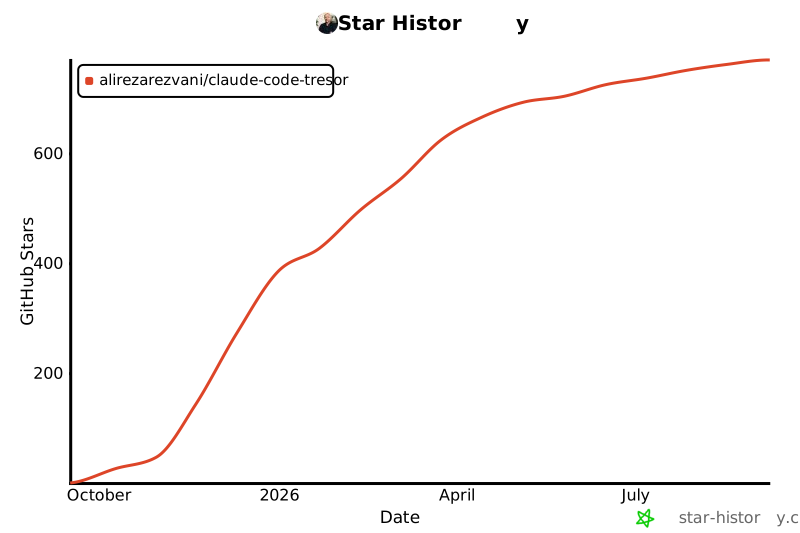](https://star-history.com/#alirezarezvani/claude-code-tresor&Date)
---
**Made with ❤️ by [Alireza Rezvani](https://github.com/alirezarezvani)**
*Empowering developers with world-class Claude Code utilities*
[](https://opensource.org/licenses/MIT)
[](CONTRIBUTING.md)
[](standards/)
**🚀 [Get Started Now](#-quick-start) | 📚 [View Examples](https://github.com/alirezarezvani/claude-code-tresor/tree/HEAD/examples/) | 🤝 [Contribute](https://github.com/alirezarezvani/claude-code-tresor/blob/HEAD/CONTRIBUTING.md)**