---
slug: "drugclaw"
source_type: "readme"
source_url: "https://cdn.jsdelivr.net/gh/drugclaw/drugclaw@main/README.md"
repo: "https://github.com/drugclaw/drugclaw"
source_file: "README.md"
branch: "main"
---
# DrugClaw
 [English](https://github.com/drugclaw/drugclaw/blob/HEAD/README.md) | [中文](https://github.com/drugclaw/drugclaw/blob/HEAD/README_CN.md)
[](https://drugclaw.com)
[](LICENSE)
[English](https://github.com/drugclaw/drugclaw/blob/HEAD/README.md) | [中文](https://github.com/drugclaw/drugclaw/blob/HEAD/README_CN.md)
[](https://drugclaw.com)
[](LICENSE)

DrugClaw is an AI Research Assistant for Accelerated Drug Discovery, implemented as a Rust multi-channel agent runtime. One agent core serves chat channels, the local Web UI, hooks, scheduled tasks, and domain skills without splitting the product into separate bots.
## TL;DR
- DrugClaw is a multi-channel AI runtime focused on drug-discovery research workflows.
- It combines tool use, memory, skills, scheduler, hooks, and Web UI in one agent core.
- You can run it locally with `drugclaw setup`, `drugclaw doctor`, and `drugclaw start`.
- Treat docking/QSAR/ADMET outputs as prioritization signals, not experimental proof.
## Table of Contents
- [What DrugClaw Is](#what-drugclaw-is)
- [Current Scope](#current-scope)
- [Capability Boundary](#capability-boundary)
- [Prerequisites](#prerequisites)
- [Demo Examples](#demo-examples)
- [Install](#install)
- [Quick Start](#quick-start)
- [Minimal Config](#minimal-config)
- [Core Concepts](#core-concepts)
- [Web UI And Hooks](#web-ui-and-hooks)
- [Science Skills](#science-skills)
- [Configuration Model](#configuration-model)
- [CLI](#cli)
- [Shell Scripts](#shell-scripts)
- [Development](#development)
- [Architecture](#architecture)
- [Documentation Map](#documentation-map)
## Built with Rust. 🦀
This project is built on top of [microclaw](https://github.com/microclaw/microclaw).
## What DrugClaw Is
DrugClaw combines drug-discovery research workflows with a general-purpose agent runtime:
- a channel-agnostic agent loop with tool use and session resume
- a provider-agnostic LLM layer with Anthropic and OpenAI-compatible backends
- persistent SQLite storage for chats, memory, auth, and observability
- a local Web UI and HTTP hook surface for operations and automation
- a skills system for reproducible workflows, including bioinformatics, chemistry, and docking
Current channel adapters include:
- Telegram
- Discord
- Slack
- Feishu / Lark
- Matrix
- WhatsApp Cloud API
- IRC
- iMessage
- Email
- Nostr
- Signal
- DingTalk
- QQ
- Web
## Current Scope
DrugClaw is already useful as:
- a tool-using chat agent for code and file operations
- a multi-chat automation runtime with hooks and scheduled tasks
- a memory-backed assistant with file memory plus structured SQLite memory
- a local operator console through the Web UI
- a research assistant for literature review, public database triage, molecular property analysis, DrugBank retrieval, QSAR, and docking workflows
The runtime is generic enough to automate other workflows, but the product direction is explicitly drug-discovery research acceleration.
## Capability Boundary
DrugClaw is strong at:
- literature and public-database lookup
- structured note-taking over biological and chemical artifacts
- reproducible scripting for bioinformatics and computational chemistry
- heuristic prioritization through docking, ADMET triage, QSAR, and structure-aware scoring
- moving from chat intent to saved artifacts, reports, and follow-up analyses
DrugClaw is not:
- a wet-lab automation system
- a substitute for medicinal chemistry or structural biology judgment
- a clinically validated ADMET or affinity oracle
- a regulatory, diagnostic, or treatment decision system
- proof that a compound works in vitro, in vivo, or in humans
When DrugClaw reports docking scores, QSAR predictions, ADMET heuristics, or affinity estimates, those outputs should be treated as prioritization signals only.
## Prerequisites
- macOS or Linux
- Docker Desktop
- Anthropic API key
---
## Demo Examples
Below are live demonstrations of DrugClaw handling real tasks via Telegram.
Show Demo Examples
1. Protein Structure Rendering
> Fetch a PDB structure, render it in rainbow coloring with PyMOL, and send the image.

2. PubMed Literature Search
> Search PubMed for recent high-impact papers and provide structured summaries.

3. Hydrogen Bond Analysis
> Visualize hydrogen bonds between a ligand and protein in PDB 3BIK.


4. Target Intelligence Dossier
> Build a concise target dossier by combining UniProt, OpenTargets, Reactome, STRING, ClinVar, and known-drug evidence into one brief.

5. Compound Database Triage
> Query PubChem, ChEMBL, and BindingDB for a compound or target, normalize the returned activity records, and send back a ranked summary table.

6. Docking Workflow Summary
> Generate the search box, run docking, and return the top poses with a compact report.

## Install
### One-line installer
```sh
curl -fsSL https://drugclaw.com/install.sh | bash
```
When Docker is installed and the daemon is reachable, the installer also tries
to build the default science sandbox image `drugclaw-drug-sandbox:latest`.
### Windows PowerShell installer
```powershell
iwr https://drugclaw.com/install.ps1 -UseBasicParsing | iex
```
### From source
```sh
git clone https://github.com/DrugClaw/DrugClaw.git
cd drugclaw
cargo build
npm --prefix web install
npm --prefix web run build
```
### Uninstall
```sh
./uninstall.sh
```
## Quick Start
### 1. Create config
```sh
cp drugclaw.config.example.yaml drugclaw.config.yaml
```
### 2. Run setup and diagnostics
```sh
drugclaw setup
drugclaw doctor
```
If the default sandbox image is already present locally, `drugclaw setup`
defaults the bash sandbox to enabled.
### 3. Start runtime
```sh
drugclaw start
```
### 4. Open the local Web UI
By default the UI listens on `http://127.0.0.1:10961`.
## Minimal Config
A smallest practical config is usually Web-first, then add channels as needed.
```yaml
llm_provider: "anthropic"
api_key: "replace-me"
model: ""
data_dir: "./drugclaw.data"
working_dir: "./tmp"
working_dir_isolation: "chat"
channels:
web:
enabled: true
telegram:
enabled: false
web_host: "127.0.0.1"
web_port: 10961
```
Recommended next steps:
- enable one chat channel under `channels:`
- set `soul_path` or add `SOUL.md`
- enable sandboxing for code execution when you need stronger isolation
- use `drugclaw web password-generate` for Web operator access
## Core Concepts
### Agent loop
The runtime does one thing consistently across channels:
1. load chat state and memory
2. build the system prompt plus skills catalog
3. call the selected model with tool schemas
4. execute tools when requested
5. persist the updated session and artifacts
The shared loop lives in [src/agent_engine.rs](https://github.com/drugclaw/drugclaw/blob/HEAD/src/agent_engine.rs). Channels are ingress and egress adapters, not separate agent implementations.
### Memory
DrugClaw has two memory layers:
- file memory: `AGENTS.md` plus chat-scoped files under `runtime/groups/`
- structured memory: SQLite-backed facts, confidence, supersession, and observability
This lets the runtime keep durable context without forcing every instruction into a single prompt.
### Skills
Show Skills Overview
Bundled skills currently include:
- `bio-tools`
- `bio-db-tools`
- `bayesian-optimization-tools`
- `omics-tools`
- `grn-tools`
- `target-intelligence-tools`
- `variant-analysis-tools`
- `pharma-db-tools`
- `chem-tools`
- `pharma-ml-tools`
- `literature-review-tools`
- `medical-data-tools`
- `clinical-research-tools`
- `medical-qms-tools`
- `stat-modeling-tools`
- `survival-analysis-tools`
- `scientific-visualization-tools`
- `scientific-workflow-tools`
- `docking-tools`
- document, spreadsheet, PDF, GitHub, weather, and macOS utility skills
Bundled domain skills now cover:
- sequence analysis and general bioinformatics workflows
- public biology database lookup across UniProt, PDB, AlphaFold, ClinVar, dbSNP, gnomAD, Ensembl, GEO, InterPro, KEGG, OpenTargets, Reactome, and STRING
- AnnData, single-cell, BAM or CRAM, and mzML dataset triage
- Arboreto-based gene regulatory network inference with GRNBoost2 or GENIE3
- local VCF, SNV, indel, and SV summarization plus target-intelligence dossiers
- public drug-discovery database lookup across PubChem, ChEMBL, BindingDB, openFDA, ClinicalTrials.gov, and OpenAlex
- datamol, molfeat, PyTDC, and medchem-backed pharma ML preparation
- DeepChem, RDKit, PySCF, assay normalization, QSAR, virtual screening, and DrugBank lookup
- hypothesis tests, statsmodels regression, Kaplan-Meier, Cox modeling, and reusable scientific figures
- citation cleanup, evidence matrices, hypothesis framing, and reproducibility checklists
- Bayesian optimization for bounded experiment suggestion and parameter tuning
- DICOM metadata inspection, biosignal analysis, and cohort-table profiling for medical research datasets
- clinical-research design, reporting-guideline selection, and study-planning support
- Vina-based docking plus downstream chemistry post-processing
See [docs/operations/science-runtime.md](https://github.com/drugclaw/drugclaw/blob/HEAD/docs/operations/science-runtime.md) for runtime requirements.
### Hooks
Hooks let you gate or modify LLM and tool traffic at runtime.
Supported events:
- `BeforeLLMCall`
- `BeforeToolCall`
- `AfterToolCall`
Supported outcomes:
- `allow`
- `block`
- `modify`
See [docs/hooks/HOOK.md](https://github.com/drugclaw/drugclaw/blob/HEAD/docs/hooks/HOOK.md).
### ClawHub
ClawHub is the registry layer for discovering and installing skills.
Use:
```sh
drugclaw skill search
drugclaw skill install
drugclaw skill list
```
Reference: [docs/clawhub/overview.md](https://github.com/drugclaw/drugclaw/blob/HEAD/docs/clawhub/overview.md)
## Web UI And Hooks
The local Web surface is not an afterthought. It exposes:
- session and history browsing across channels
- auth and API key management
- metrics and memory observability
- config self-check and runtime operations
- HTTP hook endpoints for automation ingress
Important endpoints:
- `POST /hooks/agent`
- `POST /api/hooks/agent`
- `POST /hooks/wake`
- `POST /api/hooks/wake`
Reference: [docs/operations/http-hook-trigger.md](https://github.com/drugclaw/drugclaw/blob/HEAD/docs/operations/http-hook-trigger.md)
## Science Skills
DrugClaw now ships a non-trivial scientific workflow layer.
Show Science Skills Details
### `bio-tools`
Use for:
- FASTA / FASTQ / BAM / BED workflows
- BLAST, alignment, QC, plotting, structure rendering
- literature search and general bioinformatics scripting
### `bio-db-tools`
Use for API-backed lookup of:
- UniProt
- RCSB PDB
- AlphaFold DB
- ClinVar
- dbSNP
- gnomAD
- Ensembl
- GEO
- InterPro
- KEGG
- OpenTargets
- Reactome
- STRING
Bundled template:
- `skills/science/bio-db-tools/templates/bio_db_lookup.py`
### `omics-tools`
Use for:
- `h5ad` and AnnData triage before Scanpy or scvi workflows
- BAM or CRAM region inspection with pysam
- mzML experiment inventory before pyOpenMS workflows
Bundled templates:
- `skills/science/omics-tools/templates/single_cell_profile.py`
- `skills/science/omics-tools/templates/pysam_region_profile.py`
- `skills/science/omics-tools/templates/mzml_summary.py`
### `grn-tools`
Use for:
- GRNBoost2 or GENIE3 regulatory-edge inference
- transcription factor to target ranking from bulk or single-cell expression matrices
- TF-whitelist constrained GRN runs with Arboreto
Bundled template:
- `skills/genomics/grn-tools/templates/arboreto_grn.py`
### `variant-analysis-tools`
Use for:
- local VCF or BCF summarization
- VAF, depth, PASS, and consequence filtering
- SNV, indel, and SV mutation-class counts before downstream annotation
Bundled template:
- `skills/genomics/variant-analysis-tools/templates/variant_report.py`
### `target-intelligence-tools`
Use for:
- one-file target briefs spanning identifiers, disease evidence, known drugs, pathways, and interaction partners
- compact target-validation snapshots before screening or docking
- integrating UniProt, OpenTargets, STRING, Reactome, ClinVar, and gnomAD signals into one dossier
Bundled template:
- `skills/research/target-intelligence-tools/templates/target_dossier.py`
### `pharma-db-tools`
Use for API-backed lookup of:
- PubChem
- ChEMBL
- BindingDB measured affinities
- openFDA drug labels, events, NDC, recalls, approvals, and shortages
- ClinicalTrials.gov
- OpenAlex
Bundled template:
- `skills/pharma/pharma-db-tools/templates/pharma_db_lookup.py`
### `chem-tools`
Use for:
- DeepChem featurization
- RDKit descriptors
- heuristic ADMET screening
- DrugBank local or online lookup
- assay-table normalization
- QSAR and bioactivity prediction
- ligand-only and structure-aware affinity prediction
- virtual screening reranking
### `pharma-ml-tools`
Use for:
- datamol-backed library profiling and scaffold summaries
- molfeat feature generation for QSAR or ranking workflows
- PyTDC benchmark dataset fetch and split export
- medchem rule and alert screening before prioritization
Bundled templates:
- `skills/pharma/pharma-ml-tools/templates/datamol_library_profile.py`
- `skills/pharma/pharma-ml-tools/templates/molfeat_featurize.py`
- `skills/pharma/pharma-ml-tools/templates/pytdc_dataset_fetch.py`
- `skills/pharma/pharma-ml-tools/templates/medchem_screen.py`
### `literature-review-tools`
Use for:
- citation-table normalization and deduplication
- lightweight BibTeX export from local metadata tables
- evidence-matrix assembly for review writing or gap mapping
Bundled templates:
- `skills/science/literature-review-tools/templates/citation_table_normalize.py`
- `skills/science/literature-review-tools/templates/evidence_matrix.py`
### `medical-data-tools`
Use for:
- DICOM metadata inspection and basic de-identification
- ECG, PPG, EDA, RSP, or EMG analysis with NeuroKit2
- cohort-table profiling for clinical research datasets
Bundled templates:
- `skills/medical/medical-data-tools/templates/dicom_inspect.py`
- `skills/medical/medical-data-tools/templates/neuro_signal_analyze.py`
- `skills/medical/medical-data-tools/templates/clinical_cohort_profile.py`
### `clinical-research-tools`
Use for:
- study design and endpoint planning
- reporting-guideline routing such as CONSORT, STROBE, PRISMA, STARD, TRIPOD, SPIRIT, and ICH E3
- protocol, SAP, and evidence-synthesis support
- bias, confounding, and sample-size review
### `medical-qms-tools`
Use for:
- ISO 13485 or FDA QMSR documentation planning
- gap assessment for QMS procedures and records
- CAPA, complaint, audit, supplier, and design-control documentation review
### `stat-modeling-tools`
Use for:
- statistical hypothesis tests with explicit result export
- OLS, logistic, and Poisson regression with statsmodels
- coefficient tables, confidence intervals, and model-fit summaries
Bundled templates:
- `skills/science/stat-modeling-tools/templates/stat_test_report.py`
- `skills/science/stat-modeling-tools/templates/statsmodels_regression.py`
### `survival-analysis-tools`
Use for:
- Kaplan-Meier summaries and plots
- log-rank comparisons between groups
- Cox proportional hazards baselines with hazard-ratio export
Bundled template:
- `skills/science/survival-analysis-tools/templates/survival_analysis.py`
### `scientific-visualization-tools`
Use for:
- static publication-style figures with seaborn or matplotlib
- interactive Plotly HTML charts for exploratory research review
- reusable plotting scripts parameterized by column names
Bundled templates:
- `skills/science/scientific-visualization-tools/templates/publication_plot.py`
- `skills/science/scientific-visualization-tools/templates/interactive_plot.py`
### `scientific-workflow-tools`
Use for:
- hypothesis framing from observations
- peer-review style critique for rigor and claim scope
- reproducibility checklist generation
- research-method planning and scientific-writing structure
Bundled template:
- `skills/science/scientific-workflow-tools/templates/reproducibility_checklist.py`
### `bayesian-optimization-tools`
Use for:
- proposing the next experiment from bounded numeric parameters
- balancing exploration and exploitation over expensive assay or reaction runs
- tuning conditions or hyperparameters with Gaussian-process surrogates
Bundled template:
- `skills/research/bayesian-optimization-tools/templates/bayesian_optimize.py`
### `docking-tools`
Use for:
- receptor / ligand preparation
- AutoDock Vina workflows
- box generation
- PyMOL rendering
- docking reports and chemistry post-processing
Bundled templates:
- `skills/pharma/docking-tools/templates/docking_workflow.py`
- `skills/pharma/docking-tools/templates/docking_manifest.example.json`
### Sandbox images
Build the bundled runtime image when you need the full scientific and docking toolchain:
```sh
docker build -f docker/drug-sandbox.Dockerfile -t drugclaw-drug-sandbox:latest .
```
Those Dockerfiles read version-constrained requirements from `docker/requirements-*.txt` so the science stack does not drift on every rebuild.
Design choice:
- `drug-sandbox` is the canonical shared runtime for bio, omics, chemistry, literature, medical-research, and docking skills
- the legacy `drug-sandbox-docking` tag is retained only as a compatibility alias for older configs and scripts
- dedicated `med-sandbox` or `chem-sandbox` images are not provided because the current dependency overlap is high and the operator complexity is not worth it
Reference: [docs/operations/science-runtime.md](https://github.com/drugclaw/drugclaw/blob/HEAD/docs/operations/science-runtime.md)
## Configuration Model
The main config file is `drugclaw.config.yaml`.
Important fields:
- `llm_provider`, `api_key`, `model`
- `data_dir`, `working_dir`, `working_dir_isolation`
- `channels.*`
- `sandbox.*`
- `soul_path`, `souls_dir`
- `plugins.*`
- `clawhub_*`
- `voice_provider`, `voice_transcription_command`
- `web_host`, `web_port`
Useful facts:
- `channels:` is the preferred configuration surface for modern channel setup.
- `SOUL.md` can be global, channel-level, or account-level.
- built-in skills are installed under `/skills` unless `skills_dir` overrides that path.
- runtime env overrides still use `MICROCLAW_*` prefixes for compatibility, including `MICROCLAW_CONFIG` and `MICROCLAW_SKILLS_DIR`.
Start from [drugclaw.config.example.yaml](https://github.com/drugclaw/drugclaw/blob/HEAD/drugclaw.config.example.yaml).
## CLI
Main commands:
```text
drugclaw start
drugclaw acp
drugclaw setup
drugclaw doctor
drugclaw gateway
drugclaw skill
drugclaw hooks
drugclaw web
drugclaw reembed
drugclaw upgrade
drugclaw version
```
Examples:
```sh
drugclaw web password-generate
drugclaw hooks list
drugclaw gateway status
drugclaw skill search docking
```
### ACP stdio mode (optional)
DrugClaw can run as an Agent Client Protocol (ACP) server over stdio:
```sh
drugclaw acp
```
Use this mode when another local tool needs a sessioned DrugClaw runtime over stdio instead of Telegram/Discord/Web ingress.
## Shell Scripts
The repository keeps operator scripts aligned with the runtime:
- `install.sh`: install the latest release binary on macOS or Linux
- `uninstall.sh`: remove the installed binary
- `start.sh`: build the Web UI and run the local runtime from source
- `check.sh`: run the standard local validation set
- `deploy.sh`: run release automation and optional nixpkgs follow-up
- `scripts/test_http_hooks.sh`: smoke-test Web hook endpoints
- `scripts/matrix-smoke-test.sh`: end-to-end Matrix ingestion smoke test
- `scripts/update-nixpkgs.sh`: update the `drugclaw` package in `nixpkgs`
These scripts are repository workflow glue, not a second control plane.
## Development
### Build
```sh
cargo build
npm --prefix web run build
npm --prefix website run build
```
### Test
```sh
cargo test
./check.sh
```
### Docs drift guard
```sh
node scripts/generate_docs_artifacts.mjs --check
```
## Architecture
Key files:
- [src/main.rs](https://github.com/drugclaw/drugclaw/blob/HEAD/src/main.rs): CLI entrypoint
- [src/runtime.rs](https://github.com/drugclaw/drugclaw/blob/HEAD/src/runtime.rs): application wiring
- [src/agent_engine.rs](https://github.com/drugclaw/drugclaw/blob/HEAD/src/agent_engine.rs): shared agent loop
- [src/llm.rs](https://github.com/drugclaw/drugclaw/blob/HEAD/src/llm.rs): provider abstraction
- [src/web.rs](https://github.com/drugclaw/drugclaw/blob/HEAD/src/web.rs): Web router and APIs
- [src/scheduler.rs](https://github.com/drugclaw/drugclaw/blob/HEAD/src/scheduler.rs): scheduled tasks and reflector loop
- [src/skills.rs](https://github.com/drugclaw/drugclaw/blob/HEAD/src/skills.rs): skill discovery and activation
- [src/mcp.rs](https://github.com/drugclaw/drugclaw/blob/HEAD/src/mcp.rs): MCP integration
- [src/hooks.rs](https://github.com/drugclaw/drugclaw/blob/HEAD/src/hooks.rs): runtime hook system
Supporting crates:
- `drugclaw-core`
- `drugclaw-storage`
- `drugclaw-tools`
- `drugclaw-channels`
- `drugclaw-app`
## Documentation Map
Start here for deeper docs:
- [docs/generated/tools.md](https://github.com/drugclaw/drugclaw/blob/HEAD/docs/generated/tools.md)
- [docs/generated/config-defaults.md](https://github.com/drugclaw/drugclaw/blob/HEAD/docs/generated/config-defaults.md)
- [docs/generated/provider-matrix.md](https://github.com/drugclaw/drugclaw/blob/HEAD/docs/generated/provider-matrix.md)
- [docs/a2a.md](https://github.com/drugclaw/drugclaw/blob/HEAD/docs/a2a.md)
- [docs/operations/acp-stdio.md](https://github.com/drugclaw/drugclaw/blob/HEAD/docs/operations/acp-stdio.md)
- [docs/operations/runbook.md](https://github.com/drugclaw/drugclaw/blob/HEAD/docs/operations/runbook.md)
- [docs/operations/science-runtime.md](https://github.com/drugclaw/drugclaw/blob/HEAD/docs/operations/science-runtime.md)
- [docs/releases/pr-release-checklist.md](https://github.com/drugclaw/drugclaw/blob/HEAD/docs/releases/pr-release-checklist.md)
- [docs/security/execution-model.md](https://github.com/drugclaw/drugclaw/blob/HEAD/docs/security/execution-model.md)
## License
Apache License 2.0. See [LICENSE](https://github.com/drugclaw/drugclaw/tree/HEAD/LICENSE).
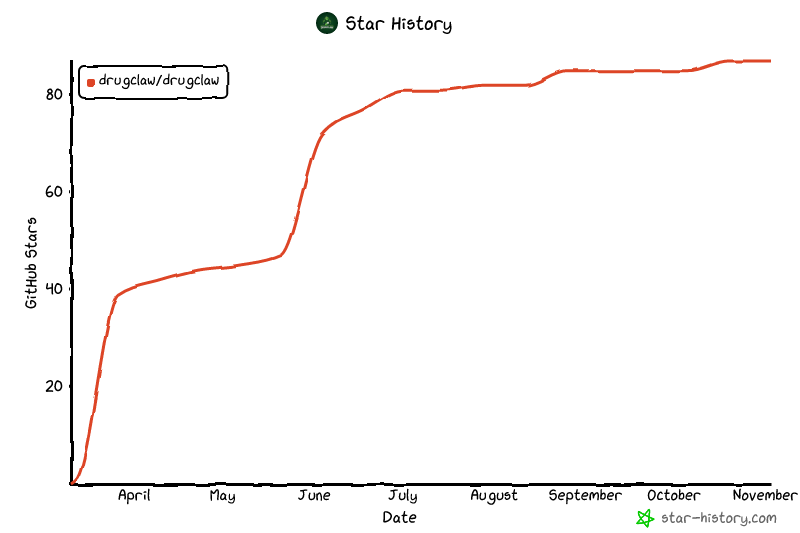
## Star History
[](https://www.star-history.com/?repos=DrugClaw%2FDrugClaw&type=date&legend=top-left)