原始内容
ESP32 Plant Watering System
A microcontroller-based system for automated plant watering with ESP32. Monitor soil moisture and control the watering pump.
Built for LilyGO T-Display-S3 ESP32-S3 development board
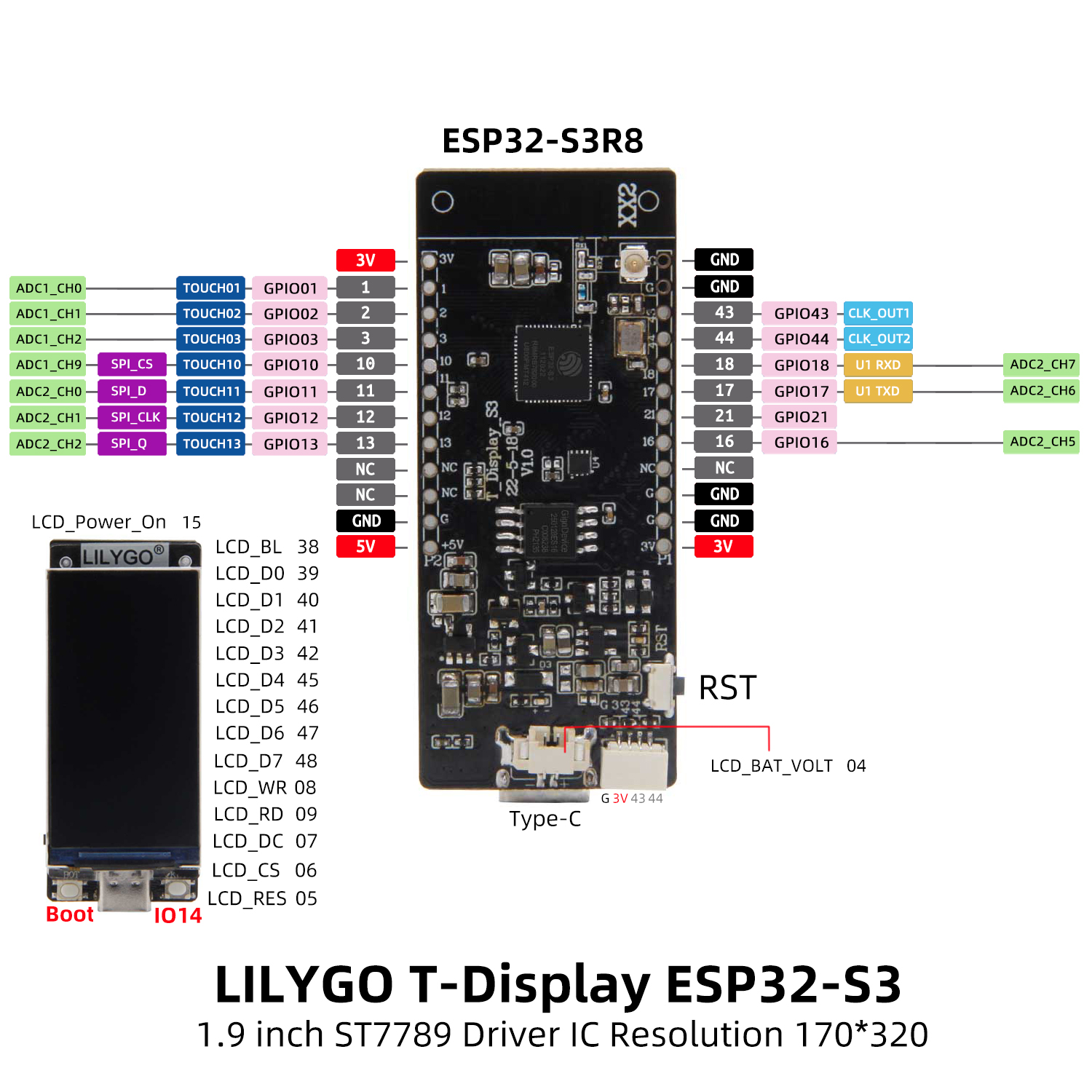
Board Features:
- ESP32-S3 dual-core MCU
- 1.9" LCD Display (170x320)
- USB-C connector
- Built-in battery management
Wiring
graph TD
    subgraph MCU [ESP32-S3 LilyGO T-Display-S3]
        G1[GPIO1]
        G2[GPIO2]
        G3[GPIO3]
        G4[GPIO4]
        G13[GPIO13]
        G14[GPIO14]
        G15[GPIO15]
        G16[GPIO16]
        G21[GPIO21]
        G38[GPIO38]
        GDISP[GPIO 6-9 and 39-48]
    end

    subgraph PERIPH [Peripherals]
        DHT[DHT11 Temp and Humidity]
        RELAY[Pump Relay]
        BATT[Battery Voltage Divider]
        MOIST[Capacitive Soil Moisture]
        MPWR[Moisture Power Switch]
        WATER[Water Level Sensor]
        WPWR[Water Level Power Switch]
        BTN[Wake Button]
        DPWR[Display Power]
        BL[Display Backlight]
        LCD[ST7789 LCD]
    end

    G1  -->|1-wire bit-bang| DHT
    G13 -->|digital out| RELAY
    G4  -->|ADC1 x2 divider| BATT
    G2  -->|ADC1 11dB| MOIST
    G16 --> MPWR
    MPWR -->|power toggle| MOIST
    G3  -->|ADC1 11dB| WATER
    G21 --> WPWR
    WPWR -->|power toggle| WATER
    G14 -->|wake source| BTN
    G15 --> DPWR
    G38 --> BL
    GDISP -->|8-bit parallel| LCD
Core Features
Sensor Integration
- DHT11 temperature/humidity monitoring
- Capacitive soil moisture sensing (analog)
- Water level detection
- Battery voltage monitoring
Display Interface
- ST7789 LCD support
- Real-time sensor data visualization
- System status display
Network Connectivity
- WiFi connection with DHCP
- MQTT integration with Home Assistant auto-discovery
- Sensor state published each wake cycle
- Pump controlled via HA switch entity; retained
ONsurvives deep sleep and executes on next wake
Power Management
- Deep sleep support
- Configurable wake/sleep cycles
- Battery-optimized operation
MQTT Integration
Published topics
| Topic | Values | Description |
|---|---|---|
{DEVICE_ID}/temperature |
{"value": "22"} |
Air temperature (°C) |
{DEVICE_ID}/humidity |
{"value": "55"} |
Air humidity (%) |
{DEVICE_ID}/moisture |
{"value": "Dry"} |
Soil moisture level |
{DEVICE_ID}/moistureraw |
{"value": "1850"} |
Raw soil moisture (mV) |
{DEVICE_ID}/overflow |
{"value": "YES"} / {"value": "NO"} |
Drainage overflow sensor |
{DEVICE_ID}/batteryvoltage |
{"value": "3820"} |
Battery voltage (mV) |
Subscribed topics
| Topic | Payload | Description |
|---|---|---|
{DEVICE_ID}/pump/set |
ON / OFF |
Schedule pump run (retained); device resets to OFF after acting |
Pump control
The pump is controlled exclusively via Home Assistant using a switch entity. The switch state is retained by the MQTT broker, so it survives the device's deep sleep (~59.5 min per cycle).
Flow:
- Flip the Water pump switch to
ONin HA from anywhere — broker stores it as retained. - On the next wake cycle, the device reads all sensors first (establishing overflow state).
- Device then subscribes to the pump topic — retained
ONis delivered with overflow state already known. - Device resets the switch to
OFF(retained) so a second wake doesn't re-trigger. - If overflow detected (raw ADC > 2800; measured ~2217 mV dry, ~3475 mV submerged) — blocked, pump does not run.
- Otherwise runs the pump for 10 seconds.
There is no auto-trigger from soil moisture. The pump run is awaited inline by the wake cycle: commands arriving during a run are processed only after it completes, and the device never enters deep sleep mid-run.
Dependencies
The project uses several Rust crates to provide functionality:
Async/Embedded Frameworks
Hardware Abstraction & Embedded I/O
Networking
ESP32-Specific Crates
Display
The built-in 1.9" ST7789 LCD display on the T-Display-S3 has the following pin configuration:
Backlight: GPIO38
CS: GPIO6
DC: GPIO7
RST: GPIO5
WR: GPIO8
RD: GPIO9
Data pins: GPIO39-42, GPIO45-48
Serialization
Miscellaneous
- heapless
- static_cell
- rand_core
- ...and others
Setup
1. Clone the repository
git clone https://github.com/yourusername/esp32-homecontrol-no-std-rs.git
cd esp32-homecontrol-no-std-rs
2. Install Rust and the necessary tools
See the ESP-RS book.
Install espup: espup GitHub
espup install
. $HOME/export-esp.sh
3. Build and run the project
cp .env.dist .env
./run.sh
Development Tools
Validate Agent Skills
To validate the .claude/skills directory structure:
# Install skills-ref validator (one-time)
cd /tmp
git clone https://github.com/agentskills/agentskills.git
cd agentskills/skills-ref
pipx install .

# Validate the skill
skills-ref validate .claude/skills/esp32-rust-embedded
Usage
To flash the firmware to your ESP32 device, run:
cargo run --release
Useful Links
DHCP & Wi-Fi
MQTT Communication
Display Interfaces
Sensors
UI & Graphics
Projects and Games
Networking
Miscellaneous Examples
Tutorials
Advanced Examples
Bitcoin Device, USB, & OTA Updates
This documentation is curated to help you get started with various functionalities, libraries, and examples for ESP32 projects using Rust.