One command to connect your Coding Agent to Telegram & Discord
---
Cursor, Claude Code, OpenCode, Codex — these Coding Agents can already write code, run scripts, analyze data, and reason through complex tasks. But they're stuck in an IDE or a terminal window.
**GolemBot gives them a body.** One command connects your Coding Agent to Slack, Telegram, Discord, Feishu, DingTalk, WeCom, WeChat, or any HTTP client — with any LLM provider. Route Claude Code through OpenRouter, run Codex on MiniMax, or point OpenCode at DeepSeek — one config block, zero code changes. Write a custom adapter to plug in email, GitHub Issues, or any other message source. Or embed into your own product with 5 lines of code. No AI framework, no prompt engineering — the agent you already have *is* the brain.
## Run Your Coding Agent Everywhere
### On IM — your team's 24/7 AI teammate
```bash
golembot init -e claude-code -n my-bot
golembot gateway # Slack, Telegram, Discord, Feishu, DingTalk, WeCom, WeChat
```
Your colleagues @ the bot in group chat. It can write code, analyze files, answer questions — because behind it is a real Coding Agent, not a thin API wrapper.
### In your product — full agent power, 5 lines of code
```typescript
import { createAssistant } from 'golembot';
const bot = createAssistant({ dir: './my-agent' });
for await (const event of bot.chat('Analyze last month sales data')) {
if (event.type === 'text') process.stdout.write(event.content);
}
```
Embed into Slack bots, internal tools, SaaS products, customer support — anything that speaks Node.js.
## Why GolemBot, not another AI framework?
| | GolemBot | Traditional AI Frameworks |
|---|---|---|
| **AI brain** | Cursor / Claude Code / OpenCode / Codex — battle-tested, full coding ability | You wire up LLM APIs + tools from scratch |
| **Setup** | `golembot init` → done | Chains, RAG, vector DB, prompt tuning... |
| **Auto-upgrade** | Agent gets smarter? Your assistant gets smarter. Zero code changes. | You maintain everything yourself |
| **Transparency** | `ls` the directory = see what the assistant knows and does | Black box pipelines |
| **Engine lock-in** | Change one line in config to swap engines | Rewrite everything |
| **Provider freedom** | 4 engines × any provider — OpenRouter, MiniMax, DeepSeek, SiliconFlow. One config block. | Locked to one LLM provider per framework |
| **Skills** | 13,000+ community skills from ClawHub, one command to install | Write your own tools and prompts from scratch |
| **Scheduled tasks** | Built-in cron scheduler — daily standups, dependency audits, test reports pushed to IM | Build your own job system |
| **Multimodal** | Image messages from IM → saved to disk → agent reads and analyzes. All 7 channels supported. | Parse platform APIs yourself |
## Quick Start
```bash
npm install -g golembot
mkdir my-bot && cd my-bot
golembot onboard # guided setup (recommended)
# Or manually:
golembot init -e claude-code -n my-bot
golembot run # REPL conversation
golembot gateway # start IM + HTTP service + Dashboard
golembot fleet ls # list all running bots
golembot skill search "data analysis" # browse 13,000+ ClawHub skills
```
Long task still running? Use `/stop` in REPL or IM, `assistant.cancel(sessionKey?)` in code, or `POST /abort` over HTTP to cancel the current task without clearing session history.
### Dashboard & Fleet
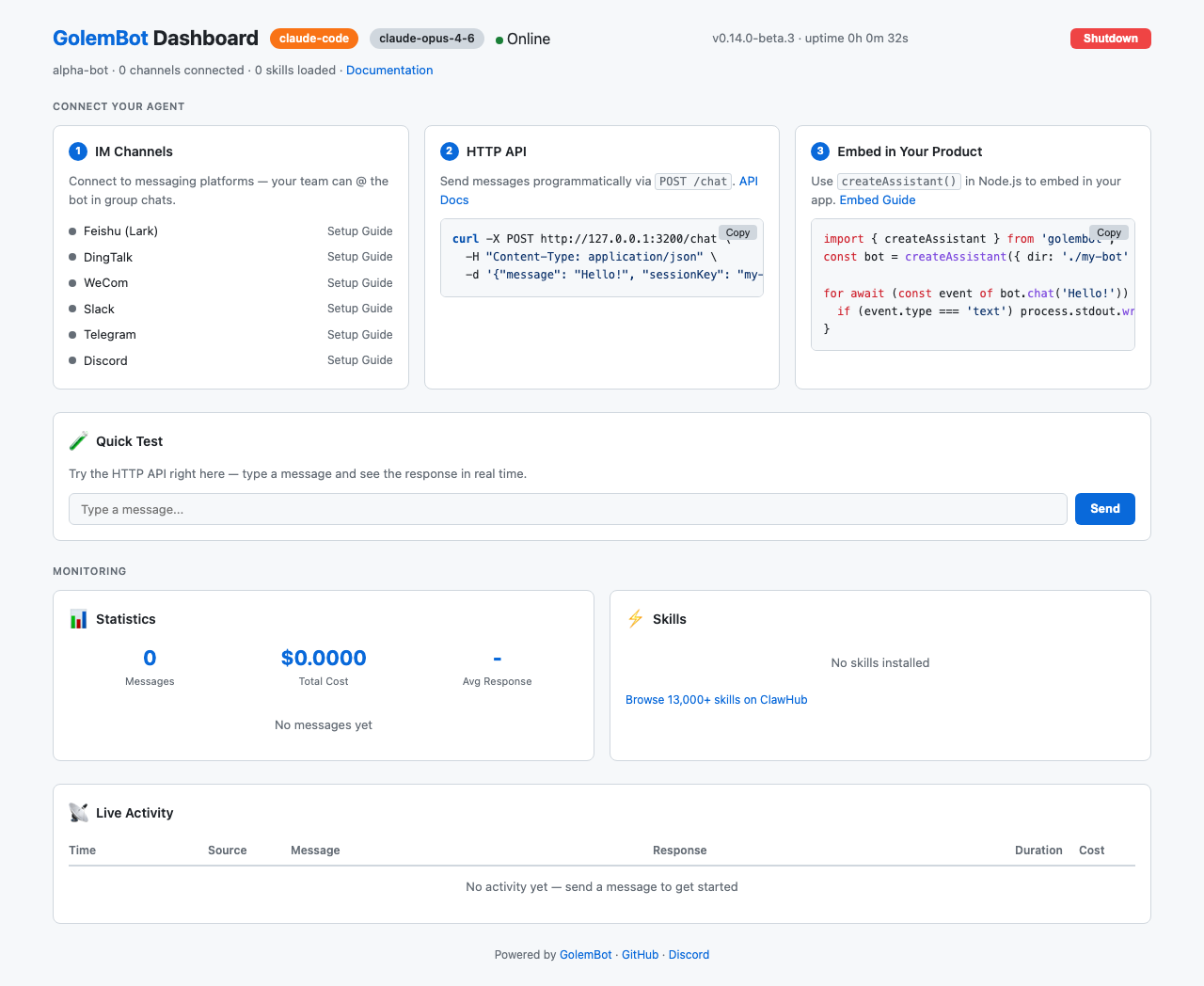
Every `golembot gateway` instance comes with a built-in web Dashboard showing real-time metrics, channel status, and a quick-test console:
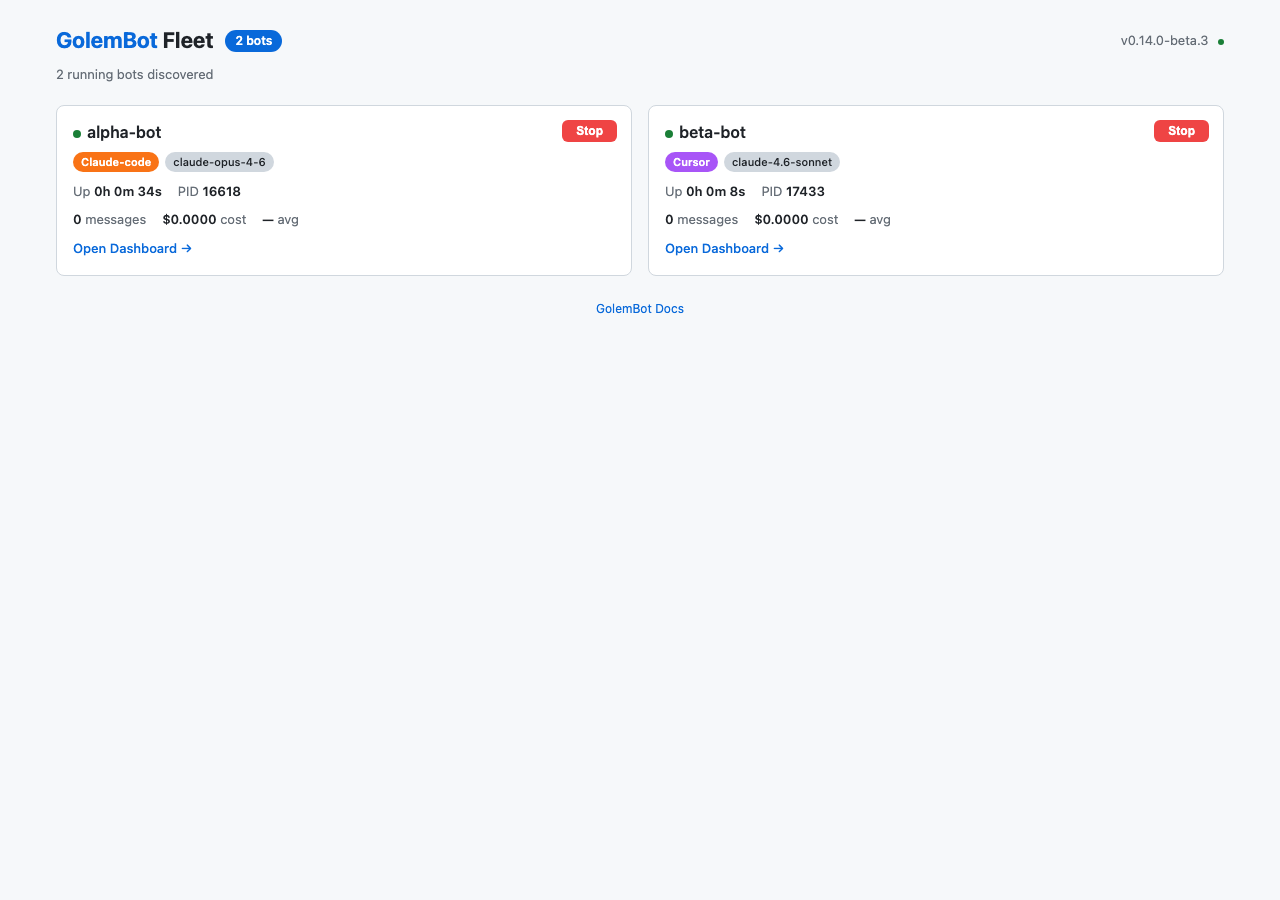
Running multiple bots? `golembot fleet serve` aggregates them into a single Fleet Dashboard:
## Architecture
```
Slack / Telegram / Discord / Feishu / DingTalk / WeCom / WeChat / HTTP API
Custom Adapters (email, GitHub Issues, ...)
│
▼
┌─────────────────────────┐
│ Gateway Service │
│ (Channel adapters + │
│ HTTP service) │
└────────────┬────────────┘
│
createAssistant()
│
┌───────┬───────┬───────┐
▼ ▼ ▼ ▼
Cursor Claude OpenCode Codex
Code
↕ Provider Routing (OpenRouter, MiniMax, ...)
```
## Engine Comparison
| | Cursor | Claude Code | OpenCode | Codex |
|---|---|---|---|---|
| Skill Injection | `.cursor/skills/` | `.claude/skills/` + CLAUDE.md | `.opencode/skills/` + opencode.json | `AGENTS.md` at workspace root |
| Session Resume | `--resume` | `--resume` | `--session` | `exec resume ` |
| API Key | CURSOR_API_KEY | ANTHROPIC_API_KEY | Depends on Provider | `CODEX_API_KEY` (preferred) / ChatGPT OAuth |
| Runtime Mode | `--force --trust --sandbox disabled` | `--dangerously-skip-permissions` | permission config | default `unrestricted`; also supports `sandbox` / `approval` / `search` / `addDirs` |
The `StreamEvent` interface is identical across all engines — switching requires zero code changes.
If you run Codex, note that GolemBot defaults to `codex.mode: unrestricted`. Set `codex.mode: safe` if you want to keep Codex sandboxed. You can also use fine-grained `codex.sandbox`, `codex.approval`, `codex.search`, and `codex.addDirs` settings.
If you route Codex through a custom provider, that provider must support the OpenAI Responses API. Providers that only expose `/chat/completions` or Anthropic-style `/messages` endpoints will fail. See the Provider Routing guide: https://0xranx.github.io/golembot/guide/provider-routing#codex-requires-responses-api
## Configuration
`golem.yaml` — the single config file:
```yaml
name: my-assistant
engine: claude-code
# Optional: route engine to a third-party LLM provider
provider:
baseUrl: "https://openrouter.ai/api"
apiKey: "${OPENROUTER_API_KEY}"
model: "anthropic/claude-sonnet-4"
channels:
slack:
botToken: ${SLACK_BOT_TOKEN}
appToken: ${SLACK_APP_TOKEN}
telegram:
botToken: ${TELEGRAM_BOT_TOKEN}
discord:
botToken: ${DISCORD_BOT_TOKEN}
botName: my-assistant # optional — normalizes @mention tokens in channel messages
feishu:
appId: ${FEISHU_APP_ID}
appSecret: ${FEISHU_APP_SECRET}
# domain: lark # optional — Lark global tenants
# pingTimeout: 30 # optional — WebSocket pong timeout in seconds
# Custom adapter — local file or npm package
my-email:
_adapter: ./adapters/email-adapter.js
token: ${EMAIL_TOKEN}
# Optional: Codex runtime controls (Codex engine only)
codex:
mode: unrestricted # compatibility alias; set safe to keep sandboxing
sandbox: workspace-write
approval: on-request
search: true
addDirs:
- ../shared-assets
gateway:
port: 3000
token: ${GOLEM_TOKEN}
```
Sensitive fields support `${ENV_VAR}` references. Custom channel adapters can be local `.js`/`.mjs` files or npm packages — [see the adapter guide](https://0xranx.github.io/golembot/api/channel-adapter).
## Skill System
A Skill is a directory containing `SKILL.md` + optional scripts. Drop it in, the assistant gains new abilities. Remove it, the ability is gone.
```
skills/
├── general/ # Built-in: general assistant
│ └── SKILL.md
├── im-adapter/ # Built-in: IM reply conventions
│ └── SKILL.md
└── my-custom-skill/ # Your own
├── SKILL.md
└── analyze.py
```
`ls skills/` is the complete list of what your assistant can do.
## 13,000+ Skills from ClawHub
GolemBot is fully compatible with [ClawHub](https://clawhub.ai) — the largest AI agent skill marketplace by OpenClaw. The `SKILL.md` format is 100% compatible, so all 13,000+ community skills work out of the box.
```bash
golembot skill search "data analysis" # discover skills
golembot skill add clawhub:data-analysis # one command to install
```
**Agent-powered skill discovery:** Your agent can search and install skills autonomously during conversations. Ask it "find me a good code review skill" — it searches ClawHub, shows results, and installs on your confirmation.
All skill commands support `--json` for programmatic access. The pluggable registry interface supports additional skill sources beyond ClawHub.
## Docker Deployment
```dockerfile
FROM node:22-slim
RUN npm install -g golembot
WORKDIR /assistant
COPY . .
EXPOSE 3000
CMD ["golembot", "gateway"]
```
## Development
```bash
git clone https://github.com/0xranx/golembot.git
cd golembot
pnpm install
pnpm run build
pnpm run test # Unit tests (1252+)
pnpm run e2e:opencode # End-to-end tests (OpenCode)
pnpm run e2e:codex # End-to-end tests (Codex)
pnpm run e2e:codex:launch # Real Codex launch verification (flags, resume, HTTP path)
```
## Contributing
We welcome contributions! Please see [CONTRIBUTING.md](https://github.com/0xranx/golembot/blob/HEAD/CONTRIBUTING.md) for guidelines.
## License
[MIT](https://github.com/0xranx/golembot/tree/HEAD/LICENSE)







 Compatible with 13,000+ OpenClaw community skills — the largest AI agent skill ecosystem. One command to search and install.