原始内容
PAM - Pi Agents Mixed



Pam is an extension for the Pi coding harness that AMPLIFIES your coding experience so you can turn it up to 11. The dial is inspired by Amp Code's The Dial.
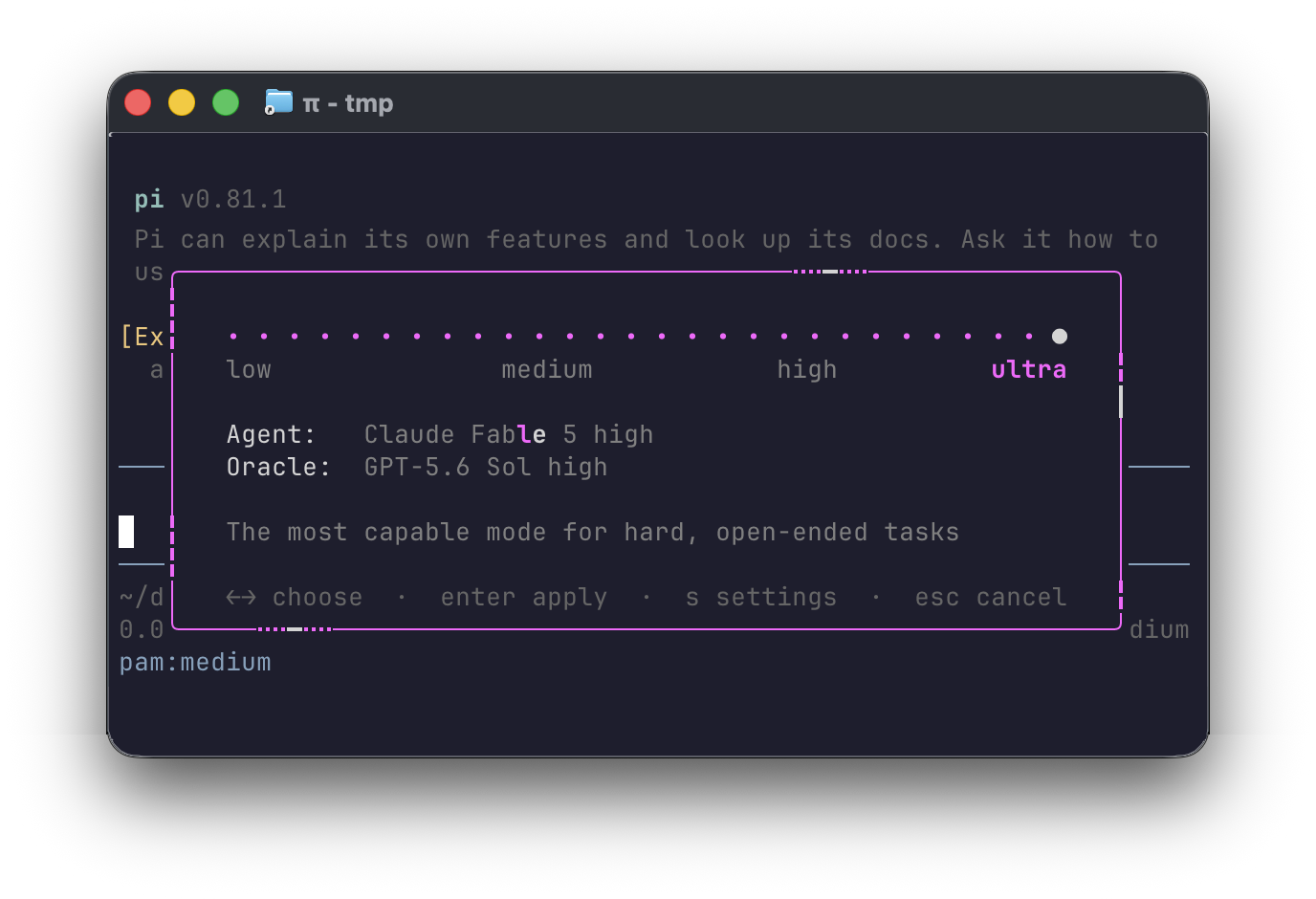
It provides an Agent <-> Oracle MoA (mixture of agents) that keeps your primary work on the faster agent and uses the smarter, slower oracle as a tool for second opinions.
There are four settings; each tier pairs an agent model with an oracle model:
- low — agent: GPT-5.6 Luna, oracle: GPT-5.6 Sol
- medium — agent: GPT-5.6 Sol, oracle: GPT-5.6 Sol
- high — agent: GPT-5.6 Sol (xhigh), oracle: Claude Fable 5
- ultra — agent: Claude Fable 5, oracle: GPT-5.6 Sol
It works with any models and providers available in Pi, and is easily customizable.
Press Ctrl+S at any time in Pi's TUI to open the dial.
PAM Install
pi install npm:@madhavajay/pam
Pam works with whatever providers Pi has, or use PAM with Alex to manage your different model sources and subscriptions:

Works best with Alex
Alex is optional. When it is connected, Pam's defaults prefer alex/* routes so a single dial can mix providers and benefit from Alex's subscription bonding and automatic failover.
Alex has customizable middleware to switch models for you dynamically in situations like:
- Fable-5 overly sensitive guardrails refuse you can transparently switch to GPT 5.6-sol
- One of your model subscriptions runs out mid /goal
- You want to use other providers like Kimi k3 subscriptions or local exolabs models
To install Alex and connect it to Pi:
curl -fsSL https://raw.githubusercontent.com/madhavajay/alex/main/install-release.sh | sh
alex auth import
alex connect pi
Configuring PAM
Loading Pam starts at medium. Press Ctrl+S or run /pam to open the dial.
Use left/right, Enter to apply, or Escape to cancel.
Press S from the dial to open model settings; closing settings returns to the same place on the dial.
Mode changes made while the agent is working apply when the current turn finishes; the status line shows pam:current→next while queued.
Modes can also be selected directly:
/pam low
/pam medium
/pam high
/pam ultra
/pam settings
/pam show
/pam save
/pam reset
/pam off
/pam help
Choose a startup mode from the command line, or explicitly start with Pam off:
pi --mode ultra
pi --mode off
--pam is kept as an alias of --mode.
Model shorthand
Start with mode letters, [agent, oracle] pairs, optional @thinking, and the built-in sol, luna, and fable aliases. Those aliases retain their full multi-provider fallback chains:
Short Syntax
pi --mode u --modes='{"u":["fable@max","sol"],"h":["sol@xhigh","fable"]}'
This turns into
pi --mode ultra --modes='{
  "ultra": {
    "agent": {
      "model": "alex:alex/claude-fable-5",
      "fallbacks": [
        "anthropic:claude-fable-5",
        "openrouter:anthropic/claude-fable-5"
      ],
      "thinking": "max"
    },
    "oracle": {
      "model": "alex:alex/gpt-5.6-sol",
      "fallbacks": [
        "openai-codex:gpt-5.6-sol",
        "openrouter:openai/gpt-5.6-sol"
      ],
      "thinking": "high"
    }
  },
  "high": {
    "agent": {
      "model": "alex:alex/gpt-5.6-sol",
      "fallbacks": [
        "openai-codex:gpt-5.6-sol",
        "openrouter:openai/gpt-5.6-sol"
      ],
      "thinking": "xhigh"
    },
    "oracle": {
      "model": "alex:alex/claude-fable-5",
      "fallbacks": [
        "anthropic:claude-fable-5",
        "openrouter:anthropic/claude-fable-5"
      ],
      "thinking": "high"
    }
  }
}'
Top-level strings define {templates} for literal, single-pass substitution:
pi --modes='{"gpt":"alex:alex/gpt-5.6","u":["{gpt}-sol@max","{gpt}-sol"]}'
Custom aliases can be top-level model strings or fallback-chain arrays:
pi --modes='{"best":"anthropic:claude-fable-5","fast":["alex:alex/glm-5.2","openrouter:z-ai/glm-5.2"],"u":["best@max","sol"],"l":["fast@low","sol"]}'
Top-level strings are both templates and aliases when they parse as models.
Aliases cannot reference other aliases. Template values are not recursively
expanded. Templates and aliases also work in ~/.pi/agent/pam-settings.json.
--modes applies for that run only and never writes the settings file unless
you explicitly run /pam save. Put persistent changes in
~/.pi/agent/pam-settings.json or use /pam settings.
Show PAMs Current Settings
See the effective configuration and any unavailable catalog refs in print mode:
pi -p '/pam show'
pi --modes='{"u":["fable@max","sol"]}' -p '/pam show'
Run /pam save to persist the current configuration, including any --modes
overrides, to ~/.pi/agent/pam-settings.json.
/pam off stops Pam's prompt and status handling but deliberately leaves the
currently selected Pi model unchanged. Selecting a model or reasoning effort
with Pi's normal controls also disables the active Pam mode.
Settings
Run /pam settings to configure the agent and oracle model for every tier in
the TUI:
- Use Up/Down to choose a tier and its
agentororacleslot. - Press Enter to open the model picker.
- Type to search all models currently available to Pi.
- Use Up/Down and Enter to save the selected model.
The selection is written to ~/.pi/agent/pam-settings.json immediately. Pam
creates the file and its parent directory when needed. If the changed slot is
the active tier's agent, Pam also switches the running Pi session to the new
model immediately.
/pam reset deletes the user settings file and returns to the bundled defaults.
You can edit ~/.pi/agent/pam-settings.json by hand. Models use
provider:model strings matching Pi's catalog, such as
openai-codex:gpt-5.6-sol, anthropic:claude-fable-5, or
openrouter:openai/gpt-5.6-sol. Run /reload in Pi after manual edits. Legacy
alex/... strings are still accepted and interpreted as models from the
alex provider. Until the user file exists, Pam reads the bundled
settings.json as read-only defaults.
Each choice has a primary model, optional fallbacks, and a reasoning
thinking level:
{
  "medium": {
    "agent": {
      "model": "alex:alex/gpt-5.6-sol",
      "fallbacks": [
        "openai-codex:gpt-5.6-sol",
        "openrouter:openai/gpt-5.6-sol"
      ],
      "thinking": "medium"
    },
    "oracle": {
      "model": "alex:alex/gpt-5.6-sol",
      "fallbacks": [
        "openai-codex:gpt-5.6-sol",
        "openrouter:openai/gpt-5.6-sol"
      ],
      "thinking": "high"
    }
  }
}
The checked-in file contains all four levels. Missing or invalid fields fall back to Pam's defaults and produce a warning instead of preventing the plugin from loading.
Wiring
Each checked-in default follows a three-layer chain: Alex first, the matching ChatGPT or Claude subscription second, and OpenRouter third.
| Mode | Agent chain | Effort | Oracle chain | Effort |
|---|---|---|---|---|
| low | alex:alex/gpt-5.6-luna → openai-codex:gpt-5.6-luna → openrouter:openai/gpt-5.6-luna |
medium | alex:alex/gpt-5.6-sol → openai-codex:gpt-5.6-sol → openrouter:openai/gpt-5.6-sol |
high |
| medium | alex:alex/gpt-5.6-sol → openai-codex:gpt-5.6-sol → openrouter:openai/gpt-5.6-sol |
medium | alex:alex/gpt-5.6-sol → openai-codex:gpt-5.6-sol → openrouter:openai/gpt-5.6-sol |
high |
| high | alex:alex/gpt-5.6-sol → openai-codex:gpt-5.6-sol → openrouter:openai/gpt-5.6-sol |
xhigh | alex:alex/claude-fable-5 → anthropic:claude-fable-5 → openrouter:anthropic/claude-fable-5 |
high |
| ultra | alex:alex/claude-fable-5 → anthropic:claude-fable-5 → openrouter:anthropic/claude-fable-5 |
high | alex:alex/gpt-5.6-sol → openai-codex:gpt-5.6-sol → openrouter:openai/gpt-5.6-sol |
high |
Pam registers pam_oracle, an LLM-callable tool that sends a concrete review
question to the active mode's oracle model. The oracle call uses its own model
and reasoning effort without changing the main agent.
This package changes no provider configuration and contains no install hook. Remove it with:
pi remove npm:@madhavajay/pam
Contributing
PRs, issues, and feature requests are all very welcome!
- Found a bug? Open an issue with your Pi version,
pi -p '/pam show'output, and what you expected. - Want a feature? Start an issue describing the use case — mode ideas, syntax sugar, new aliases, provider chains, anything.
- Want to hack on it? Clone,
npm install, thenpi install ./for an in-place dev install — edits apply immediately. Runnpm run check(typecheck + tests) before opening a PR.
git clone https://github.com/madhavajay/pam.git
cd pam
npm install
npm run check
pi install ./
Good first contributions: new built-in model aliases, default chains for more providers, and TUI polish on the dial.