---
slug: "mfs"
source_type: "readme"
source_url: "https://cdn.jsdelivr.net/gh/zilliztech/mfs@main/README.md"
repo: "https://github.com/zilliztech/mfs"
source_file: "README.md"
branch: "main"
---
 MFS — Multi-source File-like Search
A context harness for AI agents — and for building them: one unified workspace over your code, memory, skills, docs, messages, and every data source.









---

Modern AI agents run on a huge amount of **context** — and it's sprawling,
scattered, and siloed across dozens of sources and formats. That makes it hard
to manage and harder to locate: for any given task, which slice of all that
context is the part that actually matters? It piles up in:
- **Code & repos** — every repo the agent reads or writes
- **Memory & skills** — past-session transcripts, memory `.md` files, reusable `SKILL.md` skills
- **Docs & knowledge** — PDFs, design specs, Notion, crawled web pages
- **Chat & mail** — Slack, Discord, Gmail, Feishu
- **Issues & CRM** — Jira, Linear, HubSpot, Zendesk
- **Databases & object stores** — Postgres, Mongo, BigQuery, Snowflake, S3, Drive
MFS gathers it under one shell: every source becomes a **file-like tree under a
stable URI**, driven by two skills your agent loads:
- **🗂️ mfs-ingest** — the skill that bundles the commands for bringing sources
in: `mfs add` registers and indexes any connector (re-run to re-sync), and
`mfs connector` lists, inspects, and removes them.
- **🔎 mfs-find** — the skill that bundles the commands for finding across
what's ingested, in two families:
- **Search** — `search` and `grep` find things fast across huge volumes.
- **Browse** — `ls`, `cat`, `tree`, `head`, `tail` give progressive, precise
navigation down to the exact bytes.

## 🚀 Quick start
### Start the server
**Server** — start it in one terminal:
- **Option A — uv tool** (no clone; installs from PyPI, reads local paths directly)
```bash
uv tool install mfs-server && mfs-server run
```
Wait until the server logs show `Application startup complete` before switching to the client terminal.
- **Option B — Docker Compose** (isolated; builds the image from source)
```bash
git clone https://github.com/zilliztech/mfs.git && cd mfs
docker compose -f deployments/compose/docker-compose.yml up --build
```
The first build takes a few minutes. The ~600 MB embedding model downloads on the first `mfs add` and is cached in the `mfs-data` volume.
### Install the CLI
**Client** — in another terminal, install the CLI and point it at the server:
```bash
cargo install mfs-cli
```
### Set environment variables
```bash
# server address
export MFS_API_URL=http://127.0.0.1:13619
# option A: reads ~/.mfs/server.token automatically — no export needed
# option B: read the token the container auto-generated
export MFS_API_TOKEN="$(docker compose -f deployments/compose/docker-compose.yml exec -T mfs-server cat /data/server.token)"
```
Create a tiny sample tree:
```bash
mkdir -p /tmp/hello-mfs
echo "Print a greeting to the user." > /tmp/hello-mfs/greet.txt
```
Then index and search it:
```bash
mfs add --upload /tmp/hello-mfs
# --upload bundles + sends the tree to the container
# (omit it under option A: the server reads the path in place)
mfs search "where the greeting is printed" /tmp/hello-mfs
```
> macOS: run `xattr -d com.apple.quarantine $(which mfs)` once if prompted about an unidentified developer.
### Skill install
Install the skills once:
```bash
# every project + every supported agent (drop -g for the current project only)
npx skills add zilliztech/mfs --all -g
```
Install to a specific agent
Pass one or more `-a `:
```bash
npx skills add zilliztech/mfs -a claude-code -a codex -g
```
`` can be `claude-code`, `codex`, `cursor`, `windsurf`, `github-copilot`,
`gemini-cli`, `opencode`, `zed`, `cline`, `continue` — 70+ agents in all.
Check for updates
```bash
npx skills check
npx skills update
```
For project-level installs, re-run the `npx skills add` command to update.
📥 Then open your agent (Claude Code, Codex, …) and ask in plain language. First,
ingest something:
```text
Use the mfs-ingest skill to spin up a tiny hello-world project in /tmp/hello-mfs
and ingest it
```
🔍 Then search and read across it:
```text
Use the mfs-find skill to find where the greeting is printed in the hello-mfs
project, and show me the exact lines
```
🎉 That's it — you're up and running. From here, point MFS at your real sources.
> 🛠️ **The first run is a one-time setup, and the agent walks you through it:**
> it installs the `mfs` CLI, helps you start a local server, and downloads a
> ~600 MB local embedding model into `~/.mfs/`. Give it a minute. After that the
> whole stack runs locally and offline — **no API key, no GPU, no cloud account.**
>
> Don't want the model download? If you already have an embedding-service API key
> (OpenAI, …), point the server at it instead — see
> [Configure the server](#-configure-the-server).
## 💡 Use cases
### 🧠 Your agent's memory and skills
Past-session memory files (`.md`, `.jsonl`) and reusable
skills become one searchable namespace — the prompt you tuned last week or a
decision logged three sessions ago, one query away.
> The `mfs` line is the CLI; the trailing `#` comment is the same request to an
> agent (`/mfs-ingest` or `/mfs-find` — Codex uses `$mfs-ingest` / `$mfs-find`
> instead of `/`).
```bash
mfs add path/to/memory # /mfs-ingest index my session memory
mfs add path/to/skills # /mfs-ingest index my skills
mfs search "the prompt I tuned for refund disputes" --all # /mfs-find the refund-dispute prompt
```
Output
```text
file://local/.agents/memory/2026-05-31.jsonl score=0.88
{"role":"note","text":"refund-dispute prompt: lead with the order ID, then ..."}
file://local/.agents/skills/support-triage/SKILL.md score=0.74
## Refund disputes — confirm the order ID first, then check the gateway log ...
```
Open the hit — `mfs cat file://local/.agents/memory/2026-05-31.jsonl`:
```text
{"role":"note","text":"refund-dispute prompt: lead with the order ID, then ask
for the gateway transaction id; never promise a timeline before the dispute
window is confirmed."}
```
### 💻 Your codebases
Index the repos your agent reads or writes and grep them by meaning — find the
helper by what it *does*, not the name you've forgotten.
```bash
mfs add path/to/repo # /mfs-ingest index my repos
mfs search "where do we retry failed webhook deliveries?" path/to/repo # /mfs-find our webhook retry logic
```
Output
```text
file://local/repos/payments/webhooks/deliver.go score=0.84
87 // cap exponential backoff at 6 attempts, then dead-letter
88 func (d *Dispatcher) retryDelivery(ev Event) error {
file://local/repos/payments/webhooks/deliver_test.go score=0.69
TestRetryDelivery_DeadLettersAfterMaxAttempts ...
```
Open the matching lines — `mfs cat file://local/repos/payments/webhooks/deliver.go --range 80:110`:
```text
// retryDelivery re-sends a webhook with capped exponential backoff.
func (d *Dispatcher) retryDelivery(ev Event) error {
for attempt := 1; attempt <= maxAttempts; attempt++ {
if err := d.post(ev); err == nil {
return nil
}
time.Sleep(backoff(attempt))
}
return d.deadLetter(ev) // give up after maxAttempts
}
```
### 📄 Documents, images, any format
PDFs, Word docs, Markdown, screenshots — MFS converts each to text **locally**
(PDF / docx → Markdown, no API key), and with a vision model on it describes
images too. One search spans every format.
```bash
mfs add path/to/docs # /mfs-ingest index my design docs
mfs add path/to/screenshots # /mfs-ingest index my screenshots
mfs search "audit-log retention and the dashboards that show it" --all # /mfs-find audit-log retention + dashboards
```
Output
```text
file://local/design-docs/data-governance.pdf score=0.86
... Audit logs are retained for 400 days, then moved to cold storage; access
beyond 90 days requires a break-glass approval ...
file://local/screenshots/grafana-2026-06-02.png score=0.71
A Grafana dashboard; the p99 latency panel climbs to ~800 ms around 14:10,
well above the 200 ms band on the other panels ...
```
Open the hit — `mfs cat file://local/design-docs/data-governance.pdf`:
```text
# Data Governance — Audit Logs
Audit logs are retained for **400 days**, then moved to cold storage. Access
beyond 90 days requires a break-glass approval recorded in the change log.
```
### ☁️ Cloud drives and buckets
Mount a Google Drive or S3 bucket; its files become searchable text alongside
your local ones — no syncing, no downloads.
```bash
mfs add gdrive://my-drive --config ./gdrive.toml # /mfs-ingest add my google drive
mfs add s3://acme-exports --config ./s3.toml # /mfs-ingest add our s3 exports bucket
mfs search "the Q3 board deck" --all # /mfs-find the Q3 board deck
```
Output
```text
gdrive://my-drive/Board/2026-Q3-review.pdf score=0.87
... Q3 highlights: net revenue retention 118%, two enterprise logos closed ...
s3://acme-exports/finance/2026-q3-summary.csv score=0.70
quarter,net_revenue,nrr,churn 2026Q3,4.2M,1.18,1.4% ...
```
Open the hit — `mfs cat gdrive://my-drive/Board/2026-Q3-review.pdf`:
```text
# 2026 Q3 Board Review
- Net revenue retention: 118%
- New enterprise logos: Globex, Initech
- Gross margin: 79% (+2 pts QoQ)
```
### 🌍 Online sources
Crawl a docs site or mount a GitHub repo with its issues — remote content lands
in the same namespace as your local files.
```bash
mfs add web://docs.your-product.com # /mfs-ingest crawl our docs site
mfs add github://your-org/your-repo --config ./github.toml # /mfs-ingest add our github repo
mfs search "how do we rotate signing keys?" --all # /mfs-find signing-key rotation
```
Output
```text
web://docs.your-product.com/security/key-rotation score=0.88
... Signing keys rotate every 90 days. Trigger an early rotation from the
admin console; the previous key stays valid for a 24-hour overlap ...
github://your-org/your-repo/issues.jsonl score=0.75
#312 "Automate signing-key rotation" state=open labels=[security]
```
Open the hit — `mfs cat web://docs.your-product.com/security/key-rotation`:
```text
# Rotating signing keys
Signing keys rotate automatically every 90 days. To rotate early, open
Admin → Security → Keys and click "Rotate now"; the previous key stays valid
for a 24-hour overlap so in-flight tokens keep verifying.
```
### 💬 Team chat and tickets
Mount Slack, Gmail, Jira, Linear and pull the thread, the ticket, and the email
behind a decision into one answer.
```bash
mfs add slack://acme --config ./slack.toml # /mfs-ingest add our slack
mfs add jira://acme --config ./jira.toml # /mfs-ingest add our jira
mfs search "why did we revert the burst guard?" --all # /mfs-find why we reverted the burst guard
```
Output
```text
slack://acme/channels/platform/messages.jsonl score=0.90
[Tue 09:40] @carol: reverting the burst guard — it dropped healthy traffic
[Tue 09:42] @dave: agreed, reopening PLAT-491 to re-tune the window
jira://acme/teams/PLAT/issues.jsonl score=0.81
PLAT-491 "rate-limit guard misfires under burst" state=Reopened
```
Read the ticket — `mfs cat jira://acme/teams/PLAT/issues.jsonl --locator '{"id":"PLAT-491"}'`:
```text
PLAT-491 rate-limit guard misfires under burst state=Reopened
assignee: dave priority: high
The burst guard dropped healthy traffic during the Tuesday spike; reverted in
PR #604. Re-tuning the window before re-enabling.
```
### 🎫 Customers and support
Pull your CRM and help desk together — the account, its open tickets, and the
call notes behind a customer issue in one query.
```bash
mfs add hubspot://acme --config ./hubspot.toml # /mfs-ingest add our hubspot crm
mfs add zendesk://acme --config ./zendesk.toml # /mfs-ingest add our zendesk
mfs search "why is Globex unhappy with onboarding?" --all # /mfs-find Globex onboarding issues
```
Output
```text
zendesk://acme/tickets.jsonl score=0.88
#5821 "Onboarding blocked on SSO setup" status=open priority=high
requester ops@globex.com — "third week without working SSO ..."
hubspot://acme/companies/globex/notes.jsonl score=0.74
call note: Globex renewal at risk; onboarding friction flagged by the CSM ...
```
Read the ticket — `mfs cat zendesk://acme/tickets.jsonl --locator '{"id":5821}'`:
```text
#5821 Onboarding blocked on SSO setup status=open priority=high
requester: ops@globex.com
"Third week without working SSO — the SAML metadata upload keeps failing with a
500. This is blocking our rollout."
```
### 🗄️ Production data
Point MFS at Postgres, Mongo, or BigQuery and search rows as text — each row is a
file-like object, so `mfs cat` pulls back the full record.
```bash
mfs add postgres://prod/orders --config ./pg.toml # /mfs-ingest add the prod orders table
mfs search "refunds stuck in pending over 7 days" postgres://prod/orders # /mfs-find stuck pending refunds
```
Output
```text
postgres://prod/orders score=0.79
{"id":"ord_8842","status":"pending","refund_requested_at":"2026-05-30",
"amount":129.00,"gateway":"stripe","note":"customer disputed, awaiting ..."}
```
Read the full row — `mfs cat postgres://prod/orders --locator '{"id":"ord_8842"}'`:
```text
id ord_8842
status pending
refund_requested_at 2026-05-30
amount 129.00
gateway stripe
note customer disputed, awaiting gateway confirmation
```
### 🌐 One query across all of them at once
With a few sources registered, `--all` fans one query across all of them — files,
databases, trackers, chat — in a single result shape, so any hit copies straight
into `mfs cat`.
```bash
mfs search "rate-limit guard misfires under burst" --all # /mfs-find the burst rate-limit bug
```
Output
```text
slack://acme/channels/oncall/messages.jsonl score=0.91
[Mon 22:14] @alice: ratelimiter pegged 500ms p99 tail, dump attached
[Mon 22:18] @bob: smells like the burst guard from PR #418
jira://acme/teams/PLAT/issues.jsonl score=0.83
PLAT-491 "rate-limit guard misfires under burst" state=In Progress
file://local/repo/src/throttle.go score=0.71
42 func handleRateLimit(req Request) error {
```
Copy any hit into a read — same locators everywhere:
```bash
mfs cat ./repo/src/throttle.go --range 42:78
mfs cat jira://acme/teams/PLAT/issues.jsonl --locator '{"id":"PLAT-491"}'
```
First time adding a source and unsure what its TOML needs? Don't write it by hand
— just tell your agent which source you want to index, and the **mfs-ingest**
skill walks you through which credentials to grab (and where), then writes the
config and registers it for you.
## 🧰 Commands
| Group | Command | What it does |
|---|---|---|
| **Ingest & manage** | **`mfs add [--config x.toml]`** | register a source and index it; re-run to re-sync |
| | `mfs connector probe --config x.toml` | dry-run a connection before registering |
| | `mfs connector list` · `inspect` · `remove` | see and manage what's registered |
| **Search** | **`mfs search "" [] [--all]`** | hybrid semantic + keyword; scope to a path/URI, or `--all` |
| | `mfs grep ` | exact keyword / full-text |
| **Browse & read** | `mfs ls ` · `mfs tree ` | list one level, or a whole subtree |
| | **`mfs cat [--range a:b] [--locator '{...}']`** | read the exact bytes, or one structured record |
| | `mfs head ` · `mfs tail ` | sample the first / last entries |
| **Operate** | `mfs status` | server, connectors, and jobs at a glance |
| | `mfs job list` · `show ` · `cancel ` | track indexing jobs |
| | `mfs config show` | resolved endpoint / profile / token |
| | `mfs serve start` · `stop` | manage a local server process |
**Browse and search are complementary — no fixed order:**
- **Browse** (`ls` · `cat` · `tree`) — no index, fast and exact; best for walking
a small or local tree.
- **Search** (`search` · `grep`) — needs an upfront index, then finds things fast
across huge volumes with fuzzy matching; best for rough filtering.
Through an agent it's the same set in natural language, split across two skills:
- **`mfs-find`** — search + browse: `search` · `grep` · `ls` · `cat` · `tree` ·
`head` · `tail`.
- **`mfs-ingest`** — register + manage: `add` · `connector probe / list / inspect
/ remove`.
## 🔌 Connectors
Local files are only the start. MFS speaks to a growing catalog of sources —
object stores, databases, code hosts, issue trackers, CRMs, chat, mail, docs —
and mounts each one as a **URI tree** you `ls` / `cat` / `grep` / `search` like a
local directory. Same verbs, same result shape, everywhere.
| Category | Source | URI prefix | What you search |
|---|---|---|---|
| 📁 Files & objects | Local files | `file://` | any folder — text, Markdown, code, PDF, docx, images |
| | Amazon S3 (& R2 / GCS / MinIO) | `s3://` | bucket objects, converted to text |
| | Google Drive | `gdrive://` | Docs, Sheets, PDFs and files in a Drive |
| 🗄️ Databases | PostgreSQL | `postgres://` | tables and rows as searchable records |
| | MySQL | `mysql://` | tables and rows as searchable records |
| | MongoDB | `mongo://` | collections and documents |
| | BigQuery | `bigquery://` | datasets and tables |
| | Snowflake | `snowflake://` | databases and tables |
| 💻 Code & issues | GitHub | `github://` | repo files, issues, and PRs |
| | Jira | `jira://` | projects, issues, comments |
| | Linear | `linear://` | teams, issues, comments |
| 🧑💼 CRM & support | HubSpot | `hubspot://` | contacts, companies, deals, notes |
| | Zendesk | `zendesk://` | support tickets and comments |
| 💬 Chat & mail | Slack | `slack://` | channels and message history |
| | Discord | `discord://` | servers, channels, threads |
| | Gmail | `gmail://` | mail threads and messages |
| | Feishu / Lark | `feishu://` | docs and messages |
| 🌐 Docs & web | Notion | `notion://` | pages and databases |
| | Web | `web://` | crawled pages, converted to Markdown |
New connectors slot in behind the same interface, so the catalog keeps growing.
Each needs a small TOML (credentials + what to expose) — three ways to get it
right:
- **Ask your agent** — describe the source in plain language; the `mfs-ingest`
skill finds the credentials, says where to get them, and writes the TOML.
- **Probe first** — `mfs connector probe --config x.toml` dry-runs a
config, no registration and no writes.
- **Read the reference** — each connector documents its exact fields and auth.
> The connector TOML never holds a raw secret — it carries a **reference**
> (`env:VAR` or `file:/path`), and the actual token, password, or credential
> file lives on the **server** (its process env or a mounted file). So the CLI
> and your agent never touch raw credentials, and a hosted MFS can have each user
> supply their own through the service instead of a file on disk.
## 🏗️ Architecture
Everything above runs the simplest way — client and server on one machine. The
same MFS also scales to production; here's how it's put together.
MFS is a **thin client over a stateful server**, talking over one HTTP `/v1` API:
- **Client** — the `mfs` CLI, the SDKs, and the agent skills (`mfs-find` /
`mfs-ingest`). Stateless, so re-creating it on a laptop, a CI runner, or an
agent runtime is free.
- **Server** — the setup wizard, all config / credentials / env vars, the queue
+ workers, and the data backends. Everything that matters lives here, so
`env:` / `file:` secret references always resolve on the server, never the
client.
```text
┌────────────────┐ ┌────────────────────────────────────────┐
│ CLIENT │ │ SERVER · mfs-server │
│ ────────────── │ │ ────────────────────────────────────── │
│ mfs CLI │ │ setup wizard │
│ SDKs │ │ queue + workers │
│ skills │ │ config · env vars · credentials │
│ · mfs-find │ ── HTTP /v1 ──▶ │ │
│ · mfs-ingest │ │ backends (scale up as needed): │
└────────────────┘ │ vector Milvus Lite → Zilliz Cloud │
│ metadata SQLite → Postgres │
│ caches local filesystem │
└────────────────────────────────────────┘
```
The only real deployment choice is **where the server runs**. Move it onto its
own host (a VM or a single container), or scale it out across a Docker Compose
stack or a Kubernetes cluster — the CLI and skills stay with you either way.
The table below is a **recommended layout** per mode; for how to actually set
each piece, see [Configure the server](#-configure-the-server).
| Piece | Local (one machine) | Single host (its own VM or container) | Distributed (Compose / Kubernetes) |
|---|---|---|---|
| `mfs` CLI | your machine | your machine | your machine |
| Agent skills | your machine | your machine | your machine |
| `mfs-server` + workers | your machine | the server host | the server cluster (api + worker pods) |
| `mfs-server setup` wizard | your machine | the server host | the server cluster |
| `server.toml` | your machine | the server host | the server cluster (ConfigMap / mounted file) |
| Connector credentials + secret files | your machine | the server host | the server cluster (Docker / k8s secrets) |
| `env:` / `file:` ref values | your machine | the server host | the server cluster (pod env / mounted files) |
| Vector DB | Milvus Lite (local file) | self-hosted Milvus or Zilliz Cloud | Zilliz Cloud |
| Metadata DB | SQLite (local file) | Postgres | Postgres |
| `file://` ingest | server reads the path in place | CLI bundles + uploads the tree | CLI bundles + uploads the tree |
> That last row is automatic: on a shared filesystem the server reads local paths
> directly; otherwise the CLI bundles and uploads them — no flags needed.
Through an agent you don't think about any of this — the skills already encode
it. The agent detects whether client and server share a machine and adjusts
(local read vs upload) on its own, so there's nothing about deployment mode to
spell out in a prompt. Just use MFS normally.
For a split deployment, point the CLI at the server and you're set:
```bash
export MFS_API_URL=https://mfs.your-corp.internal
export MFS_API_TOKEN=...
mfs status
```
Docker images, a Compose file, and a Helm chart for split api / worker
deployments live under [`deployments/`](https://github.com/zilliztech/mfs/tree/HEAD/deployments/).
**🏭 Built for production.** MFS was built for production from day one — not a weekend demo. The split design
scales to **production-scale** data: pair the vector backend with
[Zilliz Cloud](https://cloud.zilliz.com/signup?utm_source=github&utm_medium=referral&utm_campaign=mfs-readme)'s Vector Lakebase and MFS indexes and searches
massive corpora, with the reliability and [design choices below](#-features).
## 🔧 Configure the server
Almost all configuration lives **on the server** — the embedding provider, the
vector backend, the metadata database, caches, auth, and every connector's
credentials all sit in the server's `server.toml`. The **client** barely has any
config: a tiny TOML that just says *which server to talk to* (endpoint + token),
so pointing the CLI at a local or a remote server is the whole client story.
There are two ways to configure the server, and they write the same `server.toml`:
- **The wizard** — `mfs-server setup` is a convenient interactive walk through
the common choices (embedding provider, vector DB, database, cache, auth).
Defaults are self-contained, so you can press Enter through to a working local
server and opt into hosted backends (OpenAI, Zilliz Cloud, Postgres, …) only
where you need them.
- **The TOML** — everything the wizard writes, plus the advanced knobs it
doesn't surface (cache size / eviction, chunker thresholds, namespace, worker
counts, per-connector tuning), lives in `~/.mfs/server.toml`. Edit it directly
for anything beyond the basics.
> Both run **on the server's machine or container**, not on the client — they
> write the server's `server.toml`. In local mode (client and server on the same
> machine), that's simply your local machine.

```bash
mfs-server setup # full interactive walkthrough
mfs-server setup --section embedding # re-run just one section
```
What each section of `server.toml` configures:
| Section | Configures | Default | Swap in |
|---|---|---|---|
| `[embedding]` | embedding provider · model · dim | local ONNX (BGE-M3 int8, no key) | `openai` · `gemini` · `voyage` · `jina` · `mistral` · `ollama` · `local` — needs that provider's key/extra |
| `[milvus]` | vector store | Milvus Lite (file under `~/.mfs/`) | self-hosted Milvus or [Zilliz Cloud](https://cloud.zilliz.com/signup?utm_source=github&utm_medium=referral&utm_campaign=mfs-readme) — set `uri` + `token` |
| `[database]` | metadata + transformation-cache DB | SQLite (file) | Postgres — set `dsn` |
| `[artifact_cache]` | converted-blob cache | local fs under `~/.mfs/cache` | size / eviction knobs |
| `[description]` | image descriptions (vision LLM) | off | `openai` · `anthropic` · `gemini` — needs key |
| `[summary]` | directory / file summaries | off | provider + model, `dir` / `file` scope |
| `auth_token` | API auth | auto-generated `server.token` | a fixed token, or `-` to disable |
Secrets never sit in the TOML as plaintext — the TOML carries a **reference**
(`env:VAR` or `file:/path`) and the real value lives on the **server** (its
process env or a mounted credential file), resolved at runtime. The same holds
for every connector's credentials, so secrets stay on the server, never on the
client.
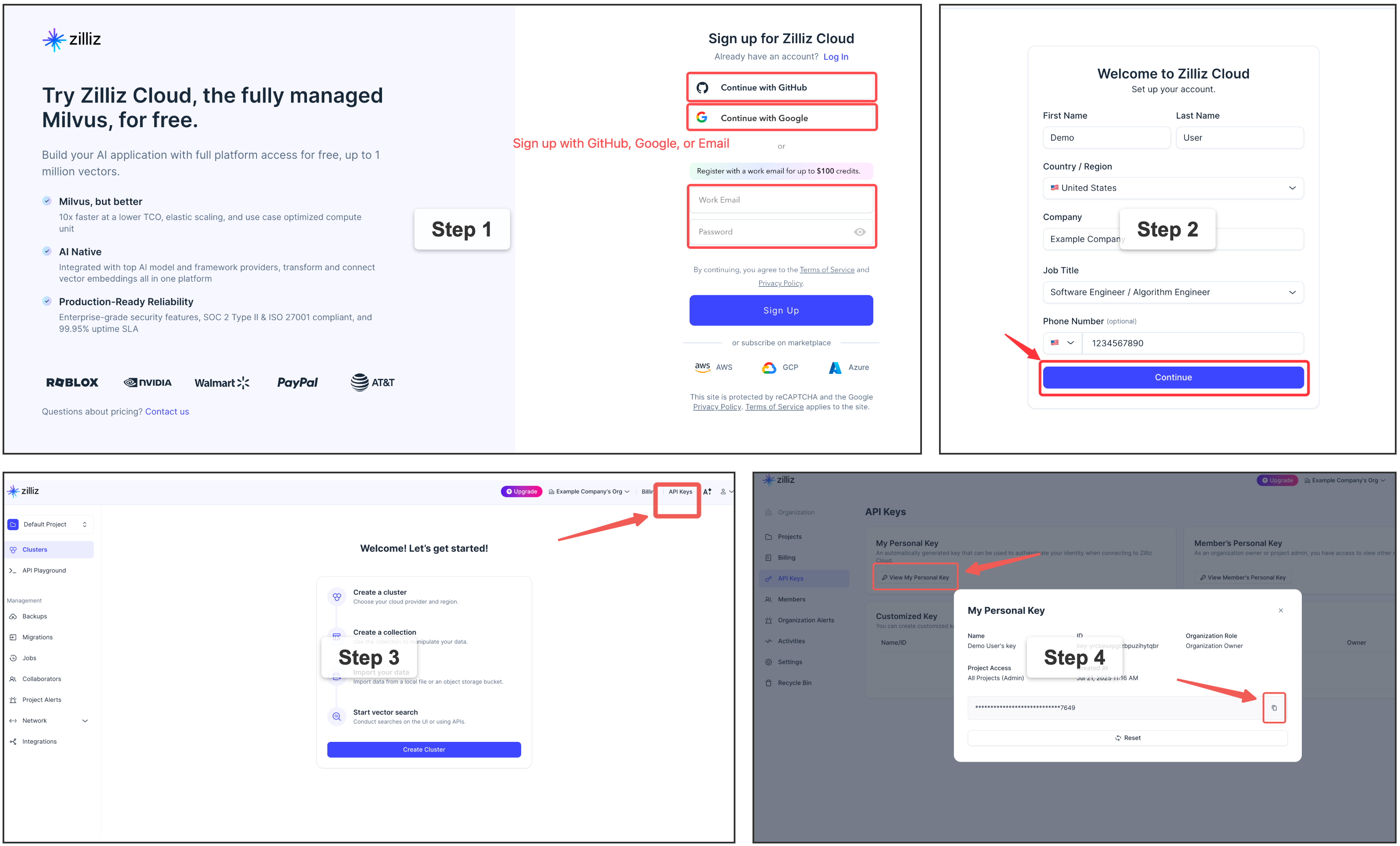
⭐ Get a free Zilliz Cloud cluster (URI + token)
For a fully managed vector backend,
[sign up](https://cloud.zilliz.com/signup?utm_source=github&utm_medium=referral&utm_campaign=mfs-readme)
for a free Zilliz Cloud cluster — the console gives you the **public endpoint
(URI)** and an **API key (token)**. Put them in `[milvus]` as `uri` + `token`,
keeping the key out of the TOML with an `env:` ref.
Use OpenAI instead of the local model?
Set the embedding provider to OpenAI and export your key — no model download:
```toml
[embedding]
provider = "openai" # instead of the default local "onnx"
```
```bash
export OPENAI_API_KEY=sk-...
```
## ✨ Features
- **🗂️ One file-like interface, any source.** Whatever the source or format, it
becomes a single file-like tree under a stable URI. Agents already speak shell,
so there's no new query language and no per-source SDK — the same handful of
verbs reach everything, and what you learn once carries across every connector.
- **🌐 Your whole workspace, one interface.** Stop wiring a separate context
harness for every scenario. Memory, code, docs, chat, tickets, databases — MFS
unifies your entire working context, with its history and state, into one
search-and-browse interface.
- **🔍 Search and browse, two legs of one loop.** Hybrid semantic + keyword
search locates fast across huge volumes; progressive browse then narrows to the
exact bytes or rows. Together they lift precise recall *and* cut token spend —
you pull in only what matters, and never trust a hit until you've reopened it.
- **🛡️ Local and production, equally at home.** Run fully local and offline, or
at production scale — neither is an afterthought. Every component is swappable
and independently scalable, so the same MFS moves between the two by
configuration alone. The index is derived and crash-safe: upstream stays the
source of truth, so you can delete it and rebuild from the original sources,
losing nothing.
- **🤖 Agent-native.** Built for how agents actually work — especially context
and memory management — so it slots into any agent setup. And when you're
building an agent of your own, you can build it on top of MFS too.
## 🤖 Build agent applications on top of MFS
Beyond using MFS through an agent in your daily work, you can build **on** it —
treat MFS as the retrieval/context **base layer** your own agent application sits
on. The robust index pipeline and the broad connector catalog are already handled:
you never touch embeddings, the vector store, or per-source plumbing — you point
at MFS and focus on the app on top.
```text
┌──────────────────┐ ┌──────────────────┐ ┌──────────────────┐
│ agents │ │ your app code │ │ your skills/MCP/ │
│ → skills + CLI │ │ → SDK (Py / TS) │ │ plugins → CLI │
│ (use directly) │ │ (BUILD ON IT) │ │ (BUILD ON IT) │
└────────┬─────────┘ └────────┬─────────┘ └────────┬─────────┘
│ │ │
└──────────────────────┼──────────────────────┘
▼
┌────────────────────────────────────────────────────────────────┐
│ MFS — CLI · SDK · HTTP /v1 │
└───────────────────────────────┬────────────────────────────────┘
│
▼
┌────────────────────────────────────────────────────────────────┐
│ index pipeline · chunking · embedding · vector DB · caches │
│ a catalog of source connectors (MFS owns all of this) │
└────────────────────────────────────────────────────────────────┘
```
- **SDK** — call the generated Python / TypeScript clients under
[`sdks/`](https://github.com/zilliztech/mfs/tree/HEAD/sdks/) straight from your application code (long-running daemons,
services, language runtimes without a shell).
- **CLI** — call the `mfs` command to build your own **skills**, **MCP servers**,
or **plugins** on top of the same surface.
### 🧩 Examples: well-known projects, rebuilt on MFS
Every example under [`examples/`](https://github.com/zilliztech/mfs/tree/HEAD/examples/) replicates a well-known project on
top of MFS — the same capability, in a fraction of the code — because MFS
already owns the part that used to be the hard part for each of them:
ingestion, chunking, embedding, the vector store, and hybrid search across many
source types. What's left is thin glue, or a single skill describing a strategy.
- [`claude-context`](https://github.com/zilliztech/mfs/tree/HEAD/examples/claude-context/) — a replica of
[claude-context](https://github.com/zilliztech/claude-context) ("make the
codebase the context for any coding agent"): an MCP server exposing
`search` + `read` over MFS, about 60 lines.
- [`deep-research-skill`](https://github.com/zilliztech/mfs/tree/HEAD/examples/deep-research-skill/) — the "reason and
search over private data" job [deep-searcher](https://github.com/zilliztech/deep-searcher)
does as a standalone framework, done here as a single skill on top of
`mfs-find` — no vector-DB glue, no provider matrix, no custom
retrieval-loop code.
- [`open-tag-skill`](https://github.com/zilliztech/mfs/tree/HEAD/examples/open-tag-skill/) — a self-hosted homage to
[Claude Tag](https://www.anthropic.com/news/introducing-claude-tag),
Anthropic's hosted `@Claude` Slack teammate: `@mention` a bot in Slack —
`@OpenClaude` or `@OpenCodex` — and it gathers authorized MFS context and
runs the task on a CLI agent backend.

See [`examples/README.md`](https://github.com/zilliztech/mfs/blob/HEAD/examples/README.md) for the full list, or each
example's own README for its install command and walkthrough.
## 🗺️ Roadmap
- **Multiple processing profiles** — run different sources through different
pipelines from one server: a code-tuned embedding model for your repos, a
multilingual one for your docs. Because models differ in dimension and vector
space, each profile maps to its own collection (a single one can't mix them),
and you search within a profile or across all.
- **Multi-user credentials and access control** — per-user secrets and
permissions, so a shared or hosted MFS can serve many users safely.
- **A wider connector catalog** — the set of sources keeps growing.
## 🙏 Acknowledgements
MFS is shaped by several related projects:
- [claude-context](https://github.com/zilliztech/claude-context),
[memsearch](https://github.com/zilliztech/memsearch), and
[deep-searcher](https://github.com/zilliztech/deep-searcher) — earlier
Zilliz code-search, memory-search, and deep-research efforts whose
community feedback shaped MFS's agent-facing direction.
- [VKFS](https://github.com/ZeroZ-lab/vkfs) — a sister exploration
of a Unix-like interface for agent access to vector-backed
knowledge.
## ⚖️ License
Apache-2.0. See [LICENSE](https://github.com/zilliztech/mfs/tree/HEAD/LICENSE).