---
slug: "oh-my-vul"
source_type: "readme"
source_url: "https://cdn.jsdelivr.net/gh/bx33661/oh-my-vul@main/README.md"
repo: "https://github.com/bx33661/oh-my-vul"
source_file: "README.md"
branch: "main"
---
# oh-my-vul
**Evidence-first vulnerability research for Pi, Codex, and Claude Code.**
Plan the research, trace the evidence, reproduce locally, and turn confirmed findings into review-ready reports.
[](https://github.com/bx33661/oh-my-vul/actions/workflows/validate.yml)
[](https://www.npmjs.com/package/oh-my-vul)
[](LICENSE)
[简体中文](https://github.com/bx33661/oh-my-vul/blob/HEAD/README.zh-CN.md) · [Example workflow](https://github.com/bx33661/oh-my-vul/blob/HEAD/docs/examples/demo-finding-flow.md) · [Changelog](https://github.com/bx33661/oh-my-vul/blob/HEAD/CHANGELOG.md)
---
`oh-my-vul` combines agent skills with a local CLI to make open-source vulnerability research repeatable in Pi, Codex, and Claude Code:
- **Start with a clear scope.** Campaigns and attack-surface cards turn a broad target into focused research questions.
- **Keep claims tied to evidence.** Findings record the tested version, source, sink, guards, reproduction, and remaining unknowns.
- **Report only when ready.** Local reproduction, duplicate checks, and strict review stop weak findings from becoming confident reports.
Research state stays in a private `.omv/` workspace. The project is designed for passive research and local validation, not live attacks against third-party services.
## Quick Start
**Requirements:** [Pi](https://pi.dev/), [Codex](https://developers.openai.com/codex/), or [Claude Code](https://docs.anthropic.com/en/docs/claude-code), Node.js 22 or later, and Python 3 for bundled Skill helpers. The deterministic report renderer additionally uses its pinned PyYAML dependency. Windows, Linux, and macOS are supported; on Windows, use a modern Windows Terminal or PowerShell for the Ink workspace.
### Pi
Install the package directly into Pi:
```sh
pi install npm:oh-my-vul
```
Pi discovers all 10 bundled Skills. Invoke the project manager with `/skill:omv`, or call a focused Skill such as `/skill:omv-find` or `/skill:omv-audit`. For the complete local `.omv/` workspace, deterministic validation, and Ink dashboard, install the matching CLI as well:
```sh
npm install --global oh-my-vul@latest
omv start
```
Pi manages the Skills itself, so Pi users should not run `omv setup`. Use `pi install npm:oh-my-vul -l` instead when the package should be enabled only for the current project.
### Codex and Claude Code
Install the CLI and add the skills to Codex:
```sh
npm install --global oh-my-vul@latest
omv setup --platform codex
```
`setup` prints the destination and immediately verifies the completed install. Once every check passes, restart Codex and invoke `$omv`. Codex installs user skills under `~/.agents/skills`. For Claude Code, run `omv setup --platform claude-code`, restart it, and invoke `/omv`. Claude Code remains the backward-compatible default platform.
From the root of the project you want to research, start a guided workspace:
```sh
omv start
```
`omv start` adds `.omv/` to `.gitignore`, detects local project metadata, and asks which vulnerability classes to investigate. To provide the scope non-interactively:
```sh
omv start --vuln xss,auth --no-interactive
```
Open that project in Codex, then invoke the Skill (or choose it from `/skills`):
```text
$omv
```
Pi users invoke `/skill:omv`; Claude Code users invoke `/omv`. The Skill applies the evidence and review gates, shows the active queue, and recommends the next action. From an interactive terminal, bare `omv` opens the Ink research workspace.
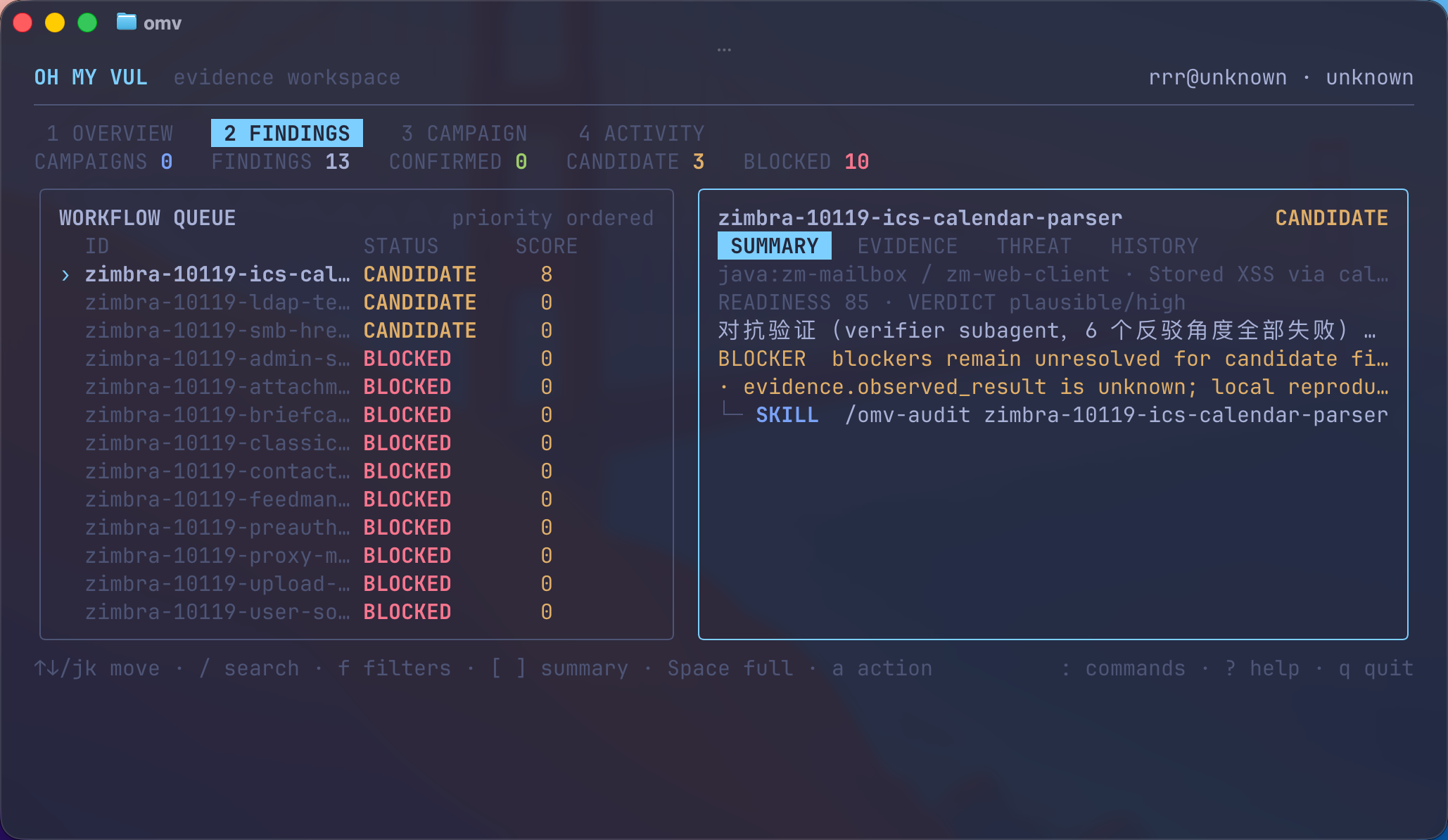
## Interactive Workspace
Run `omv` or `omv tui` in a terminal to browse the priority queue and inspect evidence without leaving the shell:
```text
Tab / 1-4 Cycle or jump to Overview, Findings, Campaign, and Activity
↑/↓ or j/k Move through findings
/ Search by id, package, status, vulnerability, or action
f Filter by lifecycle status and action surface
Enter Switch queue/detail on narrow terminals
[ / ] Switch Summary, Evidence, Threat, and History detail tabs
Space Expand the selected finding or Activity event full-width
PgUp/PgDn Page through expanded detail or Activity history
g / G Jump to the first or last available line
: Open the read-only command palette
a Explain the selected CLI or agent action
r Refresh local workspace state
? Show keyboard help
q Quit and restore the previous terminal screen
```
The Findings view keeps the priority queue and splits local detail into Summary, Evidence, Threat, and History. Compact and split views may abbreviate text to preserve layout; press `Space` to open complete logical fields full-width, wrapped to the current terminal, with a visible line range and scrolling. Overview highlights current scope and next priority, Campaign shows lane counts and deterministic next actions, and Activity pages through the latest 200 local lifecycle changes. Activity rows are selectable and `Space` reveals the complete event reason, transition, and path. Structured filters compose with text search. The command palette navigates and performs local UI actions only.
The workspace is read-only: it displays commands but never executes research commands or agent skill invocations. Use `omv dashboard` for deterministic plain output, or `omv --no-tui` / `omv tui --no-tui` to disable interactive rendering. JSON commands and piped output never start Ink. Terminals below 52 columns or 16 rows show a bounded resize prompt instead of an overflowing workspace.
Installation options
Download and preview the install without writing Skills:
```sh
npx --yes oh-my-vul@latest setup --scope user --platform codex --dry-run
```
Install only for the current project:
```sh
omv setup --scope project --platform codex
```
Upgrade the package, then refresh a user-level or project-level install:
```sh
npm install --global oh-my-vul@latest
# Choose the scope you use:
omv setup --scope user --platform codex --force
omv setup --scope project --platform codex --force
```
Every real `setup` now runs the matching platform and scope health check automatically. Run `omv doctor --strict --platform codex` separately only when diagnosing installation drift.
Preview either scope without writing files:
```sh
# Choose the scope you use:
omv setup --scope user --platform codex --dry-run
omv setup --scope project --platform codex --dry-run
```
Replace `codex` with `claude-code` for a Claude Code installation. The two platforms use separate directories and manifests, so both can be installed safely. If a global npm install reports a permissions error, fix npm's user-level prefix instead of installing this package with `sudo`.
## 1.0 CLI Compatibility
The 1.x public CLI has two stable tiers:
- **Core workflow:** `omv`, `start`, `dashboard`, `review`, `setup`, `uninstall`, `doctor`, `version`, and `help`.
- **Advanced automation:** public `campaign`, `findings`, `workspace`, `radar`, `dedup`, `disclose`, `submissions`, and `config` commands listed by `omv help --all`.
Documented arguments, exit behavior, and `--json` output from those public commands follow SemVer compatibility within 1.x. Artifact scaffolding and diagnostics invoked by bundled Skills (`campaign surfaces/seed`, `eval`, `request`, `repro`, `sources`, `report`, `threat-map`, and `verification`) are deterministic but Skill-managed; use the versions installed from the same package release.
For JSON automation, [contracts/cli-json.v1.json](https://github.com/bx33661/oh-my-vul/blob/HEAD/contracts/cli-json.v1.json) lists every public JSON form, its result kind, required typed fields, and gate behavior. Existing listed fields keep their type and meaning throughout 1.x; commands may add fields. Validation and readiness commands may return a complete diagnostic JSON document with a non-zero exit when a documented gate is not met.
The supported Node API is the package root only:
```js
import { listFindings, reviewFinding, setup } from "oh-my-vul";
```
Deep imports such as `oh-my-vul/dist/cli/*` are private implementation details and are blocked by the package export map. The exact runtime and type allowlist lives in [contracts/node-api.v1.json](https://github.com/bx33661/oh-my-vul/blob/HEAD/contracts/node-api.v1.json).
Versioned `.omv` formats follow [the contract compatibility policy](https://github.com/bx33661/oh-my-vul/blob/HEAD/contracts/README.md) and the inventory in [contracts/artifact-contracts.v1.json](https://github.com/bx33661/oh-my-vul/blob/HEAD/contracts/artifact-contracts.v1.json). Closed contracts require a new major for any field-set change; extensible contracts permit optional additions only when supported readers and writers remain compatible. Package upgrades never rewrite private research data solely to update a schema.
CLI and bundled Skills are release-coupled. Run `omv doctor --platform codex` or `omv doctor --platform claude-code` after an upgrade; content or version drift is repaired explicitly with the scoped `omv setup ... --force` command printed by doctor.
The 1.0 surface replaces earlier redundant commands:
| Removed before 1.0 | Canonical command |
|---|---|
| `omv first` | `omv start` or `omv campaign init` |
| `omv workspace init` | `omv start` |
| `omv findings workflow` | `omv dashboard` |
| `omv findings doctor ` | `omv review ` |
| `omv findings open ` | `omv findings show ` |
| `omv findings delete ` | `omv findings archive --reason ` |
## The Workflow
```text
omv start
-> initialize private state and create the first research campaign
/omv
-> resume the campaign with evidence-before-claims rules
/omv-find
-> discover and rank open-source audit targets
/omv-audit
-> prove or block the source -> sink -> guard path
/omv-repro
-> record what actually happens in a local test
/omv review --strict
-> check whether the evidence is report-ready
/omv-report
-> generate a VulDB, CVE, GHSA, OSV, or Markdown draft
```
The review gate can send a finding back for more audit, reproduction, deduplication, or adversarial verification. A candidate is never promoted just because a sink looks dangerous.
## Core Capabilities
| Goal | Command |
|---|---|
| Start a guided local research workspace | `omv start` |
| Resume or inspect work with evidence gates | `/omv`, `omv` |
| Find packages worth auditing | `/omv-find` |
| Trace data flow and evaluate guards | `/omv-audit ` |
| Guide a local reproduction | `/omv-repro ` |
| Check duplicate and rejection risk | `/omv-dedup `, `/omv-critic ` |
| Prepare reports and disclosure | `/omv-report `, `/omv-disclose ` |
| Watch releases and advisories | `/omv-radar` |
Supported ecosystems: npm, Python, Go, Rust, Java, Ruby, PHP, C#, Swift, Dart, Elixir, Perl, R, and Lua.
All installed skills
| Skill | Command | Category | Purpose |
|---|---|---|---|
| `using-omv` | `/using-omv` | manager | Bootstrap research discipline — hard gates, evidence-before-claims, process before improvisation (quality growth, not skill sprawl) |
| `omv` | `/omv` | manager | Local-first project manager — creates research campaigns, shows workspace status, and delegates finding lifecycle actions |
| `omv-find` | `/omv-find` | research | Find and rank open-source packages worth auditing for passive CVE research |
| `omv-audit` | `/omv-audit` | audit | Deep-audit a candidate finding — prove or disprove the vulnerability, fill Evidence.v1 fields for omv-report |
| `omv-repro` | `/omv-repro` | audit | Guide local reproduction of a finding — walk through execution, record observed_result, confirm or block |
| `omv-report` | `/omv-report` | reporting | Generate VulDB/CVE/GHSA/OSV advisory reports from confirmed findings |
| `omv-radar` | `/omv-radar` | intelligence | Passive watchlist intelligence — refresh local advisory/release signals and summarize radar events |
| `omv-dedup` | `/omv-dedup` | intelligence | Duplicate advisory analysis — generate deterministic NVD/GHSA/OSV/ecosystem queries and update Evidence.v1 dedup fields |
| `omv-disclose` | `/omv-disclose` | disclosure | Responsible disclosure lifecycle helper — draft vendor emails, timelines, and local submission bookkeeping guidance |
| `omv-critic` | `/omv-critic` | reporting | Adversarial pre-submission review — identify likely CNA rejection reasons before report generation |
## Local Workspace
All research artifacts live under `.omv/` in the target project:
| Path | Contains |
|---|---|
| `.omv/campaigns/` | Scope, priorities, and selected attack surfaces |
| `.omv/findings/` | Evidence.v1 records for active findings |
| `.omv/repro/` | Local reproduction notes and artifacts |
| `.omv/reports/` | Generated drafts and provenance manifests |
| `.omv/submissions/` | Disclosure and submission tracking |
Keep `.omv/` out of Git. Real findings may contain sensitive research notes and should remain private until disclosure is complete.
## Safety
- Use public metadata and source code for discovery.
- Reproduce only in local or explicitly authorized environments.
- Do not target live third-party services.
- Keep unknown or unverified facts marked as unknown.
- Treat generated reports as drafts until a human reviews the evidence.
See the [vulnerability research best practices](https://github.com/bx33661/oh-my-vul/blob/HEAD/docs/vulnerability-research-best-practices.zh-CN.md) for the full research boundary.
## Documentation
| Guide | Use it for |
|---|---|
| [Demo finding flow](https://github.com/bx33661/oh-my-vul/blob/HEAD/docs/examples/demo-finding-flow.md) | A sanitized end-to-end example |
| [Radar to audit](https://github.com/bx33661/oh-my-vul/blob/HEAD/docs/examples/radar-to-audit-walkthrough.md) | Turning passive signals into an audit |
| [Disclosure and submission](https://github.com/bx33661/oh-my-vul/blob/HEAD/docs/examples/disclosure-submission-walkthrough.md) | Following a confirmed finding through disclosure |
| [Evidence contracts](https://github.com/bx33661/oh-my-vul/blob/HEAD/contracts/README.md) | Evidence.v1 and related file formats |
| [Request broker](https://github.com/bx33661/oh-my-vul/blob/HEAD/docs/request-broker.md) | Public metadata requests, caching, and failure handling |
[Contributing](https://github.com/bx33661/oh-my-vul/blob/HEAD/CONTRIBUTING.md) · [Security policy](https://github.com/bx33661/oh-my-vul/blob/HEAD/SECURITY.md) · [Code of Conduct](https://github.com/bx33661/oh-my-vul/blob/HEAD/CODE_OF_CONDUCT.md)
## License
[MIT](https://github.com/bx33661/oh-my-vul/tree/HEAD/LICENSE)