原始内容
@onlinechefgroep/pi-agent-orchestrator
Multi-agent orchestration for the Pi coding agent: autonomous subagents, isolated worktrees, swarms, schedules, structured handoffs, prompt compression, and live terminal observability.




Install or try it immediately
Install globally in Pi:
pi install npm:@onlinechefgroep/pi-agent-orchestrator
Try the published package for one session without changing your settings:
pi -e npm:@onlinechefgroep/pi-agent-orchestrator
For a project-local install:
pi install npm:@onlinechefgroep/pi-agent-orchestrator -l
Requires Node.js 22.19.0 or newer and @earendil-works/pi-coding-agent 0.80.10 or newer.
Use pi install; running npm install alone does not register the package resources with Pi.
Why this package
| Capability | What it gives you |
|---|---|
| Autonomous subagents | Explore, Plan, Analysis, general-purpose, and custom agents with bounded execution |
| Parallel orchestration | Background groups, swarms, structured handoffs, and controlled concurrency |
| Safe isolation | Permission inheritance, partition filtering, budgets, depth limits, and optional git worktrees |
| Operator control | Interactive /agents dashboard, live status, steering, termination, schedules, and performance views |
| Ready-made workflows | Progressive-disclosure orchestration and Pi TypeScript engineering skills plus audit, plan, and implementation prompt templates |
| Local execution | No hosted control plane, no package-owned telemetry backend, and no package-owned data service |
The extension runs inside the Pi host process. It does not make outbound network calls of its own and does not store user data on a hosted service.
Real terminal showcase
The preview is rendered from the compiled dashboard, resource top view, and widget implementation. Remotion supplies the framing and encoding; the terminal content comes from the actual product renderers.
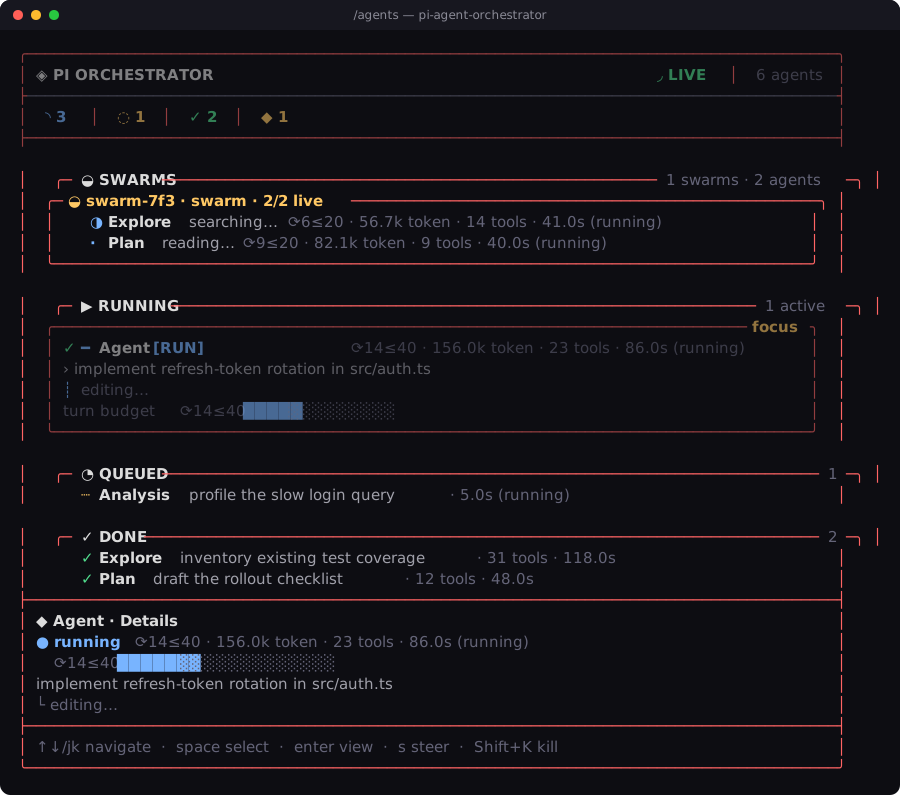
- Watch the product film — the full Remotion-rendered showcase
- Watch the dashboard preview
- Open the agent-readable project site
- Read the Pi package documentation
First useful run
Start Pi with the package, then run the packaged audit template:
/orchestra-audit src
Open the control surface while the agents run:
/agents
Useful controls:
j/kor arrows: navigate agentsSpace: multi-selectt: resource top viewz: daemon schedulesShift+K: terminate selected agents?: help/perf: performance metrics
The Pi footer can expose live running and queued counts through the subagents status slot.
Packaged skills and Orchestra workflows
The npm package includes two skills and three prompt templates. Pi loads only each skill description into the system prompt; the full workflow is read on demand.
| Command | Use |
|---|---|
/skill:pi-orchestra |
Load the complete evidence-first orchestration operating model |
/skill:pi-typescript-extension-engineering |
Engineer and review strict TypeScript across Pi tools, sessions, TUI, persistence, tests, and package boundaries |
/orchestra-audit [scope] |
Run three parallel read-only audits and synthesize ranked findings |
/orchestra-plan <goal> |
Gather evidence in parallel and produce a mechanically verifiable plan |
/orchestra-implement <goal> |
Discover, plan, implement in one isolated writer, and independently verify |
Install only the TypeScript skill into Cursor, Codex, Claude Code, or another Agent Skills-compatible client:
npx skills add https://github.com/OnlineChefGroep/pi-agent-orchestrator --skill pi-typescript-extension-engineering
The templates deliberately avoid automatic merge, publish, tag, or deploy actions unless those actions are explicitly part of the request.
Built-in agent types
| Type | Mode | Use when |
|---|---|---|
| Explore | read-only | Parallel codebase discovery and evidence collection |
| Plan | read-only | Architecture and implementation planning before edits |
| Analysis | read-only + ctx_* |
Sandboxed data or compute through optional @onlinechef/context-mode |
| general-purpose | full tools | Bounded implementation and multi-step execution |
Create project agents in .pi/agents/*.md. See Custom Agents for the complete frontmatter schema.
Core capabilities
- Interactive TUI dashboard — agent list, resource top, daemon schedules, performance metrics, help, and settings.
- Subagent lifecycle — spawn, queue, steer, stop, inspect, and collect structured results.
- Permission inheritance — children cannot silently regain tools or scopes removed by a parent.
- Worktree isolation — optional branch and filesystem isolation for implementation agents.
- Prompt compression profiles — static system-prompt guidance with global defaults and per-agent overrides; this does not compact conversation history.
- Persistent scheduling — cron, interval, and one-shot jobs with a daemon schedule view.
- Structured handoffs — machine-readable transfer between agents and chained workflows.
- Swarm coordination — dynamic membership and coordinated completion.
- Cross-extension RPC — capability-based integration for trusted peer extensions.
Default orchestration mode is single; multi-agent modes are opt-in.
Documentation
- Architecture — module map and data flow.
- Tool calling and execution contract — schemas, lifecycle ordering, cancellation, steering, concurrency, result ownership, telemetry, and test invariants.
- API reference — tools, settings, handoffs, and scheduler.
- Custom agents — frontmatter schema and examples.
- Prompt compression — exact scope and impact.
- Performance — render budgets and benchmarks.
- Troubleshooting — common operator fixes.
- Orchestra skill — evidence-first multi-agent operating model.
- Pi TypeScript extension engineering skill — strict host-compatible TypeScript for extensions and SDK orchestration.
- AGENTS.md — repository invariants for contributors and coding agents.
- CHANGELOG.md — release history.
- CONTRIBUTING.md — contribution workflow.
- SECURITY.md — private vulnerability reporting.
Development
npm ci
npm run setup:hooks   # optional local git hooks
npm run typecheck
npm run lint
npm test
npm run build
npm run verify:package
Cursor Cloud
The repository ships a deterministic Cursor Cloud
environment in .cursor/environment.json + .cursor/Dockerfile. The Dockerfile
pins Node to the .nvmrc version (node:22.19.0-bookworm) so bare shells use a
compliant Node by default; it installs with scripts/cursor-cloud-install.sh and
exposes one canonical gate:
npm run verify:cloud   # typecheck + lint + test + build + verify:package + release policy
npm run cloud:smoke    # load the built extension through the real Pi host (no API key)
License
MIT © OnlineChefGroep