原始内容
pi-switch


English | 中文
pi-switch is a Pi extension package built on top of cc-switch. It uses cc-switch as the source of provider and model configuration, then exposes a fast provider/model switcher directly inside Pi.
pi-switch does not replace cc-switch and does not modify the cc-switch database. It reads the local cc-switch SQLite database in read-only mode, registers the selected provider in Pi, and stores the active model in Pi settings.
Preview
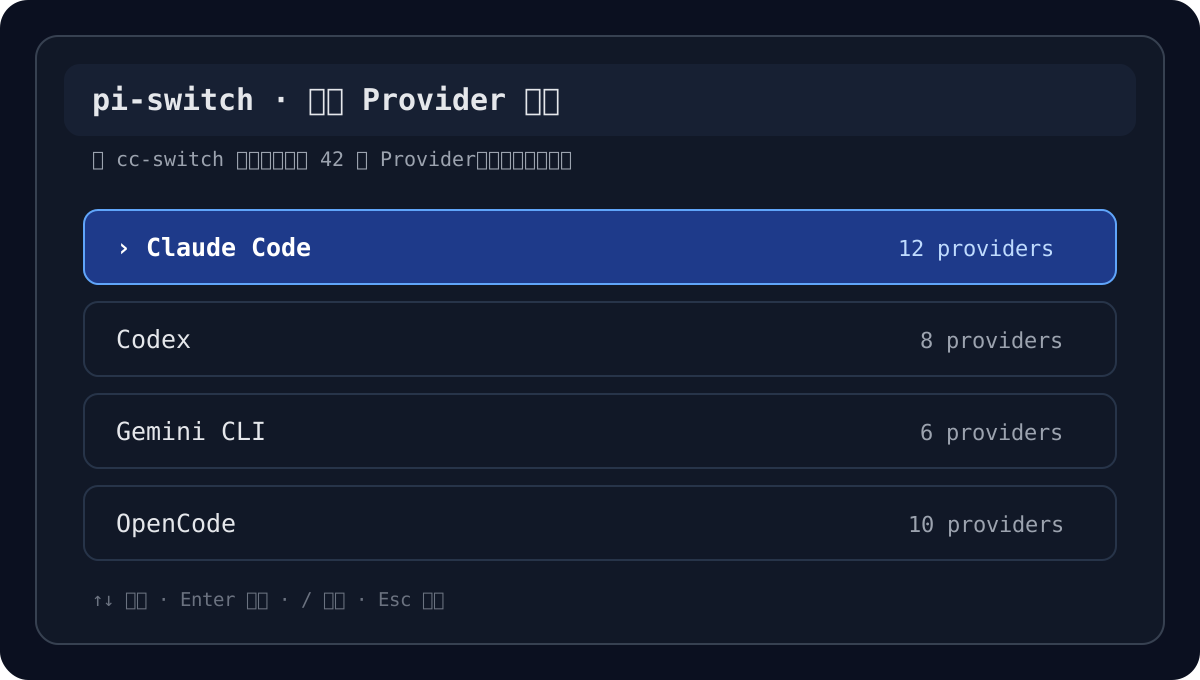
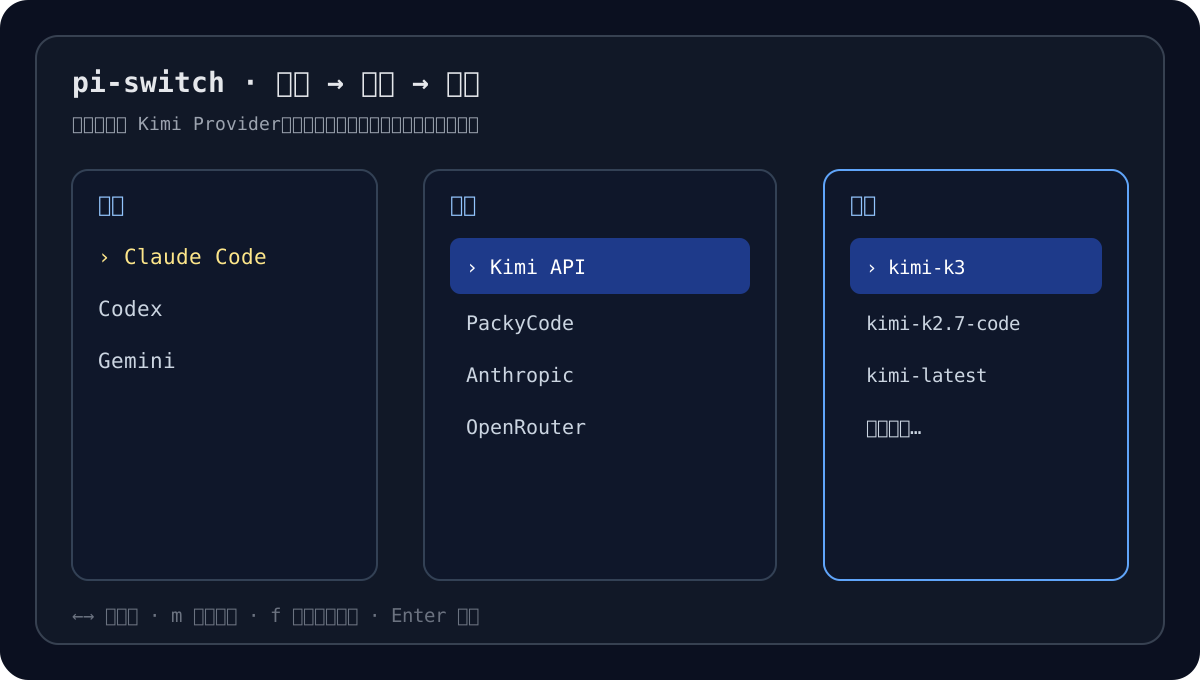
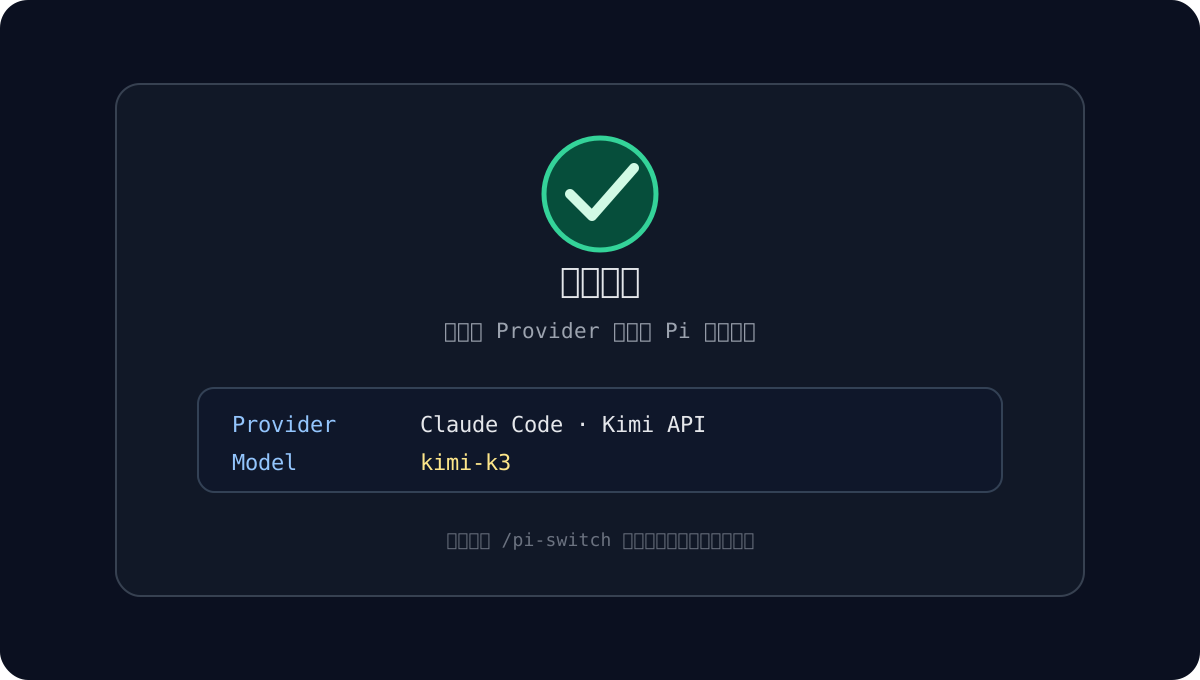
The screenshots below are sample illustrations of the interaction flow. Actual providers, models, and paths depend on your local cc-switch data.
Features
- Open the interactive switcher in Pi with
/ps-config(optional alias:/ccs). - Load provider configuration from the local cc-switch SQLite database in read-only mode.
- Use a progressive three-level picker: provider type → provider name → model.
- Search (
/), manually enter model IDs, refresh remote lists, and pin favorites withp(scrollable list — no pagination). - Remember last-N successful switches locally (no expose / multi-tool config center).
- Parse and map common API protocols: Anthropic Messages, OpenAI Responses, OpenAI Chat Completions, and Google Generative AI.
- Inject CLI-like fingerprints by default (Codex UA +
originator, Claude Codeclaude-cli/... (external, cli)+anthropic-version/anthropic-beta, GeminiCLI UA +x-goog-api-client). - Override model parameters via presets or a native dialog (
/ps-overrideor picker keyo) — e.g. 中转兼容 setsreasoning=falsewhen a relay rejects thinking. - Run structured health checks with
/ps-doctor(PASS/WARN/FAIL + fix hints). - Persist the latest selection so the next switcher session can highlight and reuse it.
- Ship a
diagnose-upstreamskill as supplemental knowledge for upstream / relay troubleshooting.
See SPEC.md for the full product contract.
Built on cc-switch
cc-switch is the upstream configuration manager. pi-switch depends on the local cc-switch data model and treats cc-switch as the source of truth for providers.
pi-switch is intentionally scoped as a Pi-side bridge:
- cc-switch owns provider creation, editing, deletion, and storage.
- pi-switch reads cc-switch providers from
~/.cc-switch/cc-switch.db. - pi-switch normalizes provider settings into Pi-compatible provider registrations.
- pi-switch switches the active Pi model without changing cc-switch state.
This means you should configure providers in cc-switch first, then use pi-switch to select and activate them inside Pi.
What this project is (and is not)
| This project (Bandersnatch0x/pi-switch) | Not this project |
|---|---|
| cc-switch → Pi bridge | Local HTTP gateway / reverse proxy |
Read-only consumer of cc-switch.db |
All-in-One provider CRUD manager |
In-process Pi extension (/ps-config) |
Standalone daemon with WebUI |
| Local pin / recent shortcuts only | Multi-tool expose / config center |
If you need a local gateway that terminates requests and manages providers itself, look at projects such as @cokefenta/pi-switch / CallmeLins/pi-switch. This repo intentionally stays a thin Pi-side bridge on top of cc-switch.
Architecture
┌──────────────────────┐
│      cc-switch       │
│ provider management  │
└──────────┬───────────┘
           │ read-only SQLite
           ▼
┌──────────────────────┐
│      pi-switch       │
│ DB read + normalize  │
└──────────┬───────────┘
           │ parsed providers
           ▼
┌──────────────────────┐
│   interactive picker │
│ type → name → model  │
│   (+ override dialog)│
└──────────┬───────────┘
           │ selected provider/model
           ▼
┌──────────────────────┐
│          Pi          │
│ register + setModel  │
└──────────────────────┘
Main modules:
pi-switch/
├─ extensions/
│  └─ index.ts                 # Pi entry: /ps-config, /ps-doctor, /ps-override
├─ src/
│  ├─ db.ts                    # Read the cc-switch SQLite database
│  ├─ register.ts              # Build and register Pi providers
│  ├─ settings.ts              # Pi settings, selection, pins/recent, overrides
│  ├─ model-meta.ts            # modelMeta presets + resolution
│  ├─ doctor.ts                # /ps-doctor pure checks
│  ├─ sqlite-path.ts           # sqlite3 executable resolution
│  ├─ models-fetch.ts          # Remote model discovery and merging
│  ├─ headers/                 # Header rule loading, merge, and vars
│  ├─ parse/                   # cc-switch provider config parsers
│  └─ ui/
│     ├─ three-level-pick.ts   # Progressive type → name → model picker
│     ├─ model-meta-dialog.ts  # Native dialog for modelMeta overrides
│     ├─ labels.ts             # Display labels and status text
│     └─ tabs.ts               # Tab helpers
├─ skills/
│  └─ diagnose-upstream/       # Upstream / relay diagnostics skill
├─ defaults/
│  └─ headers.json             # Default header rules
├─ docs/
│  └─ images/                  # README sample screenshots
├─ tests/                      # Bun tests
├─ SPEC.md                     # Product spec
├─ DESIGN.md                   # UI and interaction design notes
└─ package.json
Installation
From npm (recommended)
pi install npm:pi-ccs
After the package is published publicly on npm with the pi-package keyword, it can also appear in the Pi package catalog. There is no separate submission form — catalog discovery is based on public npm metadata (keywords includes pi-package, plus a valid package.json pi manifest).
Direct catalog page after listing:
https://pi.dev/packages/pi-ccs
From GitHub
pi install git:github.com/Bandersnatch0x/pi-switch
Git installs work even before npm / catalog listing.
Update and enable
pi update npm:pi-ccs
pi config
Pi packages usually land under ~/.pi/agent/npm/. With project-local installation, they are placed under .pi/npm/ in the current project.
Usage
In a Pi session, run:
/ps-config
Aliases:
/ccs
To edit model parameter overrides (for example disable reasoning for a Claude-protocol → GLM relay):
/ps-override
In the provider picker, after the Name column is revealed, press o to open the same override dialog for the focused provider. The footer shows o override.
Typical flow:
- Choose a provider type, such as Claude Code, Codex, Gemini, or OpenCode.
- Choose a specific provider.
- Choose a model, or manually enter a model ID.
- pi-switch registers the provider and switches the current Pi model.
After selection, Pi uses the selected provider baseUrl, apiKey, protocol type, and model ID for subsequent requests.
Override dialog
The dialog is a native Pi popup (select / input / confirm), not an inline TUI form:
Parameter override · elysiver-claude
- reasoning · default / true / false
- contextWindow · number or default
- maxTokens · number or default
- thinkingFormat · string or default
- clear all overrides
- save
- cancel
Saving writes providerOverrides keyed by the cc-switch dbId. If that provider is currently active, pi-switch re-registers it immediately.
Requirements
- Pi is installed and extension packages are enabled.
- cc-switch is installed and configured.
- The local cc-switch database exists.
- sqlite3 is available on the system.
Default database path:
~/.cc-switch/cc-switch.db
sqlite3 resolution order:
SQLITE3_PATH → ~/.pi/agent/pi-switch.json sqlitePath → sqlite3 from PATH
Windows users should explicitly configure SQLITE3_PATH if sqlite3.exe is not globally available.
Configuration
Optional configuration file:
~/.pi/agent/pi-switch.json
Example:
{
  "sqlitePath": "C:/tools/sqlite3.exe",
  "tabs": ["claude", "codex", "gemini", "opencode"],
  "vars": {
    "codexVersion": "0.144.5",
    "claudeCodeVersion": "2.1.190"
  },
  "debug": false
}
| Field | Description |
|---|---|
sqlitePath |
Overrides the sqlite3 executable path (null disables lookup) |
tabs |
Preferred provider-type order in the picker |
vars |
Optional overrides for UA template versions (otherwise auto-detected) |
providerOverrides |
Per-provider label, fingerprint, headers, and modelMeta (keyed by dbId) |
aliasCcs |
Register /ccs alias (default true) |
debug |
Enables debug output |
Database path is not in this file — use env CC_SWITCH_DB or the default ~/.cc-switch/cc-switch.db.
Parameter overrides (providerOverrides)
Some gateways reject Anthropic-style fields. A common case is Claude-protocol → GLM relays returning:
Unsupported parameter(s): `reasoning`
Use the popup dialog (/ps-override or picker key o) to set modelMeta.reasoning to false, and optionally set a short label. Values are persisted under the provider's cc-switch dbId in ~/.pi/agent/pi-switch.json:
{
  "providerOverrides": {
    "dooongai-1775180253543": {
      "label": "elysiver-claude",
      "modelMeta": {
        "reasoning": false
      }
    }
  }
}
Optional fingerprint field forces a CLI disguise preset regardless of protocol:
| Value | Effect |
|---|---|
claude-code |
claude-cli/<ver> (external, cli) + anthropic version/beta |
codex |
codex_cli_rs/<ver> (...) + originator |
gemini |
GeminiCLI/<ver> + x-goog-api-client |
none |
Skip default/api-matched rule injection; only explicit headers (if any) remain |
Explicit headers always win over the preset on conflicts.
Supported modelMeta fields:
| Field | Description |
|---|---|
reasoning |
Whether Pi may send reasoning/thinking parameters |
thinkingFormat |
One of: openai / openrouter / together / deepseek / zai / qwen / chat-template / qwen-chat-template / string-thinking / ant-ling |
contextWindow |
Context window size |
maxTokens |
Max output tokens |
After save, if the provider is currently active, pi-switch re-registers it so the override applies immediately.
The latest selection is stored as piSwitchSelection in Pi settings, so it can be highlighted the next time the switcher opens.
Note: remote model list fetching currently returns model IDs only. Per-model parameters are not imported from
/models; use protocol defaults plusproviderOverrides.modelMetainstead.
Header Rules
Default header rules are stored at:
defaults/headers.json
Optional user override file:
~/.pi/agent/provider-headers.json
pi-switch only merges allowlisted headers to avoid injecting arbitrary sensitive fields into provider configuration. Allowlist:
| Header | Default rules inject? | Notes |
|---|---|---|
User-Agent |
yes | Version/os auto-detected; overridable per provider / fingerprint |
anthropic-version |
yes (claude) | Protocol-required for Anthropic Messages |
anthropic-beta |
yes (claude) | Claude Code beta flags (template via vars.anthropicBeta) |
originator |
yes (codex) | Codex CLI private header (template via vars.codexOriginator) |
x-goog-api-client |
yes (gemini) | Gemini CLI client id (gemini-cli/<ver>) |
Authorization / x-api-key / Host / etc. are never injectable via rules or overrides.
Rule precedence: defaults/headers.json < ~/.pi/agent/provider-headers.json < providerOverrides[dbId].headers.
Branch protection
Branch and release-tag protection is documented in .github/branch-protection.md.
Development
Install dependencies:
bun install
Run tests:
bun test
Typecheck:
bun run typecheck
Pre-publish check:
bun run prepublishOnly
Release and GitHub auto-publish
Publishing is modeled after a release-gate flow (similar to vibe-designing-playbook):
- Local dry-run gates (
tree/version/test/pack/tag) - Create
vX.Y.Ztag after gates pass - Push the tag; GitHub Actions publishes to npm
One-time setup on GitHub:
- Create an npm Automation access token with publish permission
- Repo → Settings → Secrets and variables → Actions → New repository secret
- Name:
NPM_TOKEN, value: the token
Release steps:
# 1) bump version in package.json (keep semver)
# 2) commit all release changes
bun run release              # dry-run gates (no tag)
bun run release:apply        # create tag vX.Y.Z after gates pass
git push origin main
git push origin v0.1.0       # triggers Actions publish
Manual re-publish is also available from Actions → CI → Run workflow with publish=true (the matching vX.Y.Z tag must already point at that commit).
The workflow:
- runs tests + pack dry-run on push/PR
- publishes only on
v*tags (or manual dispatch) - verifies tag version ==
package.jsonversion - skips if that version already exists on npm
- uses
npm publish --access public --provenance
Supported Configuration Sources
pi-switch parses provider configuration from the cc-switch providers table and normalizes it into Pi-registerable providers where possible.
- Claude / Claude Code config parsing
- Codex config parsing
- Gemini config parsing
- Grok Build config parsing
- OpenCode config parsing
- Hermes config parsing
- Generic / OpenAI-compatible config parsing
If a provider protocol cannot be mapped to a Pi-supported API type, it is shown as non-switchable in the UI instead of being force-registered.
Out of Scope
- Does not edit the cc-switch database.
- Does not add, delete, reorder, or migrate providers.
- Does not include an API key manager.
- Does not track quota or cost.
- Does not replace cc-switch; it only acts as a switcher entry inside Pi.
- Does not import per-model metadata from remote
/modelsresponses (IDs only).