---
slug: "pi-claude-style-scroll"
source_type: "readme"
source_url: "https://cdn.jsdelivr.net/gh/EmilioAK/pi-claude-style-scroll@main/README.md"
repo: "https://github.com/EmilioAK/pi-claude-style-scroll"
source_file: "README.md"
branch: "main"
---
# pi-claude-style-scroll
Claude Code-style scrolling for Pi: keep the input box pinned and scroll the message list, even while typing.
[](LICENSE)
[]()
`pi-claude-style-scroll` is a Pi extension that makes Pi's input box behave more like Claude Code's pinned composer:
- the composer/input box stays pinned at the bottom;
- status widgets and footer controls stay with the composer;
- the message history is bounded in a viewport above it;
- the mouse wheel scrolls that message viewport, including while you are typing;
- native terminal/Herdr drag-highlight copy stays usable because the default path avoids full SGR mouse capture.
This is a fork of [`MasuRii/pi-sticky-input`](https://github.com/MasuRii/pi-sticky-input). The fork keeps the sticky split-footer renderer and changes the default scrolling UX around alternate-scroll so Pi can scroll while composing.
> Not affiliated with Anthropic or Claude Code. "Claude Code-style" describes the pinned input + scroll-while-typing behavior only.
## Demo
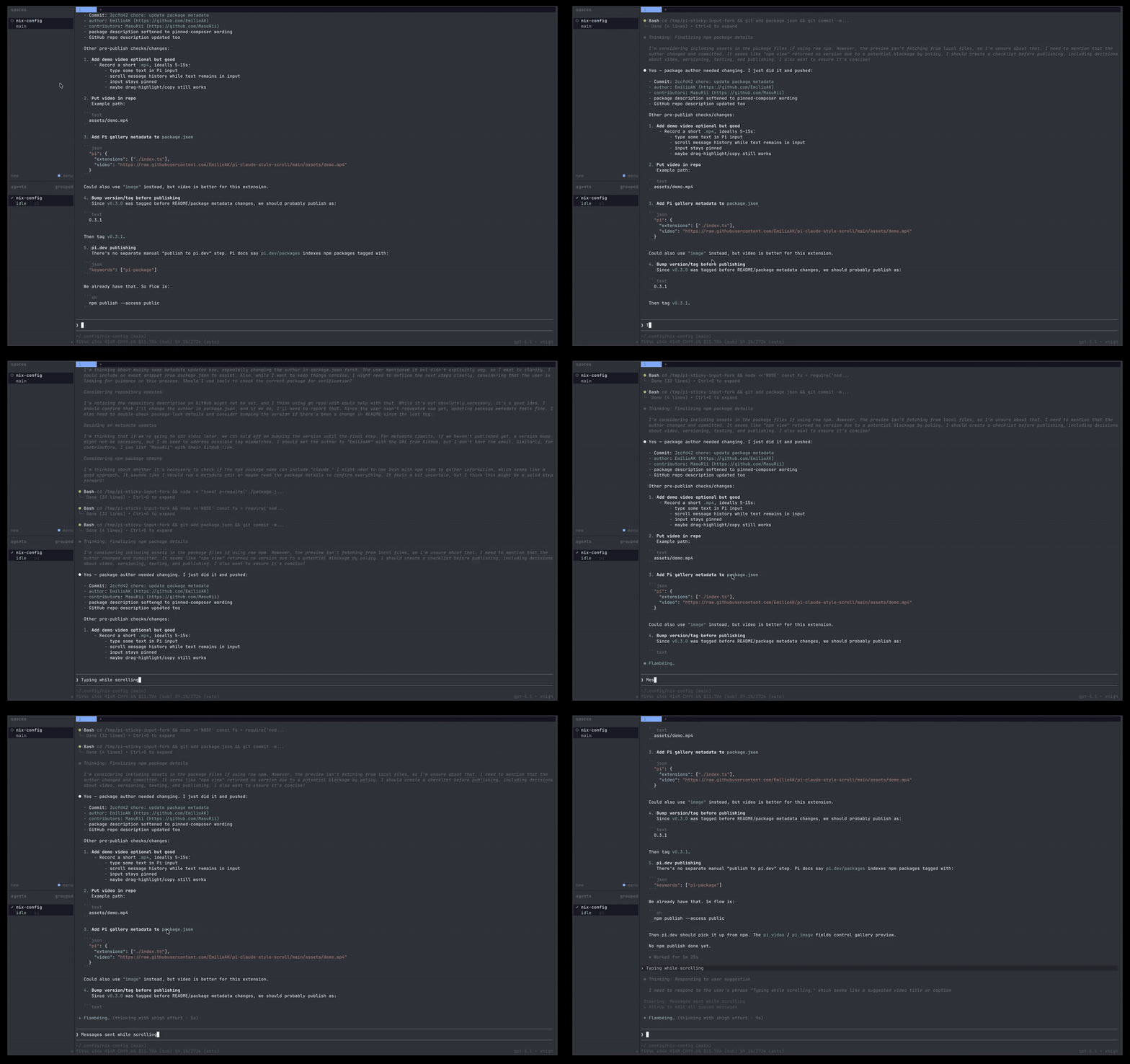
[Watch the MP4 demo](https://raw.githubusercontent.com/EmilioAK/pi-claude-style-scroll/main/assets/demo.mp4).
## Why this exists
Pi's normal terminal scrollback can fight a sticky input layout: when you wheel-scroll, the outer terminal or multiplexer may scroll old screen history instead of Pi's message list. `pi-claude-style-scroll` keeps the input visible and routes wheel scrolling to Pi's internal history viewport, so you can read earlier assistant output while drafting your next prompt.
## Install
### Git install
```bash
pi install git:github.com/EmilioAK/pi-claude-style-scroll
```
For a pinned install, use a tag or commit:
```bash
pi install git:github.com/EmilioAK/pi-claude-style-scroll@v0.3.1
```
### npm
Not published yet. Once published, the intended install will be:
```bash
pi install npm:pi-claude-style-scroll
```
## Usage
The Claude-style sticky renderer is enabled automatically when the extension loads in Pi's TUI.
The main command controls optional full mouse-wheel capture:
```text
/claude-style-scroll status
/claude-style-scroll mouse on
/claude-style-scroll mouse off
/claude-style-scroll mouse toggle
/claude-style-scroll help
```
`/sticky-input` is kept as a compatibility alias.
Most users should leave full mouse capture **off**. The default alternate-scroll path is what preserves normal terminal text selection/link behavior.
## Important tradeoff
Terminals encode alternate-scroll mouse-wheel events as cursor-up/cursor-down key sequences. That is what lets this extension scroll the message viewport without enabling full mouse capture.
Because those sequences are indistinguishable from physical Up/Down arrow keys at Pi's terminal-input layer, the default `scrollWhileTyping: true` mode means:
- mouse wheel scrolls Pi messages while you type;
- native drag-highlight/copy remains available;
- physical Up/Down arrows may scroll the message viewport instead of moving inside the prompt.
If you prefer normal Up/Down arrow editing, set `scrollWhileTyping` to `false`. Wheel scrolling will then only be treated as message scrolling when the input box is empty.
## Configuration
Config is loaded from these locations in order. Later files override earlier files.
| Scope | Path |
|-------|------|
| Extension install root | `/config.json` |
| Legacy global override | `~/.pi/agent/extensions/pi-sticky-input/config.json` |
| Global user override | `~/.pi/agent/extensions/pi-claude-style-scroll/config.json` |
| Legacy project override | `/.pi/extensions/pi-sticky-input/config.json` |
| Project override | `/.pi/extensions/pi-claude-style-scroll/config.json` |
A starter template is included at `config/config.example.json`.
```bash
mkdir -p ~/.pi/agent/extensions/pi-claude-style-scroll
cp config/config.example.json ~/.pi/agent/extensions/pi-claude-style-scroll/config.json
```
### Default config
```json
{
"debug": false,
"enabled": true,
"splitFooterRenderer": true,
"alternateScreen": true,
"alternateScroll": true,
"scrollWhileTyping": true,
"mouseScroll": false,
"mouseWheelScrollRows": 3,
"keyboardScroll": true,
"keyboardScrollRows": 10,
"minimumHistoryRows": 3,
"historyViewportLineLimit": 200
}
```
### Options
| Key | Type | Default | Purpose |
|-----|------|---------|---------|
| `debug` | `boolean` | `false` | Enables file-only diagnostics under `debug/debug.log` |
| `enabled` | `boolean` | `true` | Enables the extension |
| `splitFooterRenderer` | `boolean` | `true` | Enables the sticky split-footer renderer patch |
| `alternateScreen` | `boolean` | `true` | Uses an alternate terminal screen while the session is active |
| `alternateScroll` | `boolean` | `true` | Lets compatible terminals translate wheel input into alternate-screen cursor sequences |
| `scrollWhileTyping` | `boolean` | `true` | Handles alternate-scroll cursor sequences even while the prompt contains text |
| `mouseScroll` | `boolean` | `false` | Enables full SGR mouse-wheel capture for terminals without alternate-scroll support |
| `mouseWheelScrollRows` | `number` | `3` | Rows scrolled per wheel event |
| `keyboardScroll` | `boolean` | `true` | Enables page-key and home/end history scrolling |
| `keyboardScrollRows` | `number` | `10` | Rows scrolled per keyboard page event |
| `minimumHistoryRows` | `number` | `3` | Minimum history viewport height before falling back on very small terminals |
| `historyViewportLineLimit` | `number` | `200` | Maximum retained renderer-managed history lines before choosing the visible slice |
## Compatibility notes
- `mouseScroll: false` is the preferred mode when you want terminal/Herdr drag-highlight copy.
- `/claude-style-scroll on` enables SGR mouse capture. Use it only if alternate-scroll does not work in your terminal and you accept that native selection/link clicks may be captured.
- Overlays and structurally unknown layouts fall back to Pi's original renderer for safety.
- The legacy `PI_STICKY_INPUT_DISABLE_SPLIT_FOOTER=1` environment variable still disables the split-footer patch. The new name is `PI_CLAUDE_STYLE_SCROLL_DISABLE_SPLIT_FOOTER=1`.
## Development
```bash
npm install
npm test
npm run typecheck
npm run build
npm run package:dry-run
```
## Credits
Forked from [`MasuRii/pi-sticky-input`](https://github.com/MasuRii/pi-sticky-input), which provides the original sticky split-footer renderer, terminal-session management, config layering, and tests. This fork changes the default input/scroll behavior to prioritize a pinned composer that can scroll message history while you type.
## License
MIT. See [LICENSE](https://github.com/EmilioAK/pi-claude-style-scroll/tree/HEAD/LICENSE). Original copyright remains with MasuRii.