原始内容
pi-pinned-input



pi-pinned-input is a Pi extension that pins the prompt editor, status widgets, and footer controls to the bottom of the terminal while session history scrolls in a bounded viewport above them.
- npm: https://www.npmjs.com/package/pi-pinned-input
- Pi package gallery: https://pi.dev/packages
- GitHub: https://github.com/patamimbre/pi-pinned-input
Fork of MasuRii/pi-sticky-input with a bounded custom prompt editor, OpenCode-style prompt history navigation, and a simplified configuration.
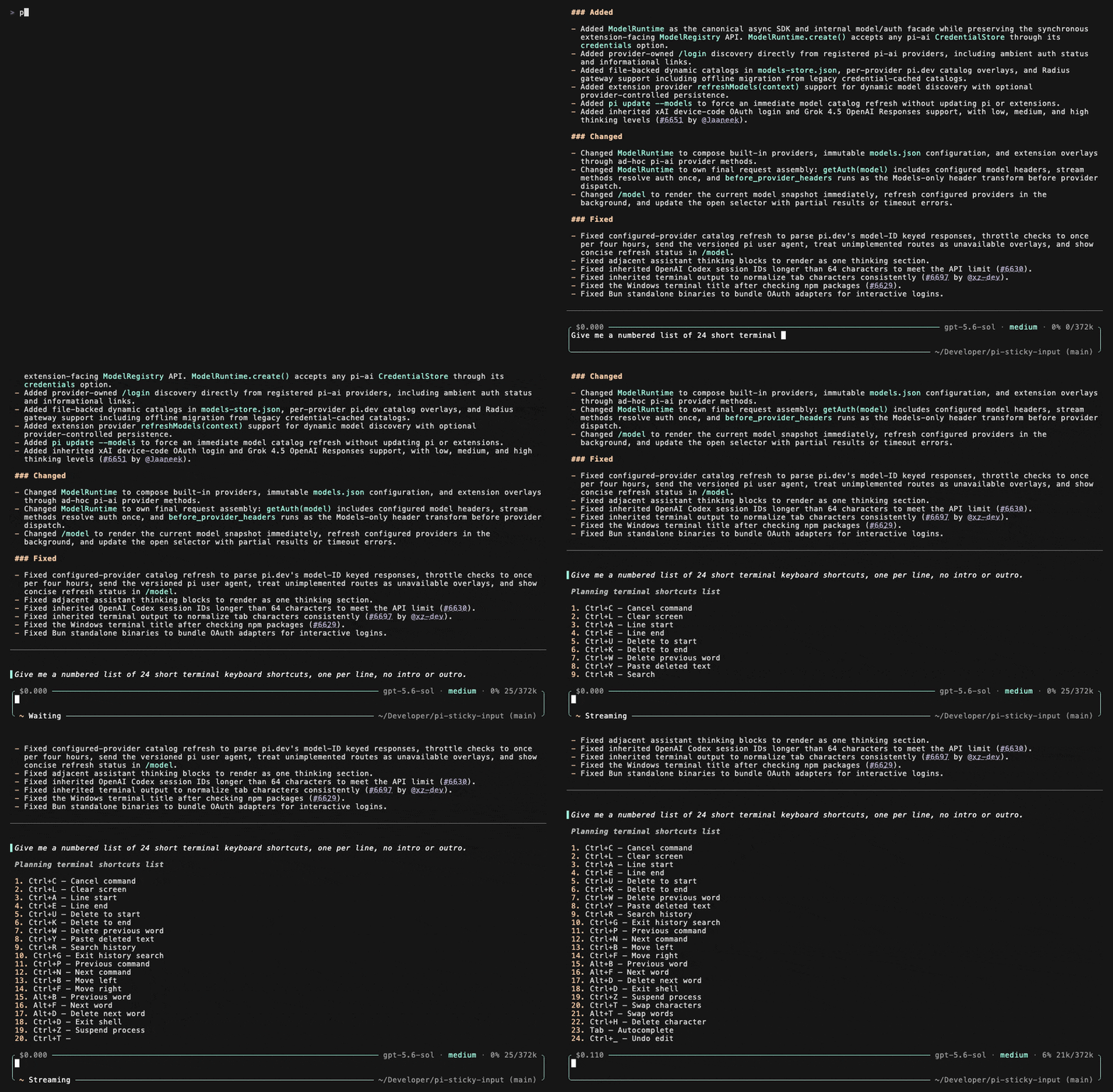
Capabilities
- Keeps Pi's status, widgets, prompt editor, and footer together in an anchored lower pane.
- Grows the prompt editor from one visible text row until the lower pane reaches 60% of the terminal (configurable).
- Bounds rendered history above the lower pane so long sessions do not push the prompt editor off screen.
- Uses an alternate screen by default to avoid terminal scrollback fighting the pinned layout.
- Supports keyboard history scrolling with
PageUp,PageDown,Ctrl+PageUp,Ctrl+PageDown,Ctrl+Home, andCtrl+End. - Routes mouse-wheel events to the history viewport regardless of pointer position.
- Preserves OpenCode-style prompt history navigation: arrows change prompts only at the absolute draft boundaries.
- Keeps a scrolled-up viewport pinned and marks new output without interrupting reading.
- Verifies Pi's version before installing the bounded prompt editor and warns instead of failing on untested releases.
- Falls back to Pi's original renderer for overlays and structurally unknown layouts.
- Keeps debug logging disabled by default and writes only to the extension-local
debug/directory when enabled.
Installation
npm package
pi install npm:pi-pinned-input
Git repository
pi install git:github.com/patamimbre/pi-pinned-input
Local extension folder
Place this folder in one of Pi's extension discovery paths:
| Scope | Path |
|---|---|
| Global default | ~/.pi/agent/extensions/pi-pinned-input |
| Project | .pi/extensions/pi-pinned-input |
Pi discovers the extension through the root index.ts entry listed in package.json, which forwards to src/index.ts.
Usage
The split renderer is enabled automatically when the extension loads and the TUI is available.
The /pinned-input command controls optional mouse-wheel capture at runtime:
/pinned-input status
/pinned-input mouse on
/pinned-input mouse off
/pinned-input help
Mouse-wheel history scrolling is enabled by default. Set "mouse": false or run /pinned-input mouse off if a terminal's native mouse behavior is incompatible. Keyboard history scrolling remains available.
Configuration
Runtime configuration is loaded from these locations in order. Later files override earlier files, so project config wins over user/global config.
| Scope | Path |
|---|---|
| Extension install root | <extension-root>/config.json |
| Global user override | ~/.pi/agent/extensions/pi-pinned-input/config.json |
| Project override | <project>/.pi/extensions/pi-pinned-input/config.json |
A starter template is included at config/config.example.json. Copy it to the global or project override path for customization, or let the extension use production defaults when no local config exists.
mkdir -p .pi/extensions/pi-pinned-input
cp config/config.example.json .pi/extensions/pi-pinned-input/config.json
The published package intentionally excludes local runtime state: config.json and debug/ stay local to each installation.
Configuration options
| Key | Type | Default | Purpose |
|---|---|---|---|
debug |
boolean |
false |
Enables file-only diagnostics under debug/debug.log |
enabled |
boolean |
true |
Enables the extension |
mouse |
boolean |
true |
Enables reliable SGR mouse-wheel capture |
mouseWheelScrollRows |
number |
3 |
Rows scrolled per wheel event |
keyboardScrollRows |
number |
10 |
Rows scrolled per keyboard page event |
minimumHistoryRows |
number |
3 |
Minimum history viewport height before falling back on very small terminals |
lowerPaneMaxPercent |
number |
60 |
Maximum terminal percentage used by editor, status, widgets, and footer (40–90) |
Example config
{
  "debug": false,
  "enabled": true,
  "mouse": true,
  "mouseWheelScrollRows": 3,
  "keyboardScrollRows": 10,
  "minimumHistoryRows": 3,
  "lowerPaneMaxPercent": 60
}
Invalid or missing values are normalized to bounded defaults when the extension loads configuration.
Compatibility
powerline-footer: compatible by default becausepi-pinned-inputkeeps status, widgets, editor, and footer inside the lower pane instead of replacing singleton editor/footer hooks.pi-agent-router: compatible because below-editor widgets remain inside the lower pane viewport.pi-startup-redraw-fix: compatible becausepi-pinned-inputpatches the liveTUI.doRenderpath and uses terminal clear ordering that does not require startup-redraw-fix's full-clear rewrite.- Custom prompt editors installed by other extensions are wrapped when they expose Pi's standard layout and cursor methods; incompatible editors are kept as-is with a visible warning.
- Overlays and structurally unknown layouts fall back to Pi's original renderer for safety.
Debug logging
Debug logging is disabled by default through "debug": false. When enabled, logs are appended only to:
debug/debug.log
The extension does not write debug output to console, stdout, or stderr, and no debug log file is opened when debug logging is disabled.
Development
pnpm typecheck
pnpm test
pnpm build
pnpm package:dry-run
License
MIT © German Castro. Based on pi-sticky-input © MasuRii.