---
slug: "pi-posher"
source_type: "readme"
source_url: "https://cdn.jsdelivr.net/gh/jeff-phil/pi-posher@main/README.md"
repo: "https://github.com/jeff-phil/pi-posher"
source_file: "README.md"
branch: "main"
---
# pi-posher

> Pi extension that helps agents and builders keep their code prim and proper.
`pi-posher` automatically runs configured tools such as: formatters, linters, SAST, file conversions, etc. after successful `write` / `edit` agent tool calls.
Users are also able to run `/poshify` slash command on-demand to validate changes to files in newly sourced repos, or for adding external files into a project that need to be posh.
## Why
Many times IDEs automatically format, lint, reorganize imports, do security checks, convert files, and run many other tools when saving files, creating code outside of your standards. This allows users to immediately know issues and fix code issues when it's fresh, vs. going through an entire pipeline.
Agents need the same capabilities in order to format, adjust, check files after edits and write operations. And this may be even more of a need depending on the model being used, or the technology being built.
## Install
```bash
pi install npm:pi-posher
```
## Defaults and prerequisites
On first use, `pi-posher` seeds a global config (`~/.pi/agent/extensions/pi-posher/poshifiers.json`) with default poshifiers for many languages and formats such as go, python, typescript, javascript, svelte, json, yaml, and markdown. These defaults are a starting point — you should edit or remove any entry to match the set of tools and technology you actually use.
> **Note:** The default `audit-tools` and most Python tooling rely on [`uv`](https://docs.astral.sh/uv/) to run commands. For the best out-of-box experience, install `uv` so that `semgrep` and `ruff` commands work without modification. If you prefer `pip`, `npm`, `pnpm`, or other runners, update the `cmd` and `args` in the config to suit your environment.
## Configuration
`pi-posher` automatically respects `.gitignore` and `.ignore` files in the project root (`{workspace}`) when scanning directories or matching files. Any paths listed in those files are skipped entirely — no tools are run against them, and they are pruned during recursive directory walks.
This means you don't need to duplicate `.gitignore` entries in every poshifier's `exclude` array. Only add `exclude` patterns for files that _are_ tracked but should still be skipped by a specific tool (e.g. `vendor/` for Go, but not `node_modules/` which is already in `.gitignore`).
Each poshifier has an optional `init-setup` block with:
- `init-configs`: Array of bundled config files, directories, or glob patterns to copy into the project root (`{root}`). Supports `{name}` placeholder for per-language variants.
- Paths without `{name}/` are copied to `{root}` directly (e.g., `.prettierrc`).
- Paths with `{name}/` strip the `{name}` prefix and preserve any remaining subdirectories (e.g., `{name}/foo/bar.json` → `{root}/foo/bar.json`).
- Directory entries (e.g., `{name}/foo/`, `{name}/foo/**`) are copied recursively. Existing files in the destination are skipped; new files from the source are merged in.
- Glob patterns are supported in the final path segment (e.g., `{name}/configs/*.json`, `{name}/rules/*.{json,yaml}`). The glob matches files in the directory part. Any matched file is copied with its parent subdirectory preserved.
- Files already in the destination are skipped without error.
- Empty glob matches silently skip.
- `init-tools`: Commands to run during init (e.g., `npm install --save-dev ...`).
- `fix-tools`: Commands to run for `/poshify --fix` (same schema as `tools`).
- `audit-tools`: Commands to run for `/poshify --audit` and at `turn_end` after agent edits (same schema as `tools`).
- `maxFileSizeBytes`: Optional limit in bytes; files larger than this are silently skipped (default 2 MB).
Every tool object (in `tools`, `fix-tools`, `audit-tools`, or `init-tools`) supports these fields:
| Field | Type | Description |
| ----------- | -------- | --------------------------------------------------------------------- |
| `cmd` | string | Command to run |
| `args` | string[] | Arguments passed to the command |
| `cwd` | string | Working directory (supports placeholders) |
| `timeoutMs` | number | Timeout in milliseconds (default 15000) |
| `config` | string | Path to a config file; sets `{config}` and `{configDir}` placeholders |
| `env` | object | Key/value map merged into the command's environment |
Global config, trusted automatically:
```text
~/.pi/agent/extensions/pi-posher/poshifiers.json
```
**On first use**, the `pi-posher` seeds this file with default "poshifiers" for go, python, typescript, javascript, svelte, json, yaml, and markdown. You can edit or remove any entry to fit your desired defaults, and add your own tools to run.
Project local configs can be placed in the project level `.pi` directory:
```text
~/projects/my-project/.pi/poshifiers.json
```
Project entries override global entries with the same `name` (go, typescript, python, etc.), and entries must be explicitly trusted by the user before running.
### Example config
${\color{#5991F1}[\,click\,to\,expand\,]}$
Configuration examples for named `python`, `json`, and `markdown` **_poshifiers_**
```json
{
"poshifiers": [
{
"name": "python",
"include": ["**/*.py"],
"anchors": ["pyproject.toml", "ruff.toml"],
"tools": [
{
"cmd": "uv",
"args": ["run", "ruff", "format", "{files}"],
"cwd": "{root}",
"timeoutMs": 25000
},
{
"cmd": "uv",
"args": ["run", "ruff", "check", "{files}"],
"cwd": "{root}",
"timeoutMs": 30000
}
],
"fix-tools": [
{
"cmd": "uv",
"args": ["run", "ruff", "check", "--fix", "{files}"],
"cwd": "{root}",
"timeoutMs": 30000
}
],
"audit-tools": [
{
"cmd": "uv",
"args": [
"run",
"--with",
"semgrep",
"semgrep",
"scan",
"--json",
"-q",
"--error",
"--config",
"auto",
"{files}"
],
"cwd": "{root}",
"timeoutMs": 60000
}
]
},
{
"name": "json",
"include": ["**/*.json*"],
"exclude": ["node_modules/**", "package-lock.json"],
"anchors": ["package.json"],
"init-setup": {
"init-configs": [".prettierrc", ".prettierignore"],
"init-tools": [
{
"cmd": "npm",
"args": ["install", "--save-dev", "prettier", "node-jq"],
"cwd": "{root}",
"timeoutMs": 120000
}
]
},
"tools": [
{
"cmd": "npm",
"args": ["exec", "--", "prettier", "--parser=json", "--write", "{files}"],
"cwd": "{root}",
"timeoutMs": 15000
},
{
"cmd": "npm",
"args": ["exec", "--", "node-jq", "-e", ".", "{file}"],
"cwd": "{root}",
"timeoutMs": 15000
}
],
"audit-tools": [
{
"cmd": "uv",
"args": [
"run",
"--with",
"semgrep",
"semgrep",
"scan",
"--json",
"-q",
"--error",
"--config",
"auto",
"{files}"
],
"cwd": "{root}",
"timeoutMs": 60000
}
]
},
{
"name": "markdown",
"include": ["**/*.md"],
"exclude": ["node_modules/**"],
"anchors": ["package.json"],
"init-setup": {
"init-configs": [".prettierrc", ".markdownlint.json"],
"init-tools": [
{
"cmd": "npm",
"args": ["install", "--save-dev", "prettier", "markdownlint-cli"],
"cwd": "{root}",
"timeoutMs": 120000
}
]
},
"tools": [
{
"cmd": "npm",
"args": ["exec", "--", "prettier", "--write", "{files}"],
"cwd": "{root}",
"timeoutMs": 15000
},
{
"cmd": "npm",
"args": ["exec", "--", "markdownlint", "{files}"],
"cwd": "{root}",
"timeoutMs": 15000
}
],
"fix-tools": [
{
"cmd": "npm",
"args": ["exec", "--", "markdownlint", "--fix", "{files}"],
"cwd": "{root}",
"timeoutMs": 15000
}
],
"audit-tools": [
{
"cmd": "uv",
"args": [
"run",
"--with",
"semgrep",
"semgrep",
"scan",
"--json",
"-q",
"--error",
"--config",
"auto",
"{files}"
],
"cwd": "{root}",
"timeoutMs": 60000
}
]
}
]
}
```
## Trust and security
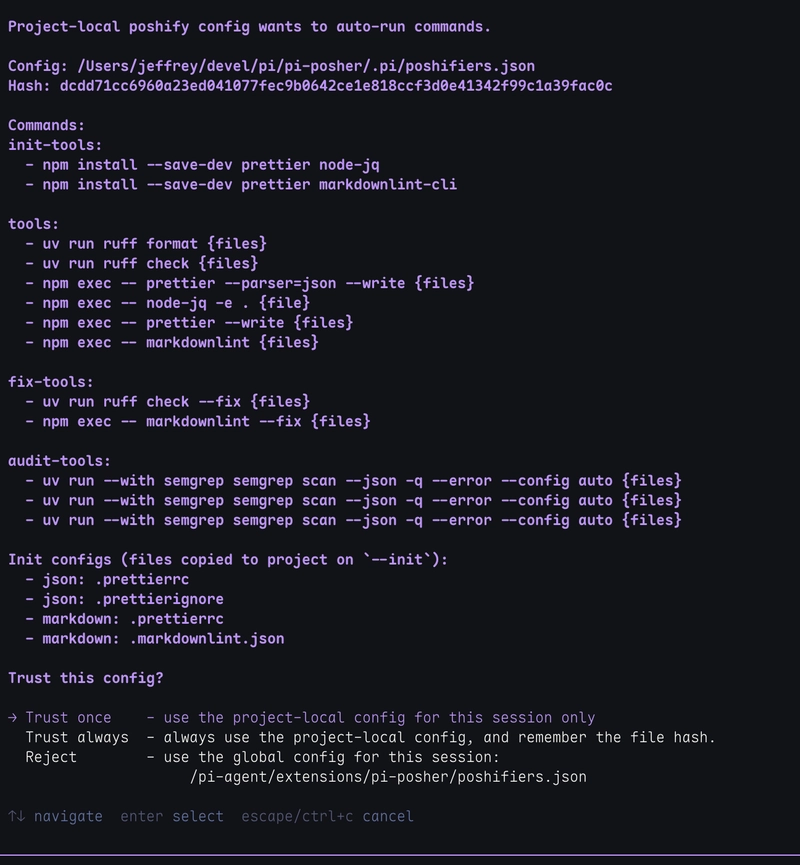
Project local configs (e.g. `~/projects/my-project/.pi/poshifiers.json`), especially from unknown repositories, could run arbitrary commands on your machine that are evil in nature.
Here are the guardrails to prevent malicious configs and scripts:
- Project local config content is uniquely hashed
- Unknown hashes prompt for `Trust once`, `Trust always`, or `Reject`
- The prompt shows every configured tool command in the project local config file
- The options `Trust once` and `Reject` are session specific, and won't prompt again during the current session while the config remains unchanged.
- `Trust always` stores the hash in `~/.pi/agent/extensions/pi-posher/trust/poshify.json`
- Changing the project local config changes the hash and asks again to trust or reject
- Non-interactive mode rejects project local config by default
- Commands run as `cmd` & `args[]`, so each can be validated against shell injection
Global config (`~/.pi/agent/extensions/pi-posher/poshifiers.json`) is considered trusted because it is user-owned agent configuration.
## Behavior
After the agent successfully does a `write` or `edit` operation on a file:
1. Pi Posher looks for poshifiers matching `include` / `exclude` file and directory glob patterns
2. Extension uses `anchors` to find the `{root}` of the current project
3. Skips files above `maxFileSizeBytes`
4. Runs each command in the `tools` array sequentially, in order on the file.
5. Sends a compact summary for the tool, or error details if the tool fails that is also a `steer` message for the clanker to correct.
6. Tracks the file in a list of files that were written or edited during the turn.
7. At the end of the turn, the list of tracked files will have the `audit-tools` batch run on them together. This will be more efficient for deeper level, longer taking audit tools such as `semgrep` because the files and tools are batched.
> **Note:** if files are modified by the clanker with `bash` commands, then the files are **_not_** tracked. For this, it would be a good idea to run the one of the `/poshify ...` slash commands manually to look for issues. Or you can ask `Run poshify on .` or `Run poshify on @src/` from the prompt.
When a slash command (`/poshify`, `/poshify --fix`, `/poshify --audit`) is used, or when `audit-tools` run at `turn_end`, all matched files are collected and grouped by their resolved command configuration. Commands that contain a `{files}` placeholder are batched — all matching files sharing the exact same resolved command are passed together in one invocation by replacing `{files}` with the collected paths. This works for `tools`, `fix-tools`, and `audit-tools`.
To avoid shell ARG_MAX limits (the system's longest number of argument or parameter characters that can be passed to a command), batched files are further split into sub-batches of up to **100 files** per invocation.
At `turn_end`, audit findings are deduplicated across turns (same finding is reported once per session), and all audit output is steered into the agent context so it can react to issues.
Agent `write` and `edit` operations still run `tools` per-file (not batched for the turn), so you get immediate feedback after each edit.
> **Note:** Since there could be several `write` and `edit` operations to files during an agent "turn" (which is the agent processing, thinking, working, and responding to a user prompt), you would not want long running tool commands (2+ secs) for each write and edit. That is the main reason in the default configuration, `semgrep` runs in batch at the end of the turn because it could take 5+ seconds even for a basic source file. The disadvantage of audit-tools being run at `turn_end` is you have to reprompt to fix the issues, since it completes after a turn has ended. But the advantage is any files that were written or edited can be batched all together at the end instead of each sequentially.
If the tool command and parameters are the same across names (e.g. python, typescript, markdown), then all of those files will be batched into the same run as well saving lots of time. Key point, try to keep tools as consistent as possible for long running commands like `semgrep`, but specialized tools such as `svelte-check` can also be run as a specific audit tool for any changed svelte files during the turn.
### Context filtering
Successful poshify output is automatically filtered out of the agent's conversation context to reduce token usage. Only messages containing warnings, errors, or audit findings are retained, so the agent can focus on actionable issues rather than repeated "all good" confirmations.
### Manually running
You can also trigger poshify manually with the slash command or the `run_poshify` custom tool.
#### `/poshify` slash command
```text
/poshify (file|dir)... # Run configured tools for required file(s) or directory(ies)
/poshify --init # Install init configs for a poshifier type
/poshify --fix [file|dir]... # Run configured fix-tools, default: current working directory
/poshify --audit [file|dir]... # Run tools & audit-tools for file(s) or directory(ies), def: cwd
/poshify --help # Show this usage
```
`/poshify` with no arguments and `/poshify --help` shows help usage message, and includes the list of available `--init` names.
**`/poshify --init `** copies the `init-configs` defined for that poshifier into the current project, seeds user-level overrides from bundled templates if absent, and runs the `init-tools` commands (typically `npm install --save-dev ...`). Existing files in the project are skipped. For example:
- `/poshify --init typescript` copies `.prettierrc`, `.prettierignore`, `eslint.config.mjs`, `eslint-ts.mjs` to the project root and installs ESLint + Prettier.
- `/poshify --init markdown` copies `.prettierrc` to the project root and `.markdownlint.json` to the project root, then installs Prettier + markdownlint-cli.
- A config like `{name}/foo/bar.json` would be placed at `foo/bar.json` in the project.
**`/poshify --fix [file|dir]`** runs the `fix-tools` configured for each matching poshifier. Each poshifier can define its own fix commands (e.g., `eslint --fix`, `ruff check --fix`, `markdownlint --fix`). Files without configured `fix-tools` are silently skipped. Default: current working directory.
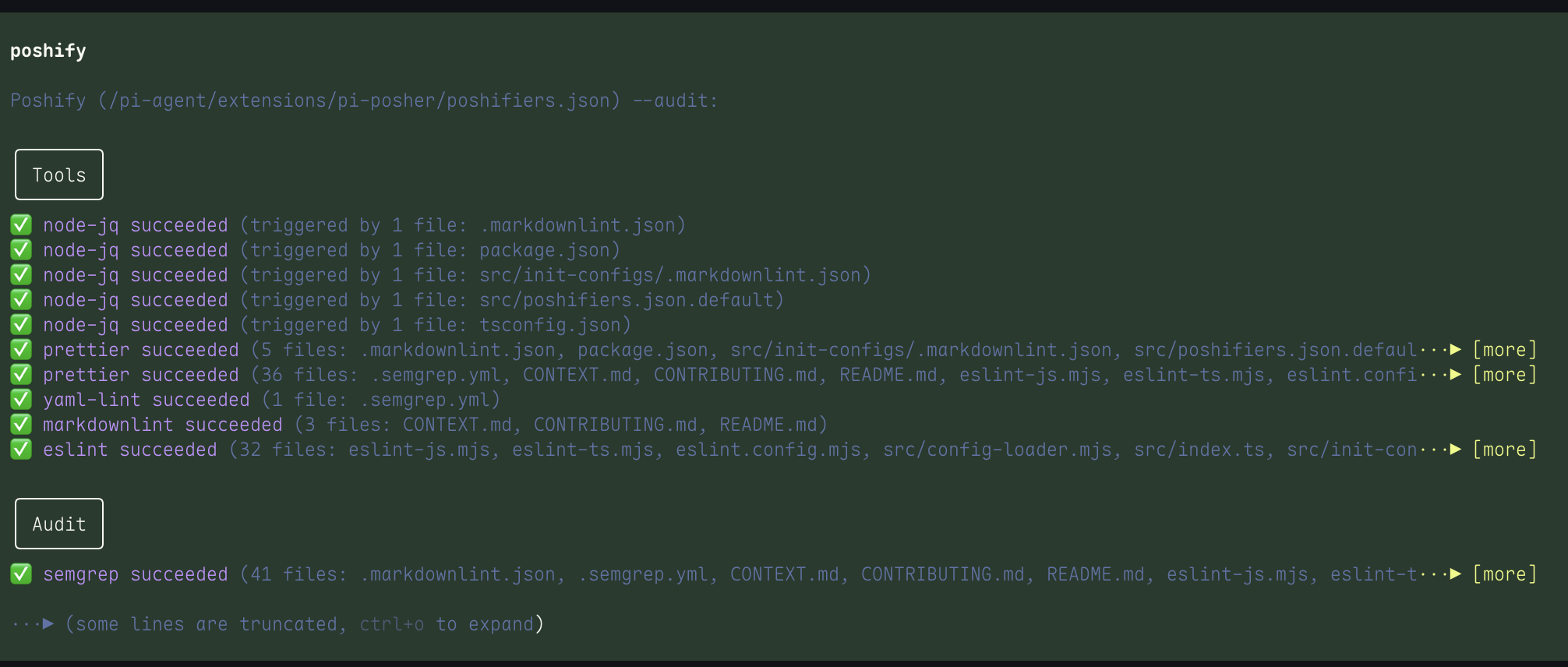
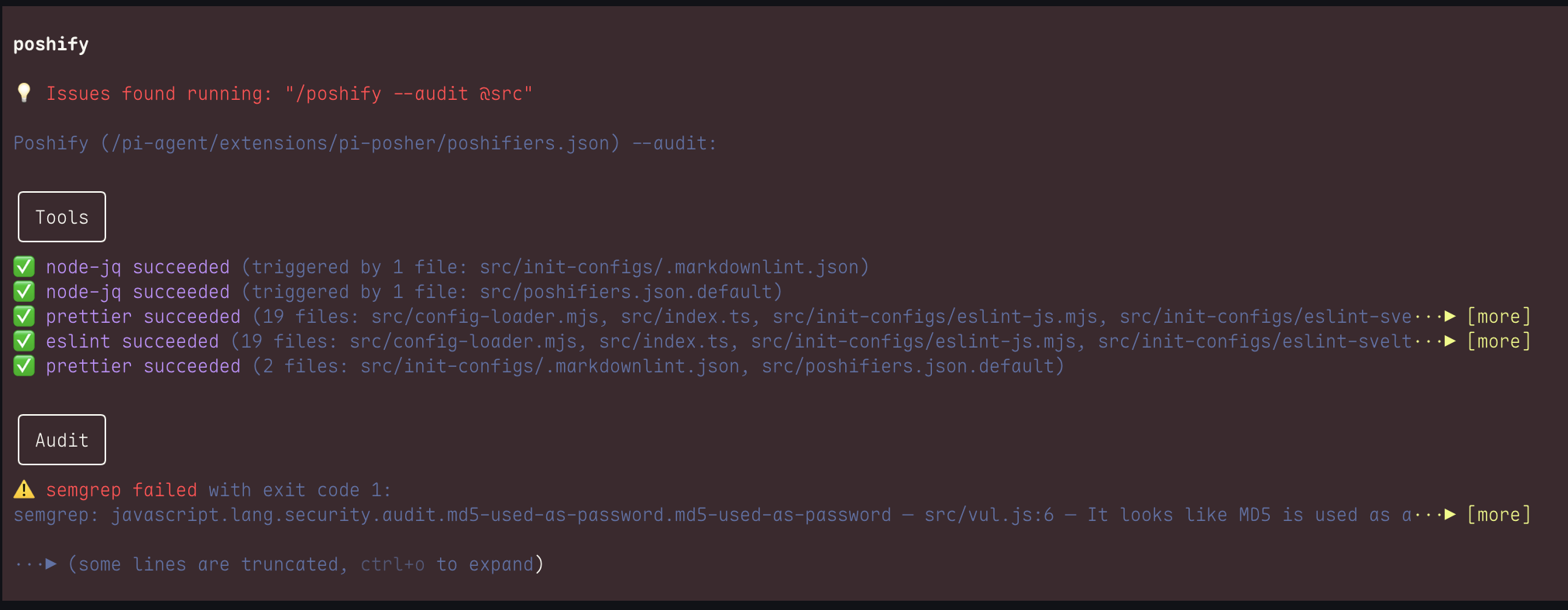
**`/poshify --audit [files|dir]`** runs both the `tools` and `audit-tools` for each matching poshifier, reporting them as separate sections under a combined `Poshify Audit` header. Files without configured `audit-tools` are silently skipped for that section. This is the same behavior used at turn-end for agent edits. Default: current working directory.
#### `run_poshify` tool
Callable by the LLM with a `path` argument. The model can invoke it when asked to "run poshify on X".
Both the slash command and the tool scan matching files recursively, run configured tools, and report results in the same output format as the automatic trigger.
> **Note:** `run_poshify` or "run poshify on X" prompt only runs the standard `tools` and not `audit-tools`. To manually run the `audit-tools` use the `/poshify --audit (file|dir)` slash command.
## Relative paths and placeholders
Path rules:
1. Absolute paths are used as-is.
2. Relative `cmd`, `config`, and `cwd` values with `/` are resolved relative to `{root}`.
3. Bare command names are resolved through `PATH`.
4. Passing paths to `/poshify ...` commands can use standard "@" prefix such as `@some/file` for file discovery.
Placeholders (template tags):
| Placeholder | Meaning | Example |
| ------------- | ----------------------------------------------------------------------------------------- | --------------------------------------------------------------------------- |
| `{workspace}` | Pi working directory, or directory containing `.pi/poshifiers.json` | `/Users/jeffrey/my-project` |
| `{root}` | Nearest directory containing an `anchor` marker | `/Users/jeffrey/my-project` |
| `{file}` | Absolute path to the file being processed | `/Users/jeffrey/my-project/src/foo.go` |
| `{files}` | All matched file paths (triggers batching; use in `tools`, `fix-tools`, or `audit-tools`) | `/Users/jeffrey/my-project/src/foo.go /Users/jeffrey/my-project/src/bar.go` |
| `{relFile}` | `{file}` relative to `{root}` | `src/foo.go` |
| `{dir}` | Absolute directory containing the file | `/Users/jeffrey/my-project/src` |
| `{relDir}` | That directory relative to `{root}` | `src` |
| `{config}` | Resolved command config path (if set) | |
| `{configDir}` | Directory containing `{config}` | |
| `{name}` | Poshifier name (useful in `init-setup` paths and args) | `typescript` |
`{root}` is found by walking up from `{file}` looking for `anchors`. `{workspace}` is where Pi is running. They are usually the same, but in a monorepo where a file is in `packages/bar/` and the anchor (`package.json`) is there, `{root}` = `packages/bar/` while `{workspace}` = the repo root.
> **Note on `anchors`:** If `anchors` is omitted or empty, it defaults to `['.project', '.git']`.
> The auto discovery behavior if no anchor defined:
>
> - Walks up from the target file/directory
> - Stops at the first directory containing either .project or .git
> - .project still wins if intentionally placed in a subdir (e.g., monorepo package boundary)
> - .git catches everything else as a universal fallback
> - If neither exists anywhere up to root directory, error message lists both: anchors not found (.project, .git)
## Screenshot and Output examples
Project local config file needing to be trusted:
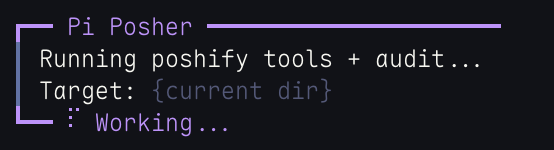
While running:
Successful run with details:
Failed run for full `audit` and details:
## Disable a poshifier
Remove it from the config, or override with an empty object:
```json
{
"poshifiers": [{ "name": "go" }]
}
```
## Acknowledgement
Security hashing aspects inspired by [pi-code-quality](https://pi.dev/packages/pi-code-quality).