原始内容
pi-vim-flash
Your Pi conversation is now a Vim buffer.
pi-vim-flash adds Vim-style prompt editing and Flash.nvim-inspired navigation to Pi. Jump to any matching character in the visible conversation, enter Visual mode at the target, extend the selection with Vim motions, and yank assistant output without touching the mouse.
Why this exists
Most modal editor extensions stop at the input prompt. pi-vim-flash also treats Pi's rendered transcript—user messages, assistant responses, code blocks, and tool output—as a keyboard-navigable surface.
That changes the common “find something useful above, reach for the mouse, drag a fragile selection, copy it” workflow into one keyboard sequence:
- Jump instead of scroll: search one visible character and choose a home-row label.
- Act at the destination: the jump immediately becomes a Visual-mode anchor.
- Select with Vim motions: extend across wrapped responses, code, Markdown, and tool output.
- Copy what Pi actually rendered: syntax colors and layout stay visible while selecting;
ycopies the selected transcript text. - Keep the same muscle memory in the prompt: use counts, operators, text objects, registers, Visual mode, and familiar Vim motions below the transcript too.
The defining feature is not merely “Vim keys in a text box.” It is making the whole Pi conversation feel like one actionable Vim surface.
Demo
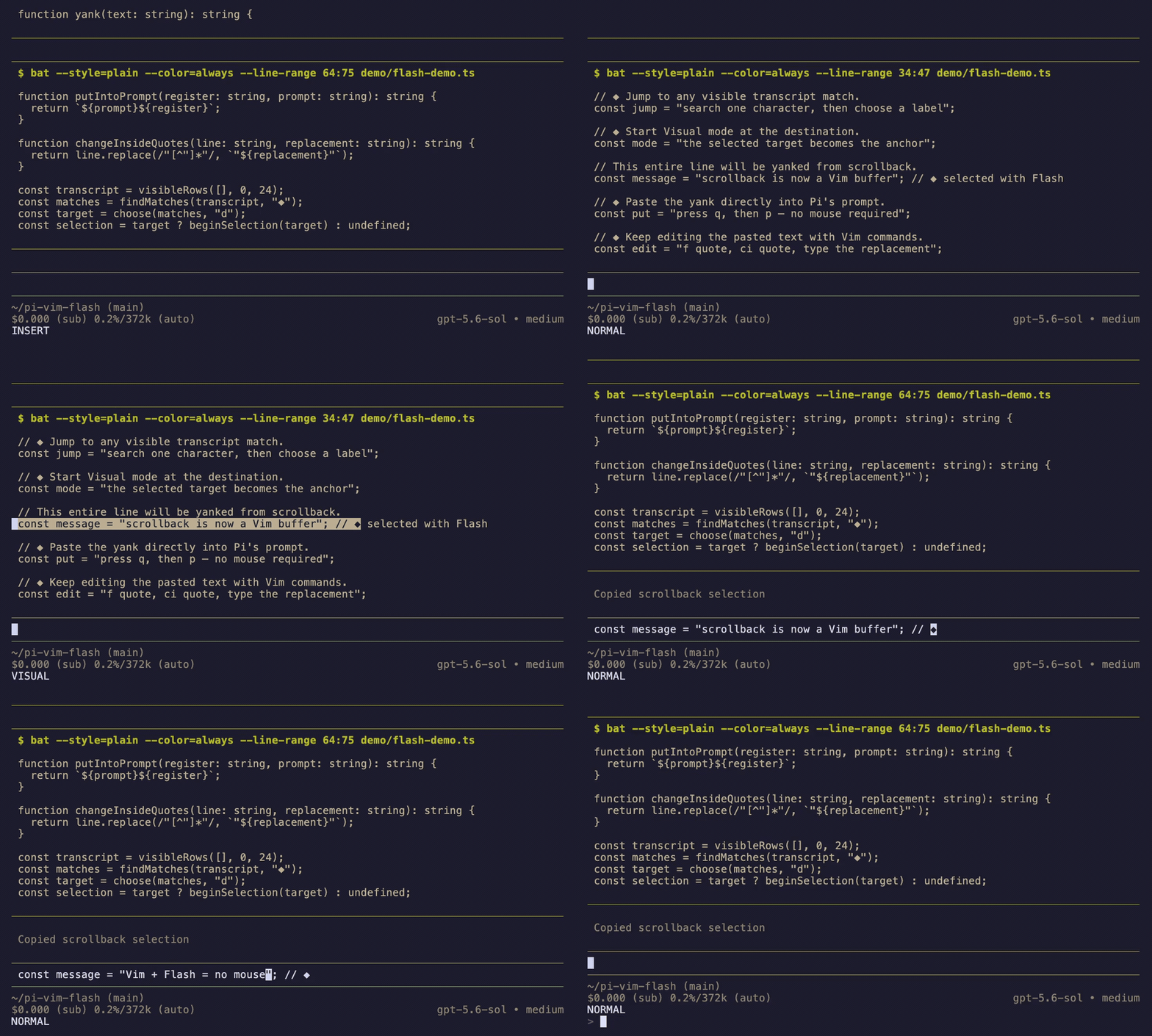
The demo is recorded from the real Pi TUI and shows the complete workflow—not just the jump:
Ctrl-Uscrolls up through earlier tool output.s+◆overlays home-row labels on visible transcript matches.dchooses the target and0extends the Visual selection across its line.yyanks the highlighted transcript text.qreturns to the prompt andpputs the yank into the editor.f"+ci"changes the quoted text, thenAappends a final comment.
The result is a mouse-free round trip from old agent output to editable prompt text.
The signature workflow
From Normal mode with an empty prompt:
- Press
s. - Type a character visible in the transcript.
- Type the label displayed over the match.
- The jump target becomes a Visual-mode anchor.
- Extend with
h,j,k,l,w,b,e,0, or$. - Press
yto copy the rendered transcript selection.
The overlay reuses Pi's native rendered transcript components, preserving Markdown, syntax highlighting, tool output, and message styling.
Install
Try it without installing:
pi -e npm:pi-vim-flash
Install globally:
pi install npm:pi-vim-flash
Restart Pi after installation.
For local development:
pi -e ./src/index.ts
Prompt editing
Press Esc to enter Normal mode. Press i to return to Insert mode.
Modes
| Key | Action |
|---|---|
Esc |
Insert → Normal; cancel a pending Normal-mode command |
i, a |
Insert at / after cursor |
I, A |
Insert at first non-whitespace / end of line |
o, O |
Open line below / above |
v, V |
Visual / Visual Line mode |
Motions
Most motions accept a count, such as 3w, 2j, and 4e.
| Keys | Action |
|---|---|
h j k l |
Character and line movement |
w b e |
Keyword-word motions |
W B E |
Whitespace-delimited WORD motions |
0 ^ $ |
Line start, first non-whitespace, line end |
gg, G |
Prompt start / end; {count}gg and {count}G jump to a line |
{, } |
Previous / next paragraph |
% |
Matching (), [], or {} delimiter |
f F t T{char} |
Find / till a character on the current line |
;, , |
Repeat the last character-find forward / reversed |
Operators and edits
| Keys | Action |
|---|---|
d{motion}, c{motion}, y{motion} |
Delete, change, or yank by motion |
dd, cc, yy, Y |
Linewise operation |
D, C, S |
Delete to EOL, change to EOL, change line |
x, r{char} |
Delete / replace characters |
p, P |
Put after / before using the unnamed register |
u |
Undo through Pi's editor |
J, gJ |
Join lines with / without normalized spacing |
Counts compose with motions and operators: 3x, 2dd, d3w, and 2d3w.
Text objects
Use text objects with d, c, or y:
- Words:
iw,aw,iW,aW - Quotes:
i",a",i',a',i`,a` - Pairs:
i(/a(,i[/a[,i{/a{and their closing-delimiter aliases
Examples: ciw, di", ya{.
Visual mode
Visual and Visual Line modes support:
- Motions:
h j k l w b 0 $ - Flash jump:
s{char}{label} - Operations:
y,d,x,c
Transcript navigation
With an empty prompt in Normal mode:
| Keys | Action |
|---|---|
s{char}{label} |
Flash jump and start Visual selection |
k, j |
Scroll one row |
Ctrl-U, Ctrl-D |
Scroll half a page |
gg, G |
Transcript top / bottom |
v |
Toggle selection at the transcript cursor |
h j k l w b e 0 $ |
Extend transcript selection |
y |
Copy selected rendered text |
i, a |
Return to prompt Insert mode |
q, Esc |
Close transcript navigation |
Inspiration and related projects
pi-vim-flash exists because two excellent plugins proved how good label-based movement and modal prompt editing can feel:
- flash.nvim by folke inspired the
s→ search character → home-row label interaction. Flash.nvim brings search labels, enhanced character motions, and structural navigation to Neovim; this package adapts the core label-jump idea to Pi's rendered transcript and turns the destination into a Visual selection anchor. - pi-vim by lajarre is a comprehensive modal editor for Pi's input prompt and helped establish the expected Vim command surface in Pi. If your priority is broad, highly tested prompt-editing parity, it is absolutely worth checking out.
pi-vim-flashis an independent implementation whose defining focus is unified prompt and transcript navigation, Visual selection, and yanking.
Both projects are MIT-licensed. Many thanks to their authors and contributors for the inspiration and for pushing modal navigation forward.
Intentional differences from Vim
slaunches Flash instead of substituting the character under the cursor. Flash navigation is the package's primary feature.- Visual Block mode, redo, search (
/,?,n,N), macros, named registers, repeat (.), and a full Ex command line are not implemented. - Transcript selection operates on rendered terminal text. Copied code may therefore reflect wrapping and visible tool formatting.
Clipboard support
Yanks and register-writing edits maintain an internal unnamed register and mirror it best-effort to:
- macOS:
pbcopy/pbpaste - Wayland:
wl-copy/wl-paste - X11:
xcliporxsel - Windows:
clip/ PowerShellGet-Clipboard
Immediate delete/yank → put works through the internal register even if no system clipboard utility is available.
Compatibility
Tested against the minimum supported Pi 0.80.6 and Pi 0.80.10; CI also checks the latest published Pi release.
Transcript navigation uses some non-public Pi TUI/editor internals to render the native conversation inside an overlay. Those APIs can change between Pi releases. Supported Pi versions will be tested and documented as the package evolves.
Development
npm install
npm run check
Re-record the MP4 and GIF demo with VHS, bat, and ffmpeg installed:
./demo/render.sh
npm run check runs strict TypeScript checking and 52 unit/integration tests. Coverage includes editor key sequences, modes, counts, ranges, linewise edge cases, registers, text objects, character-find behavior, prompt and transcript Flash targets, rendered ANSI selection, extension lifecycle cleanup, and transcript Visual yanking.
Security
Pi extensions execute with your user permissions. Review extensions before installation. This package invokes only local clipboard utilities and does not make network requests.
License
MIT