---
slug: "travel-plan-viz"
source_type: "readme"
source_url: "https://cdn.jsdelivr.net/gh/zexuanw958-svg/travel-plan-viz@main/README.md"
repo: "https://github.com/zexuanw958-svg/travel-plan-viz"
source_file: "README.md"
branch: "main"
---
 👋 我是 Migo · 你的旅行领航员 —— 候鸟天生会规划路线、掐准时间
# 🗺️ Migo · 旅行领航
travel-plan-viz
**把一趟旅行变成一个美观、离线可读、手机优先的单文件 HTML 页面**
交互地图 · 每日时间轴 · 出发前订票提醒 · 行前须知 · 待选航班 · 片区价位酒店
一个 [Claude Code](https://claude.com/claude-code) / Codex 通用 Skill(也可适配其他 Agent)
[](LICENSE)
[](#-样例)
[](#-中文)
[](#-安装跨-agent)
[](#-特点)
[](#-测试)
🎬 更多 AI 工具实战玩法:作者抖音 @泽轩604(app 内搜索即达 · 本项目的抖音原帖)
✨ 特点 · 🧑💻 零基础安装 · 🚀 安装 · ❓ FAQ · 🏗️ 原理 · ⭐ Star
中文 · English
---
## ⭐ Star History
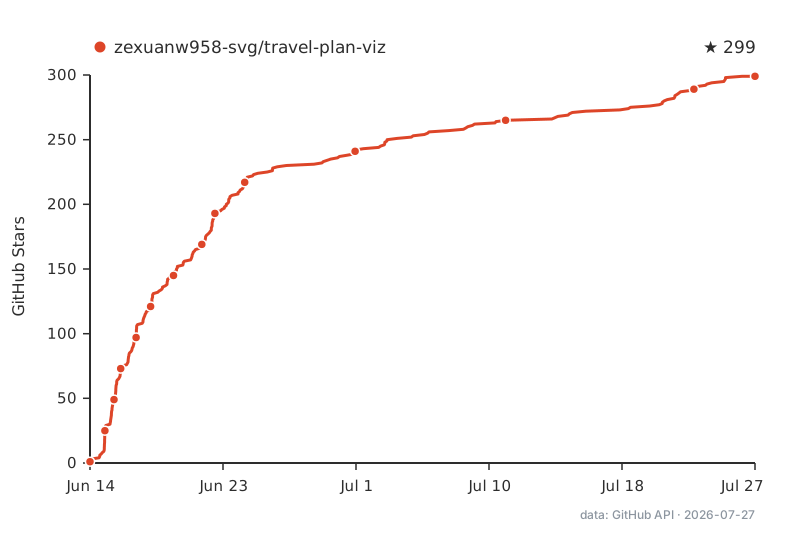
趋势图由本仓库 GitHub Action 基于 GitHub 星标数据每日自动重绘,非实时;实时 Star 数请看页面顶部。
Chart is redrawn daily by this repo's GitHub Action from GitHub stargazer data (not real-time) — see the count at the top of the page for the live number.
---
## 🌏 中文
### 这是什么
`travel-plan-viz` 是一个 Claude Code / Codex 通用 Skill(也可适配其他 Agent)。你只要说一句"帮我做香港 4 天 3 晚的旅行计划",它就会**联网调研、排好行程、生成一个精美的单文件 HTML 网页**——手机上随时打开,文字行程离线可读,整页可截图存相册。
灵感来自社区的 "vibe coding 旅游攻略" 玩法,升级为一个正式、可复用、把易错逻辑固化下来的 Skill。
### ✨ 特点
| | 功能 |
|---|---|
| 🧭 | **两种入口**:只给目的地+天数让它帮你规划;或丢一份现成计划让它直接出页面 |
| 🗺️ | **交互地图**:Leaflet + 免费地图(无需 API key),编号景点 + 按序虚线路线 + 一键跳手机导航(iOS 走 Apple Maps、Android 走 geo: 深链,境内点位另附高德地图、境外另附 Google 地图链接,均为官方免 key URI);来自高德/腾讯的 GCJ-02 坐标自动纠偏为 WGS-84,点位不漂移 |
| 📅 | **每日时间轴**:早/中/晚分段,每个景点带真实照片、评分、一句话点评 |
| ⏰ | **出发前提醒**:根据出发日期倒推"几号前订什么",页顶待办清单 + 时间轴 ⚠️ 徽标 |
| 🌦️ | **行前须知**:按出发季节定制的天气/穿搭/台风提醒、支付方式、必备 App、购票时机 |
| ✈️ | **待选航班**:未预订时给 3–5 个真实候选班次,订不上有备选 |
| 🏨 | **片区价位酒店**:综合各景点位置推荐住宿片区,每片区给经济/中档/高端选项 |
| 🍜 | **每日美食**:每餐推荐 + 必点菜及参考价 |
| 📄 | **单文件 + 响应式 + 离线可读**:一个 `.html`,手机/桌面自适应布局(手机单列、桌面多列加宽);文字行程离线可读,地图/图片需联网、失败时优雅降级不露破图 |
| ✅ | **生成后机械校验**:`validate.js` 自动检查字段缺失、坐标越界/离群(抓"经纬度写反/查错城市")、必需区块——不靠"生成时自觉" |
| 🔁 | **可持续迭代**:完整行程数据以 JSON 内嵌在页面里,把 HTML 丢回来说"把第三天的 X 挪到第四天",改数据重渲染、不丢字段 |
| 💡 | **不止转网页,还给建议**:把现成计划丢进来,会顺手对照"完善行程"标准提几条可选优化(克制、不硬来)——这是 Agent 区别于"纯提示词转 HTML"的地方 |
| 🔌 | **可选适配官方旅行 skill**:若你另装了飞猪 / 高德 / 腾讯地图 / 滴滴等官方 skill,会调用它们补充实时航班、酒店、路线规划、天气,并附「去预订 / 导航 / 叫车」链接;**没装则照常走联网调研,功能不缺**。这部分数据的实时性由对应官方 skill 负责 |
| ⚠️ | **全覆盖免责声明**:明确所有信息为 AI 整理、可能过时,引导到官方 App 核实 |
### 🏗️ 工作原理
混合架构——**易错的机械逻辑固化为可复用引擎,视觉表现每次交给"设计步骤"重新生成**:
- `assets/map.js`:Leaflet 地图引擎(编号标记、路线、iOS/Android 导航链接、GCJ-02→WGS-84 坐标纠偏)
- `assets/reminders.js`:提醒引擎(截止日期计算、清单/徽标渲染)
- `assets/validate.js`:契约校验引擎(生成后机械检查字段/坐标/必需区块,ERROR 必须修复)
- `assets/page-contract.md`:内容契约,告诉设计步骤每个区块要哪些数据
- `references/research-guide.md`:联网调研指南(坐标/图片/营业时间/天气/交通…,含图片必须校验可加载、票价不查实时)
- `references/design-guidelines.md`:内置美学准则(无外部设计 skill 时的兜底)
> **设计步骤可插拔、无硬依赖**:如果你装了 `frontend-design` 或 `huashu-design`(花叔Design)这类设计 skill,会自动调用、效果更佳;都没装也能用内置美学准则出一份像样的页面。所以本 skill 可独立安装,不强制先装别的。
> **第三方旅行 skill 可选适配(同样是软依赖)**:如果你另装了飞猪、高德、腾讯地图、滴滴等官方旅行 skill,本 skill 会调用它们补充实时数据(航班 / 酒店 / 路线规划 / 天气 / 精确坐标),并在页面附上「去预订 / 导航 / 叫车」链接;没装则照常走联网调研,页面不缺任何区块。这些数据的实时性与真实性由对应官方 skill 负责,本 skill 只做适配与呈现、不做背书。
### 🚀 安装(跨 Agent)
> **🧑💻 我完全不懂代码怎么装?** 有一份从「什么是 GitHub、怎么下载」讲到「装完对 AI 说哪句话」的保姆级教程,**Windows / Mac 每一步都有**:👉 [零基础安装指南 INSTALL.md](https://github.com/zexuanw958-svg/travel-plan-viz/blob/HEAD/INSTALL.md)。下面的一行命令是给熟悉终端的用户的快捷方式。
把 skill 链接到对应 Agent 的 skills 目录:
```bash
# Claude Code
ln -sfn "$(pwd)/travel-plan-viz" ~/.claude/skills/travel-plan-viz
# OpenAI Codex
ln -sfn "$(pwd)/travel-plan-viz" ~/.codex/skills/travel-plan-viz
```
**用其他 Agent?** 本 skill 平台无关——核心是一份指令 + 三个纯 JS 引擎。没有 skills 机制的 Agent,把 `travel-plan-viz/SKILL.md` 当作指令喂给它即可。完整适配方法与「通用适配提示词」见 [`travel-plan-viz/references/porting-to-other-agents.md`](https://github.com/zexuanw958-svg/travel-plan-viz/blob/HEAD/travel-plan-viz/references/porting-to-other-agents.md)。
### 💬 用法
在 Claude Code / Codex 里直接说:
```
帮我做香港 4 天 3 晚的旅行计划 # 模式 A:从零规划
```
```
这是我的行程<贴上文字/HTML>,帮我做成网页 # 模式 B:已有计划
```
生成后,把 HTML 文件丢回给 Claude 还能继续改,例如:"第三天太赶,把 X 挪到第四天"——页面内嵌了完整行程 JSON,改的是数据、重渲染呈现,不会丢字段。
### 🖼️ 样例
`samples/` 目录下有现成产物,浏览器直接打开:
- `chengdu-4d3n-real.html` —— 成都 4 天 3 晚(模式 A:只给目的地+天数,从零规划,含都江堰/青城山一日 + 二选一方案)
- `hongkong-4d3n-real.html` —— 香港 4 天 3 晚(真实联网数据)
- `shenzhen-3d2n-real.html` —— 深圳 3 天 2 晚(只给天数,从零生成)
- `tokyo-5d4n-real.html` —— 东京 5 天 4 晚(模式 B:粗略计划 + Agent 建议后生成)
### ❓ 常见问题(FAQ)
**Q:这和直接问豆包 / 千问 / ChatGPT「帮我写个攻略」有什么区别?**
直接问大模型,得到的是一段文字或一次性的页面。这个 skill 把容易出错的环节固化成了可复用的工程流程:
- **行程体检**:丢现成计划进来,它会对照「完善行程」清单提几条可选优化建议(克制、不硬来),不只是转个格式;
- **单文件离线可读**:一个 `.html` 存进手机,没网也能看文字行程;
- **点导航**:地图上每个景点一键跳手机导航(iOS 走 Apple Maps,Android 走 geo: 深链,境内点位另附高德地图、境外另附 Google 地图免 key 链接);
- **订票倒推提醒**:按出发日期倒推「几号前该订什么」,页顶自动生成待办清单;
- **机械校验 + 可持续迭代**:生成后自动校验坐标 / 字段 / 必需区块,行程数据以 JSON 内嵌页面——之后说一句「把第三天的 X 挪到第四天」就能改,不丢字段。
**Q:AI 攻略是不是伪需求?信息还得自己核实。**
一半同意。价格、营业时间、班次这类时效信息,确实必须以官方渠道为准——所以页面自带全覆盖免责声明,并引导到官方 App 核实,这一点不装。这个 skill 的价值不在「替你核实、替你预订」,而在**整理与提醒**:把散落的信息排成能直接照着走的行程页,把「几号前订什么」替你倒推出来。核实那一步,诚实地留给你。
**Q:能做外国城市吗?**
能。`samples/` 里的东京 5 天 4 晚就是现成例子。地图用 OpenStreetMap 全球瓦片,海外坐标本身就是 WGS-84 标准、无需纠偏;只有来自高德 / 腾讯的国内坐标才需要 GCJ-02 纠偏(skill 会自动处理)。
### 📁 项目结构
```
travel-plan-viz/
SKILL.md # 工作流编排:判断模式 → 调研 → 生成
assets/
map.js # Leaflet 地图引擎:标记/路线/导航链接/坐标纠偏(已单测)
reminders.js # 提醒引擎(已单测)
validate.js # 契约校验引擎:生成后机械检查(已单测,含 CLI)
page-contract.md # 给设计步骤的内容契约
references/
research-guide.md # 联网调研指南
design-guidelines.md # 内置美学准则(无外部设计 skill 时兜底)
porting-to-other-agents.md # 跨 Agent 适配指南 + 通用提示词
samples/ # 生成的示例页面
test/ # 引擎单元测试(node --test)
docs/superpowers/ # 设计文档与实现计划
```
### 🧪 测试
```bash
node --test test/*.test.js
```
### ⚠️ 免责声明
页面中所有信息(天气、航班、酒店、餐厅、门票、价格、营业时间、评分、活动等)均为 AI 基于公开资料整理的**参考建议**,可能不准确或已过时,**请务必在官方渠道核实后再预订或前往**。
### 📄 许可证
[MIT](https://github.com/zexuanw958-svg/travel-plan-viz/tree/HEAD/LICENSE) —— 随意使用、修改、商用,保留版权声明即可。欢迎 issue / PR。
---
## 🌐 English
### What is this
`travel-plan-viz` is a [Claude Code](https://claude.com/claude-code) / Codex Skill (and portable to other agents). Just say *"plan me a 4-day Hong Kong trip"* and it will **research online, build the itinerary, and generate a polished single-file HTML page** — mobile-first, text readable offline, screenshot-friendly.
Inspired by the community "vibe-coding travel guide" trick, turned into a proper, reusable Skill that hard-codes the error-prone bits.
### ✨ Features
| | Feature |
|---|---|
| 🧭 | **Two modes**: give only a destination + days and let it plan; or hand it an existing plan and it just renders the page |
| 🗺️ | **Interactive map**: Leaflet + free tiles (no API key), numbered stops + ordered dashed route + tap-to-navigate links (Apple Maps on iOS, geo: on Android, plus key-free Amap links for mainland-China stops and Google Maps links elsewhere); GCJ-02 coords from Amap/Tencent are auto-converted to WGS-84 so pins don't drift |
| 📅 | **Daily timeline**: morning/noon/evening, each stop with a real photo, rating, and one-line review |
| ⏰ | **Pre-trip reminders**: deadlines back-calculated from the departure date — a top checklist + ⚠️ badges on the timeline |
| 🌦️ | **Pre-trip essentials**: season-aware weather/packing/typhoon notes, payment, must-have apps, ticket timing |
| ✈️ | **Candidate flights**: 3–5 real options when nothing is booked, so there's a fallback |
| 🏨 | **Hotels by area & price**: recommends staying areas based on the itinerary, with budget/mid/premium options |
| 🍜 | **Daily food**: per-meal picks with signature dishes and reference prices |
| 📄 | **Single file, responsive, offline-readable**: one `.html`, adapts to phone & desktop (single column on mobile, multi-column on desktop); the text itinerary reads offline, while map tiles & photos need a connection and degrade gracefully (no broken-image icons) |
| ✅ | **Post-generation validation**: `validate.js` mechanically checks missing fields, out-of-range/outlier coordinates (catches swapped lat/lng or wrong-city lookups), and required blocks — no relying on "the model probably did it right" |
| 🔁 | **Iterable output**: the full trip data is embedded as JSON inside the page; hand the HTML back and say "move X from Day 3 to Day 4" — it edits the data and re-renders, no fields lost |
| 💡 | **Not just conversion — advice too**: hand it an existing plan and it offers a few optional improvements against a "complete-itinerary" checklist (restrained, never pushy) — the agent's edge over a plain prompt-to-HTML trick |
| 🔌 | **Optional adapter for official travel skills**: if you also install official skills like Fliggy / Amap / Tencent Maps / DiDi, it calls them for realtime flights, hotels, route planning, and weather, plus "book / navigate / hail a ride" links; **without them it falls back to web research — nothing missing**. Realtime accuracy of that data is owned by those official skills |
| ⚠️ | **Full disclaimer**: states all info is AI-compiled and may be outdated; points users to official apps |
### 🏗️ How it works
A hybrid architecture — **error-prone mechanics are baked into reusable engines, while the visual design is regenerated each time by a "design step"**:
- `assets/map.js` — Leaflet engine (numbered markers, route, iOS/Android navigation links, GCJ-02→WGS-84 conversion)
- `assets/reminders.js` — reminder engine (deadline math, checklist/badge rendering)
- `assets/validate.js` — contract validation engine (mechanical post-generation checks on fields/coordinates/required blocks; errors must be fixed)
- `assets/page-contract.md` — content contract telling the design step what each block needs
- `references/research-guide.md` — web-research guide (coords/photos/hours/weather/transport…, images must be verified loadable, no realtime pricing)
- `references/design-guidelines.md` — built-in aesthetic guidelines (fallback when no external design skill is present)
> **The design step is pluggable, with no hard dependency**: if you have a design skill like `frontend-design` or `huashu-design`, it's used automatically for better results; without any, the built-in guidelines still produce a presentable page. So this skill installs standalone — no need to install anything else first.
> **Optional adaptation to official travel skills (also a soft dependency)**: if you separately install official travel skills like Fliggy, Amap, Tencent Maps, or DiDi, this skill calls them to enrich realtime data (flights / hotels / route planning / weather / precise coordinates) and adds "book / navigate / hail a ride" links on the page; without them it falls back to web research and no block is missing. The realtime accuracy of that data is owned by those official skills — this skill only adapts and presents it, without endorsement.
### 🚀 Install (cross-agent)
> **New to all this?** There's a zero-basics, step-by-step install guide (Windows & Mac, written in Chinese): [INSTALL.md](https://github.com/zexuanw958-svg/travel-plan-viz/blob/HEAD/INSTALL.md).
Link the skill into your agent's skills directory:
```bash
# Claude Code
ln -sfn "$(pwd)/travel-plan-viz" ~/.claude/skills/travel-plan-viz
# OpenAI Codex
ln -sfn "$(pwd)/travel-plan-viz" ~/.codex/skills/travel-plan-viz
```
**Using another agent?** This skill is platform-agnostic — it's just an instruction file plus three vanilla-JS engines. For agents without a skills mechanism, feed `travel-plan-viz/SKILL.md` as instructions. Full porting steps and a ready-to-paste adaptation prompt: [`travel-plan-viz/references/porting-to-other-agents.md`](https://github.com/zexuanw958-svg/travel-plan-viz/blob/HEAD/travel-plan-viz/references/porting-to-other-agents.md).
### 💬 Usage
In Claude Code or Codex, just say:
```
Plan me a 4-day, 3-night trip to Hong Kong # Mode A: plan from scratch
```
```
Here is my itinerary , make a page # Mode B: existing plan
```
After it's generated, hand the HTML back to Claude to keep editing, e.g. *"Day 3 is too packed, move X to Day 4."* The full trip data is embedded as JSON in the page, so edits change the data and re-render — nothing gets lost.
### 🖼️ Samples
Ready-made outputs in `samples/`, open them in a browser:
- `chengdu-4d3n-real.html` — Chengdu, 4D3N (Mode A: planned from just destination + days; Dujiangyan/Mt. Qingcheng day trip + either-or options)
- `hongkong-4d3n-real.html` — Hong Kong, 4D3N (real researched data)
- `shenzhen-3d2n-real.html` — Shenzhen, 3D2N (generated from days only)
- `tokyo-5d4n-real.html` — Tokyo, 5D4N (Mode B: rough plan + agent suggestions)
### ❓ FAQ
**Q: How is this different from just asking a chatbot to "write me an itinerary"?**
A plain chat gives you a wall of text or a one-off page. This skill bakes the error-prone parts into a reusable pipeline: an itinerary health-check with restrained optional suggestions (Mode B), a single offline-readable HTML file, tap-to-navigate map pins, booking reminders back-calculated from your departure date, mechanical post-generation validation, and embedded JSON data so the page stays editable without losing fields.
**Q: "AI travel guides are pointless — you have to verify everything yourself anyway."**
Half agreed. Time-sensitive info (prices, opening hours, schedules) must be verified through official channels — which is exactly why every page ships with a full-coverage disclaimer pointing to official apps. The value here is **organizing and reminding** — laying scattered info out as a usable itinerary page and back-calculating what to book by when — not verifying or booking for you. That last step is honestly left to you.
**Q: Does it work for cities outside China?**
Yes — the Tokyo 5D4N sample is one. The map uses global OpenStreetMap tiles; overseas coordinates are already WGS-84 and need no conversion (GCJ-02 correction only applies to coordinates coming from Amap/Tencent).
### 📁 Structure
```
travel-plan-viz/
SKILL.md # workflow: detect mode → research → generate
assets/
map.js # Leaflet engine: markers/route/nav links/coord conversion (unit-tested)
reminders.js # reminder engine (unit-tested)
validate.js # contract validation engine: post-generation checks (unit-tested, has CLI)
page-contract.md # content contract for the design step
references/
research-guide.md # web-research guide
design-guidelines.md # built-in aesthetics (fallback w/o external design skill)
porting-to-other-agents.md # cross-agent porting guide + adaptation prompt
samples/ # generated example pages
test/ # engine unit tests (node --test)
docs/superpowers/ # design specs & implementation plans
```
### 🧪 Tests
```bash
node --test test/*.test.js
```
### ⚠️ Disclaimer
All information on the page (weather, flights, hotels, restaurants, tickets, prices, opening hours, ratings, events, etc.) is AI-compiled from public sources, **for reference only** — it may be inaccurate or outdated. **Always verify on official channels before booking or going.**
### 📄 License
[MIT](https://github.com/zexuanw958-svg/travel-plan-viz/tree/HEAD/LICENSE) — use, modify, and ship it freely; just keep the copyright notice. Issues and PRs welcome.