---
slug: "cerul"
source_type: "readme"
source_url: "https://cdn.jsdelivr.net/gh/cerul-ai/cerul@main/README.md"
repo: "https://github.com/cerul-ai/cerul"
source_file: "README.md"
branch: "main"
---
## Why Cerul
Web pages are easy for AI agents to search. **Video is not.**
Most video search today is limited to transcripts — what was *said*. Cerul goes further by indexing what is *shown*: slides, charts, product demos, code walkthroughs, whiteboards, and other visual evidence.
> [!NOTE]
> Cerul is in active development. The API is live at [cerul.ai](https://cerul.ai) — sign up to get a free API key.
## Quickstart
### Claude Code plugin
Install the official Cerul plugin in Claude Code:
```bash
/plugin marketplace add cerul-ai/cerul-plugin-cc
/plugin install cerul@cerul-plugin
```
Source: [cerul-ai/cerul-plugin-cc](https://github.com/cerul-ai/cerul-plugin-cc).
### Use with your AI agent
Copy this and send it to your agent (Claude Code, Codex, Cursor, etc.):
```
Install the Cerul video search skill: mkdir -p ~/.claude/skills/cerul && curl -fsSL https://raw.githubusercontent.com/cerul-ai/cerul/main/skills/cerul/SKILL.md -o ~/.claude/skills/cerul/SKILL.md && cat ~/.claude/skills/cerul/SKILL.md
```
Your agent will install the CLI, set up credentials, and start searching videos as a tool.
Or install via the skills CLI:
```bash
npx skills add cerul-ai/cerul
```
Install for specific agents
```bash
# Claude Code
mkdir -p ~/.claude/skills/cerul && curl -fsSL https://raw.githubusercontent.com/cerul-ai/cerul/main/skills/cerul/SKILL.md -o ~/.claude/skills/cerul/SKILL.md
# Windsurf
mkdir -p ~/.codeium/windsurf/skills/cerul && curl -fsSL https://raw.githubusercontent.com/cerul-ai/cerul/main/skills/cerul/SKILL.md -o ~/.codeium/windsurf/skills/cerul/SKILL.md
# OpenCode
mkdir -p ~/.config/opencode/skills/cerul && curl -fsSL https://raw.githubusercontent.com/cerul-ai/cerul/main/skills/cerul/SKILL.md -o ~/.config/opencode/skills/cerul/SKILL.md
# Cline / Cursor
mkdir -p .claude/skills/cerul && curl -fsSL https://raw.githubusercontent.com/cerul-ai/cerul/main/skills/cerul/SKILL.md -o .claude/skills/cerul/SKILL.md
```
### CLI
```bash
curl -fsSL https://cli.cerul.ai/install.sh | bash
cerul search "Sam Altman on AI video generation tools"
```

> Inline video frame previews are supported in iTerm2, WezTerm, and Kitty. Enable with `cerul config` and toggle **Images** on. Other terminals show text-only results.
### MCP (Model Context Protocol)
Connect any MCP-compatible client to the hosted endpoint (replace with your API key):
```bash
# Claude Code
claude mcp add --transport streamable-http "https://api.cerul.ai/mcp?apiKey=YOUR_API_KEY" cerul
# Codex
codex mcp add --url "https://api.cerul.ai/mcp?apiKey=YOUR_API_KEY" cerul
```
Also works with Claude Desktop, Cursor, Windsurf, and other MCP clients.
SDK & API
**Python**
```bash
pip install cerul
```
```python
from cerul import Cerul
client = Cerul(api_key="YOUR_API_KEY")
results = client.search(query="Sam Altman on AGI timeline", max_results=5)
for r in results:
print(r.title, r.url)
```
**JavaScript**
```bash
npm install cerul
```
```javascript
import { cerul } from "cerul";
const client = cerul({ apiKey: "YOUR_API_KEY" });
const result = await client.search({ query: "Sam Altman on AGI timeline", max_results: 5 });
for (const r of result.results) {
console.log(r.title, r.url);
}
```
**cURL**
```bash
curl "https://api.cerul.ai/v1/search" \
-H "Authorization: Bearer YOUR_API_KEY" \
-H "Content-Type: application/json" \
-d '{"query": "Sam Altman on AGI timeline", "max_results": 5}'
```
Full API spec: [`openapi.yaml`](https://github.com/cerul-ai/cerul/blob/HEAD/openapi.yaml) | [cerul.ai/docs](https://cerul.ai/docs/search-api)
## License
Licensed under [Apache 2.0](https://github.com/cerul-ai/cerul/tree/HEAD/LICENSE).
Community
Questions, feedback, or just want to follow along? Join the conversation — pick whichever community is closest to you.
**🇨🇳 中国 (China)** — scan to join the WeChat group:
微信群 (WeChat)
「Cerul.ai 官方社群」

**🌍 International** — chat with users and contributors worldwide on Discord:
 > **Heads up:** the WeChat QR rotates periodically and may expire. If a scan fails, ping us on [Discord](https://discord.gg/qHDEMQB9vN) or [X / Twitter](https://x.com/cerul_hq) for the latest invite.
[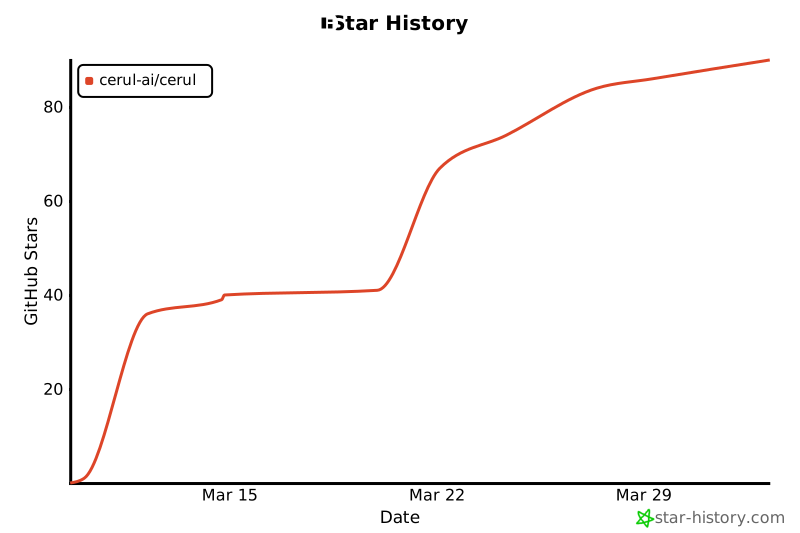](https://star-history.com/#cerul-ai/cerul&Date)
Built by @JessyTsui







